# Referencing Tracker Items

Drop a live reference to any tracker item into a document or AI chat. The chip shows the current status and title and stays up to date.

This page covers mentioning a tracker item inside a document or an AI chat. The reference renders as a chip that shows the item's current status and title, and it stays current as the item changes. For structured item-to-item relationships like parent and child, see [Linking Tracker Items](https://nimbalyst.com/docs/task-management/linking-tracker-items/); for connecting items to AI sessions, see [Linking Sessions and Tracked Items](https://nimbalyst.com/docs/task-management/linking-sessions-and-tracked-items/).

### Insert a reference with #

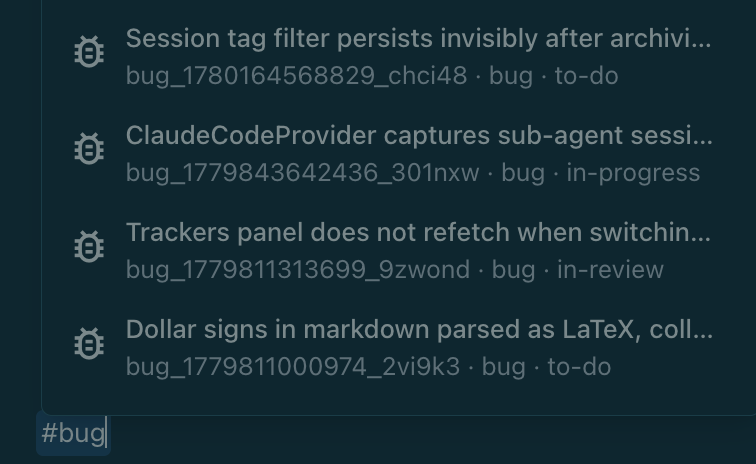
In a document, type `#` and start typing to search your items by key, title, or description. Pick one from the list to insert it as a chip. Typing `##` or `###` still creates a heading, so your markdown headings are unaffected.

- Narrow the search to one type by including its name, for example type `#bug` to list only bugs, then keep typing to filter.
- Archived items are left out of the picker.

<figure><img loading="lazy" decoding="async" src="https://nimbalyst.com/docs/assets/tracker-reference-picker.png" alt="The tracker reference picker filtered to bug items after typing #bug"><figcaption><p>Type # to search your items. Add a type name, like #bug, to narrow the list.</p></figcaption></figure>

The same reference works in the AI chat, so you can point the agent at a specific item as you talk to it.

### What the chip shows

A reference chip can show the item's type, issue key, live title, workflow state, and owner. Because it resolves the item live, those values update on their own as the item changes. Completed items keep their reference but cross out the title, making finished work visible without making the link disappear.

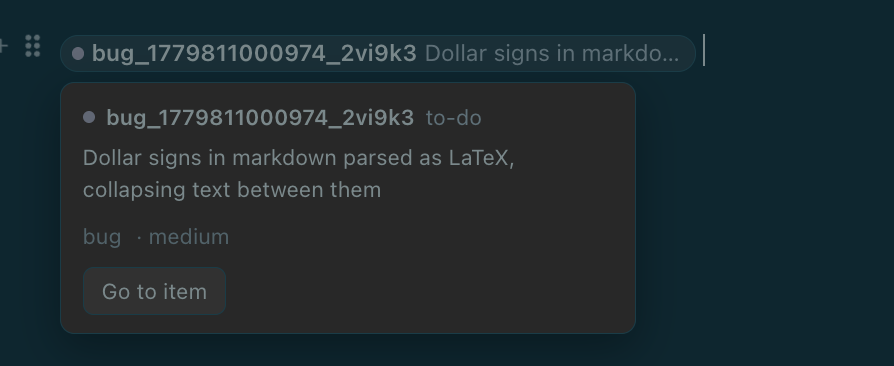
Click a chip to open a preview with the item's status, type, priority, and owner, plus a **Go to item** button that takes you straight to it. If the underlying item can't be found (it was deleted, or has not synced to this machine yet), the chip shows the identifier in muted text and marks it as not resolved.

<figure><img loading="lazy" decoding="async" src="https://nimbalyst.com/docs/assets/tracker-reference-chip.png" alt="An inserted tracker reference chip and its preview card with a Go to item button"><figcaption><p>A reference chip, and the preview that opens when you click it, with status, type, priority, and a Go to item button.</p></figcaption></figure>

In raw markdown, a reference is stored as a link using the `nimbalyst://` scheme, so it survives round-tripping through plain text.

### References from the AI

When an agent mentions a Tracker item in chat, it links the item as the same clickable chip instead of plain text. You get the live workflow state at a glance and can click through to the item without hunting for it.

References to other AI sessions in the transcript are clickable too, so you can move directly to the related conversation.