From 7 Tabs to One Workspace: Faster Iteration on Richer Context for You and Your Coding Agent
Why consolidating terminal, docs, tasks, diagrams, and mockups into one workspace improves iteration speed for both humans and coding agents.
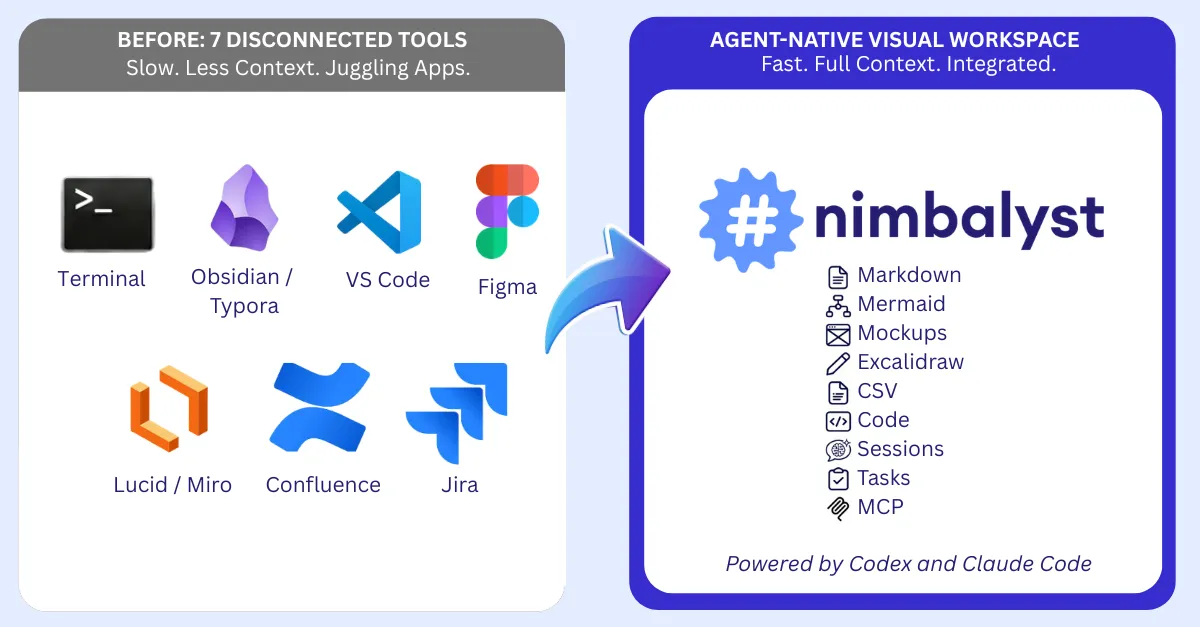
Coding agents are fast. Humans juggling tools are slow.
To build a single feature with a coding agent, most teams touch seven tools. The terminal to run Claude Code or Codex. Obsidian or Typora to review markdown, edit plans, review documentation. Jira for task tracking. Figma for mockups. Lucidchart for architecture diagrams. VS Code to edit code. Confluence for team documentation.
For the human, that means constant tab-switching — opening a spec here, checking a ticket there, flipping to a diagram, then back to the terminal. It’s slow and mentally expensive.
For the agent, it’s not great either. The context it needs is scattered across all those apps. Yes, MCP can connect an agent to Jira or Confluence and its faster than a human, but bridging isn’t the same as seeing. The agent gets fragments through API calls, not the full picture.
Nimbalyst takes a different approach. It provides one integrated workspace for markdown, code, mockups, Excalidraw diagrams, Mermaid charts, CSVs, task trackers, and agent sessions — all of them aware of each other, all of them accessible to the coding agent, and editable by the human. The human stops tab-switching. The agent gets full context. And MCP still works — the agent can still reach out to Jira, Slack, GitHub, or any other SaaS tool when it needs to. The difference is that the core artifacts of building — the spec, the diagram, the mockup, the code, the task, the session — live together integrated instead of apart.
Tool 1: Terminal (Incorporating the Command Line)
Claude Code and Codex run inside Nimbalyst with the same file access and command execution. When the agent edits files, you see side-by-side diffs with syntax highlighting. When it creates diagrams or mockups, they render inline. When you need a terminal, Nimbalyst has an integrated one.
Most people run their coding agents in the terminal today. You open iTerm or Terminal.app, type claude or codex, and start a session. The agent reads files, writes code, runs tests. It works.
But the terminal is a text interface. When your agent edits a file, you see a diff in monospace text. When it creates a mockup, you can’t see it. When it modifies a diagram, you have to open another app to check. The terminal is where the agent lives, but it’s a poor environment for reviewing its work.
Nimbalyst includes a built-in terminal for when you need direct shell access. But more importantly, it provides a native environment for coding agents. Claude Code and Codex run inside Nimbalyst with full workspace access — the same file reading, code writing, and command execution you get in the terminal, but with visual rendering of everything the agent touches.
| Feature | Terminal | Nimbalyst |
|---|---|---|
| Agent file access | Yes | Yes |
| Agent command execution | Yes | Yes |
| Visual diff review | Text-only | Side-by-side with syntax highlighting |
| Diagram rendering | No (must open externally) | Inline in workspace |
| Mockup preview | No (must open browser) | Rendered, Annotate visually. |
| Agent sees your docs | Only if in repo | Yes (specs, diagrams, mockups) |
| Multiple parallel sessions | Separate terminal tabs | Managed sessions with search and resume |
| Session persistence | Scrollback only | Full conversation history |
| The terminal isn’t going away. You still need it for interactive processes, debugging, and ops work. But as the primary interface for coding agents, it’s being replaced by environments that can actually show you what the agent is doing. |
Tool 2: Obsidian / Typora (Replacing Your Markdown Editor)
Nimbalyst provides true WYSIWYG markdown editing for you together with the ability to collaborate on the markdown with your coding agent. When Claude Code or Codex make an edit to the markdown, you see the red/green diffs and can review and approve them. Your docs are the context that you and the agent read and act on together. ** **You don’t need to toggle between the terminal or your coding app and your markdown editor. With Nimbalyst, they are integrated.
Tool 3: VS Code (Replacing Your Code Editor)
With coding agents, you spend less time writing code and more time reviewing it. The editor’s role changes from “where I type code” to “where I review AI-generated code.”
Nimbalyst’s code editor is powered by Monaco which is the same engine that runs VS Code. It’s a real editor with syntax highlighting for 30+ languages, line numbers, code folding, minimap, find and replace, bracket matching, and auto-save.
When your coding agent edits a file, you see a side-by-side diff with green additions and red deletions. Navigate between changes with previous/next buttons. Accept all or reject all. Review AI work the way you’d review a pull request, not by scanning a chat window and trying to mentally map text diffs to your codebase.
The file edits sidebar tracks every file the agent touched: what it edited, what it read, what you referenced. Git status badges show you what’s modified, staged, or untracked. Line counts show additions and removals. When the agent changes 15 files across a feature implementation, you see exactly what happened and can review each change.
Nimbalyst can spin up git worktrees so your coding agent works on a separate branch without touching your main working directory. Run multiple parallel agent sessions on different features, each isolated in its own worktree.
Tool 4: Lucidchart (Replacing Your Diagramming Tool)
Nimbalyst includes a full Excalidraw editor for diagrams. Not an embed — a native integration where .excalidraw files are first-class citizens in your workspace.
Tell your coding agent “create a flowchart showing user authentication” and it builds the diagram using Nimbalyst’s Excalidraw tools. Add shapes, connect elements, import Mermaid diagrams, align and distribute elements — all through natural language. But, also edit that excalidraw visually. Iterate with the agent.
Tool 5: Figma (Replacing Your Prototyping Tool)
Nimbalyst’s Mockup editor lets you have your coding agent create UI mockups using HTML and CSS and Javascript. Describe what you want, and the AI generates a working mockup you can see and iterate on.
This enables functional prototyping so you can communicate “here’s what this feature should look like” without spending hours in a design tool.
- Describe the UI you want to the AI
- See a rendered preview immediately
- Use annotation tools to highlight and comment and describe changes
- Iterate
The mockup is real HTML and CSS. It renders in a browser. It’s not a static image — buttons look like buttons, layouts flex, and you can see how things actually behave.
What you gain: Speed. A PM can go from idea to visual mockup in minutes, using natural language, without learning a design tool. And the mockup lives in the same workspace as the spec and the code.
The coding agent loop: This is where tool consolidation pays off the most. You describe a feature to the agent. It creates a mockup so you can see what it’s planning. You refine the mockup through conversation. Then you say “implement this” — and the agent already has the mockup as context. No exporting from Figma, no describing the UI in words, no “make it look like the design.” The mockup and the implementation happen in the same session, with the same agent.
Tool 6: Confluence (Replacing Your Documentation Platform)
This one is less about a specific feature and more about how Nimbalyst changes where documentation lives.
The Confluence problem: Documentation goes into Confluence. Code goes into git. They drift apart immediately. Nobody updates the Confluence page after the feature ships. Six months later, the docs are wrong and everyone knows it.
The Nimbalyst approach: Documentation is markdown files in your workspace, alongside code. They version with git. They’re visible to AI. When the spec changes, the change is in the same repo as the implementation.
What you gain: Documentation that stays current because it lives next to the code. A coding agent that can read your PRD and implement it in the same session. And when the agent changes the code, it can update the docs too — because they’re in the same workspace, not locked behind a Confluence API.
The agent-documentation loop: In the terminal, your coding agent can technically read and write markdown files. But it has no idea those files are documentation, and it can’t render them. In Nimbalyst, the agent understands the structure of your workspace. It can read your plan document, check the status of tracked items, and update documentation as part of an implementation session. Docs become a living part of the development process, not an afterthought.
Tool 7: Jira (Replacing Your Task Tracker)
Jira is where work gets organized. Tickets, stories, epics, sprints. And coding agents can already connect to Jira through MCP — reading tickets, pulling acceptance criteria, even updating status. But, the human doesn’t have a visual view into the work’s organization without opening a separate application.
Nimbalyst includes built-in trackers for plans, tasks, bugs, decisions, and ideas and these can be extended for trackers of your choice, blogs for instance. Your tasks live in the same workspace as your code and specs. You can visualize your tasks, organize them yourself, but also have your coding agent create, edit, update, and work based off your task system.
The Unified Context Advantage
The agent bottleneck isn’t intelligence — it’s context and human/agent iteration speed.
Claude Code and Codex are remarkably capable. They can architect systems, write complex code, debug subtle issues. But when your spec lives in Confluence, your tasks in Jira, and your mockup in Figma, the agent has to request each piece through separate MCP calls. It is like reading a book one sentence at a time through an API. Nimbalyst unifies the context.
Humans need to gather, think about, and act on a similar context. When this means opening many different apps, filtering to the right place, connecting the pieces, we have less context and move more slowly.
Nimbalyst is the agent-native visual workspace where you and agents work quickly together with the full context.