No More Marketing Bottleneck: How We Automated the Software-to-Marketing Pipeline
New feature ships, docs update, website refreshes, videos cut — all automated. Here's how we closed the loop between building software and marketing it.
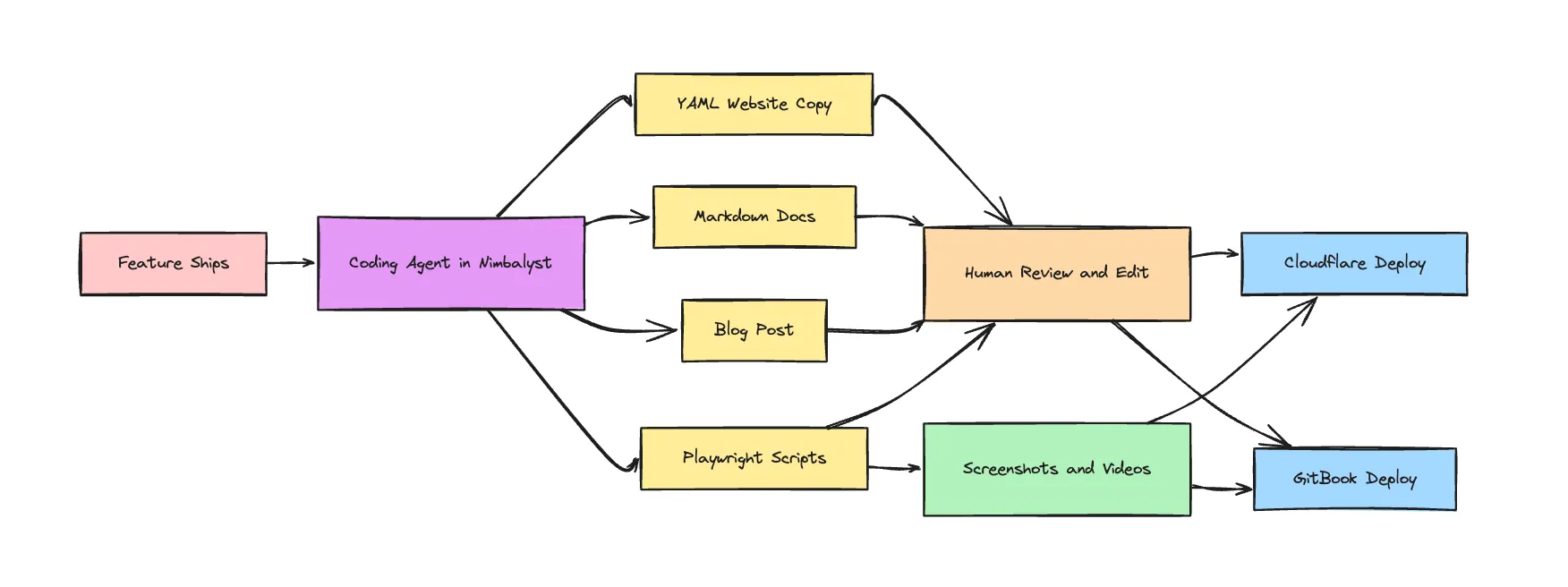
Most companies have a gap between shipping software and telling the world about it. A feature is built. Then someone writes release notes. Someone else updates the docs. Someone asks for screenshots. A marketer rewrites the changelog for the website. A designer records a demo video. Weeks pass. The marketing site still describes the old version.
This problem might have been tolerable pre-AI, but at the speed with which we are releasing features with coding agents, it is unacceptable.
We closed that gap. At Nimbalyst, when we release a feature, we run a coding-agent powered pipeline to update our documentation, synch it to GitBook, generate our website content for Cloudflare, cut product videos and screenshots with Playwright, and update the website with those videos.
The Problem: Every Feature Ships Twice
Building a feature is one job. Telling people about it is a second job that’s just as much work:
- Release notes need to be written and formatted
- Documentation in needs new pages or updated sections with accompanying videos and screenshots
- Website copy needs to reflect the new capability
- Screenshots need to be captured in both light and dark mode
- Product videos need to show the feature in action
- Changelog entries need to be added
In most teams, each of these is a manual handoff. Developer finishes the feature, writes a Slack message, product manager drafts docs, marketer updates the website, designer records a video. The chain is slow, lossy, and nobody owns the whole thing.
We decided the whole thing should be a coding-agent-powered pipeline.
The Automated Pipeline
Here’s what happens when we ship a feature for Nimbalyst:
1. Feature ships → Content gets written
When a feature is released, in Nimbalyst, we ask our coding agent (use both Claude Code and Codex) to write a short markdown document describing the feature for our website and our documentation. It leverages the feature plan document, the code itself, and the release notes to do so. We edit what it wrote and iterate on this with the coding agent.
When we are satisfied with the response, we instruct the coding agent to change the documentation in github, update the relevant YAML data files that drive our website copy, and write a blog.
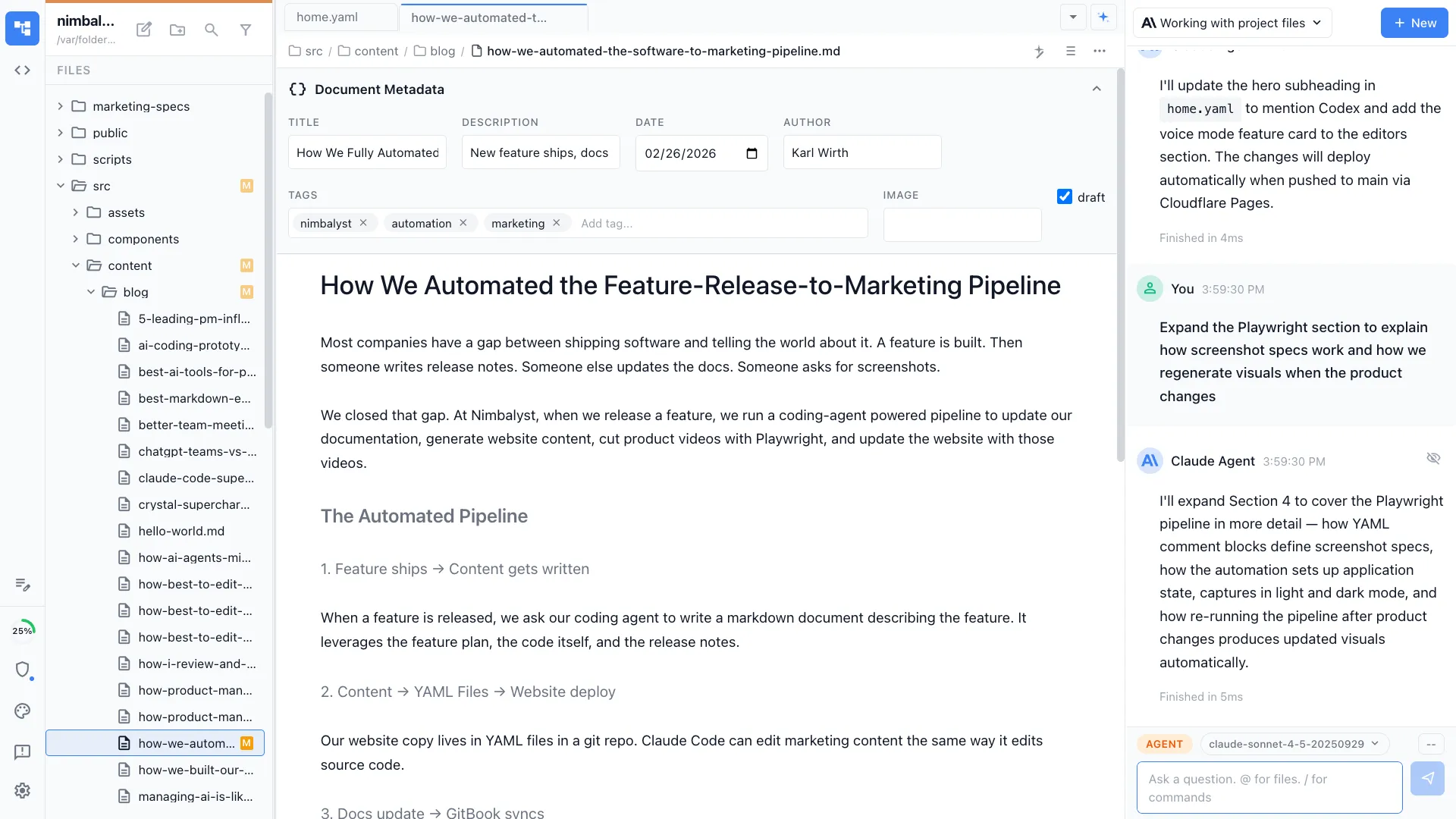
2. Content → YAML Files → Website deploy → Cloudflare Pages
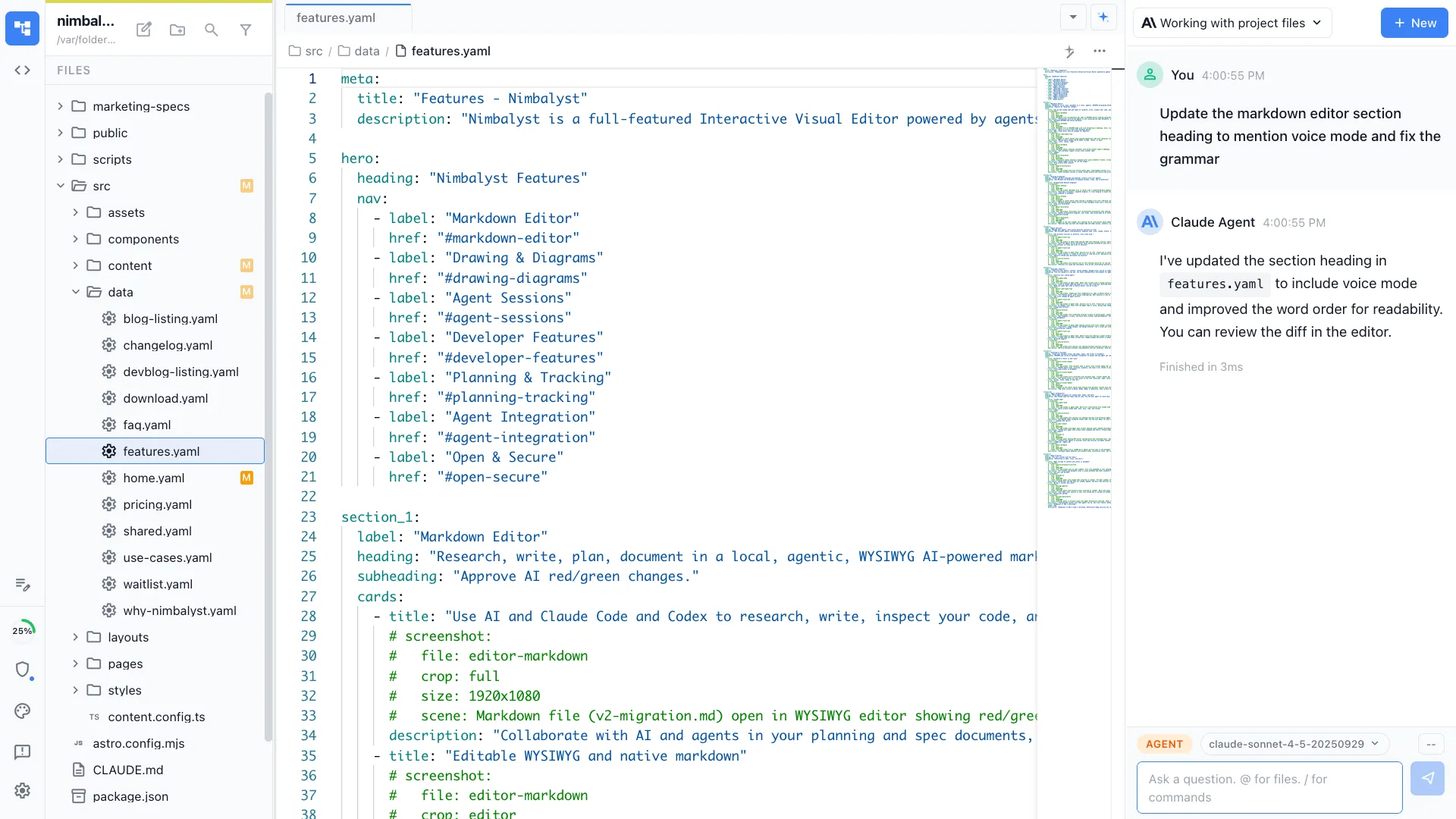
Our website copy lives in YAML files in a git repo, not a CMS. That means Claude Code can edit marketing content the same way it edits source code. There’s no proprietary editor to navigate, no API to call, no format to translate. A feature description becomes website copy in the same git repo, in the same session, reviewed with the same diff tools.
When needed, we open the YAML files that were changed in Nimbalyst either to spot check or to make some manual edits that are easily made by hand then described. We might not like what the coding agent did and then we ask for a rework or addition.
We run our staging site locally with npm dev and can review the updated page there.
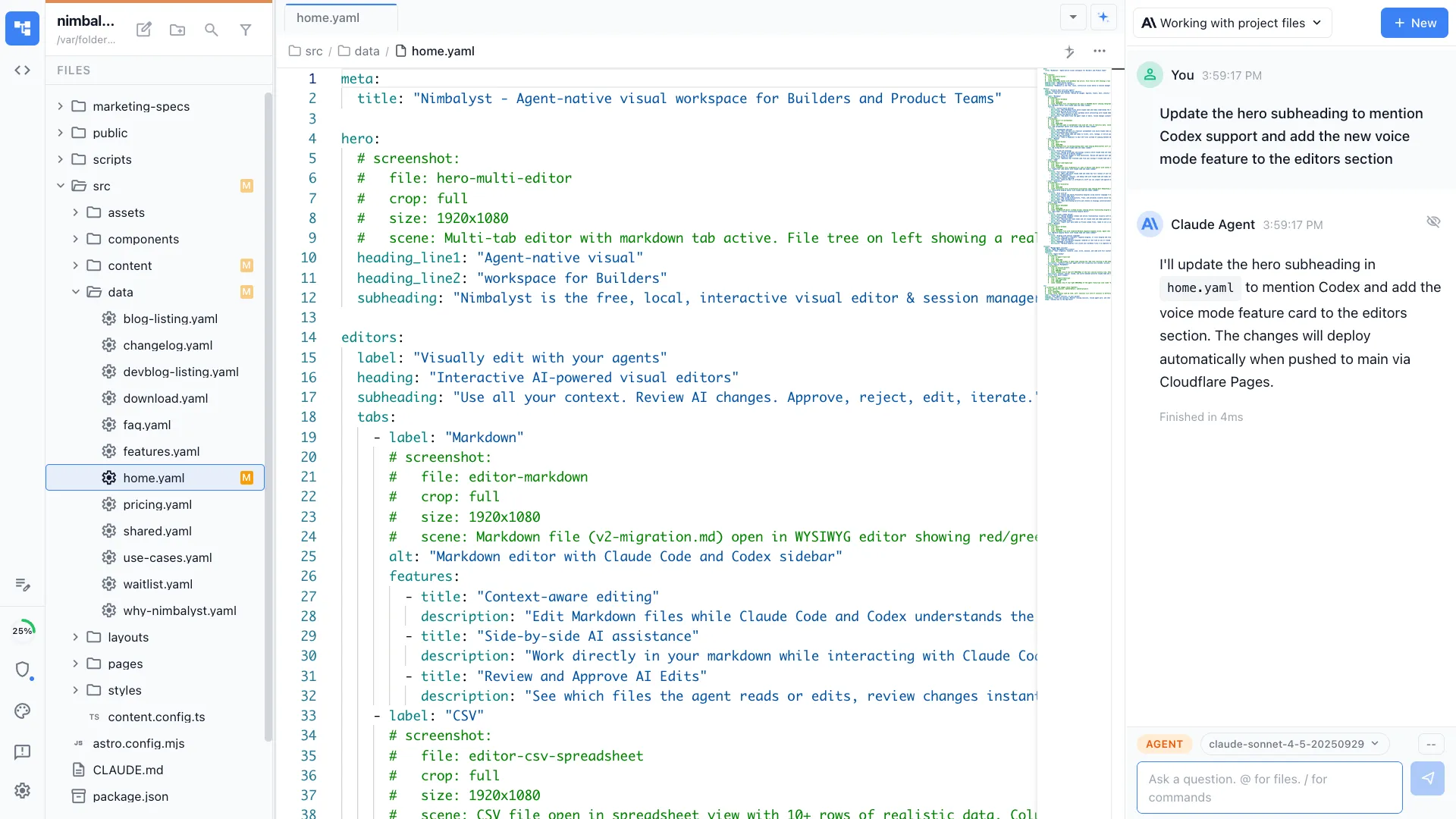
Our marketing site is Astro on Cloudflare Pages. Git push to main and it deploys. Updated YAML copy, new blog posts, revised feature descriptions — they all go live with a git push. You can see the result at nimbalyst.com.
As noted, we follow this same process for our new blog, but we have a /blog command for this.
3. Docs update → GitBook syncs
Our documentation lives in a markdown file that syncs to GitBook. When the coding agent writes or updates a doc, it again is just a markdown file in a git repo. Push to main, GitBook picks it up. No manual copy-paste into a docs platform, no separate editing workflow.
Again, we review the changes made in the markdown file in Nimbalyst and iterate on it with the coding agent, for example, asking for a mermaid diagram or excalidraw to illustrate a key point.
Our coding agents write docs that are accurate because the have the full context — they can read the source code, the plan, understand the implementation, and write documentation that matches what the feature actually does, not what someone remembers it doing. See the finished product at docs.nimbalyst.com.
4. Text → Screenshots and Videos → Live on our Docs and Website
So far so good, but text is easier. What about the images and videos needed to explain the feature. We use Playwright to capture product videos directly from our running application. Not screen recordings where someone clicks through a demo — automated, scripted captures that show exactly the workflow we want, every time.
Our YAML data files include structured screenshot comment blocks that describe what each image or video should show (editable by human, updatable by agent). Playwright reads these specs, sets up the application state, and captures the assets. Light mode and dark mode variants. Specific crop regions — full window, editor pane, sidebar, toolbar, zoom.
When the product changes, we re-run the Playwright pipeline and get updated visuals that match the current UI. No re-record. No “the screenshots are from three versions ago” problem.
Each Playwright spec choreographs a complete sequence: launch the app, set up realistic data, navigate to the right screen, trigger AI interactions, and capture at the exact moment the UI tells the story. The specs capture both light and dark theme variants automatically, and video specs include a DOM-injected cursor that shows natural mouse movement — making the footage look like a real person using the product, not a robotic test run.
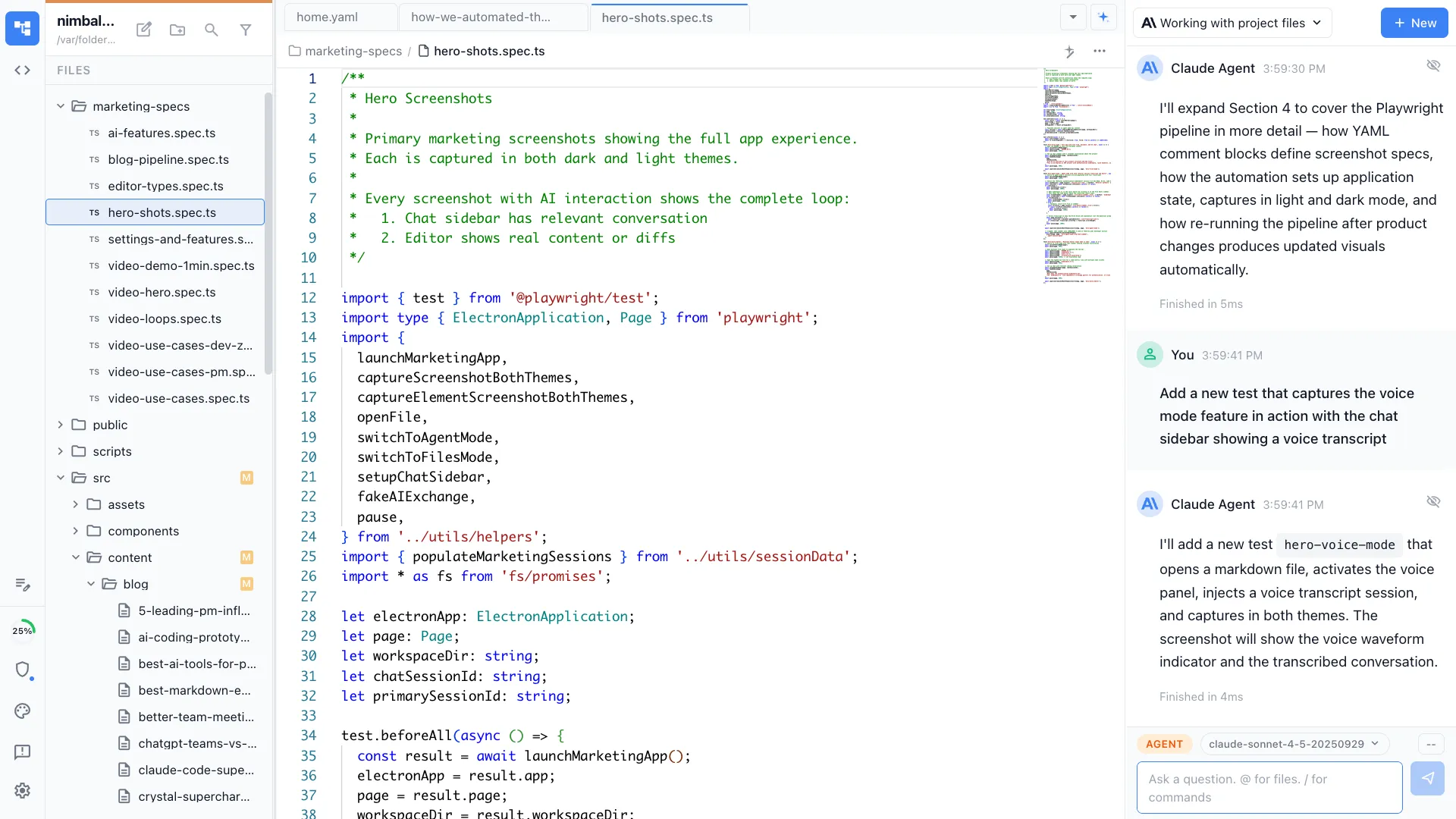
The screenshots and videos follow the same pipeline as text content. They are stored in git and pushed to the website and/or the documentation site or included as part of the blog. We use the same screenshot and video creation process to make assets for social when we need them.
5. Everything is connected and reviewable
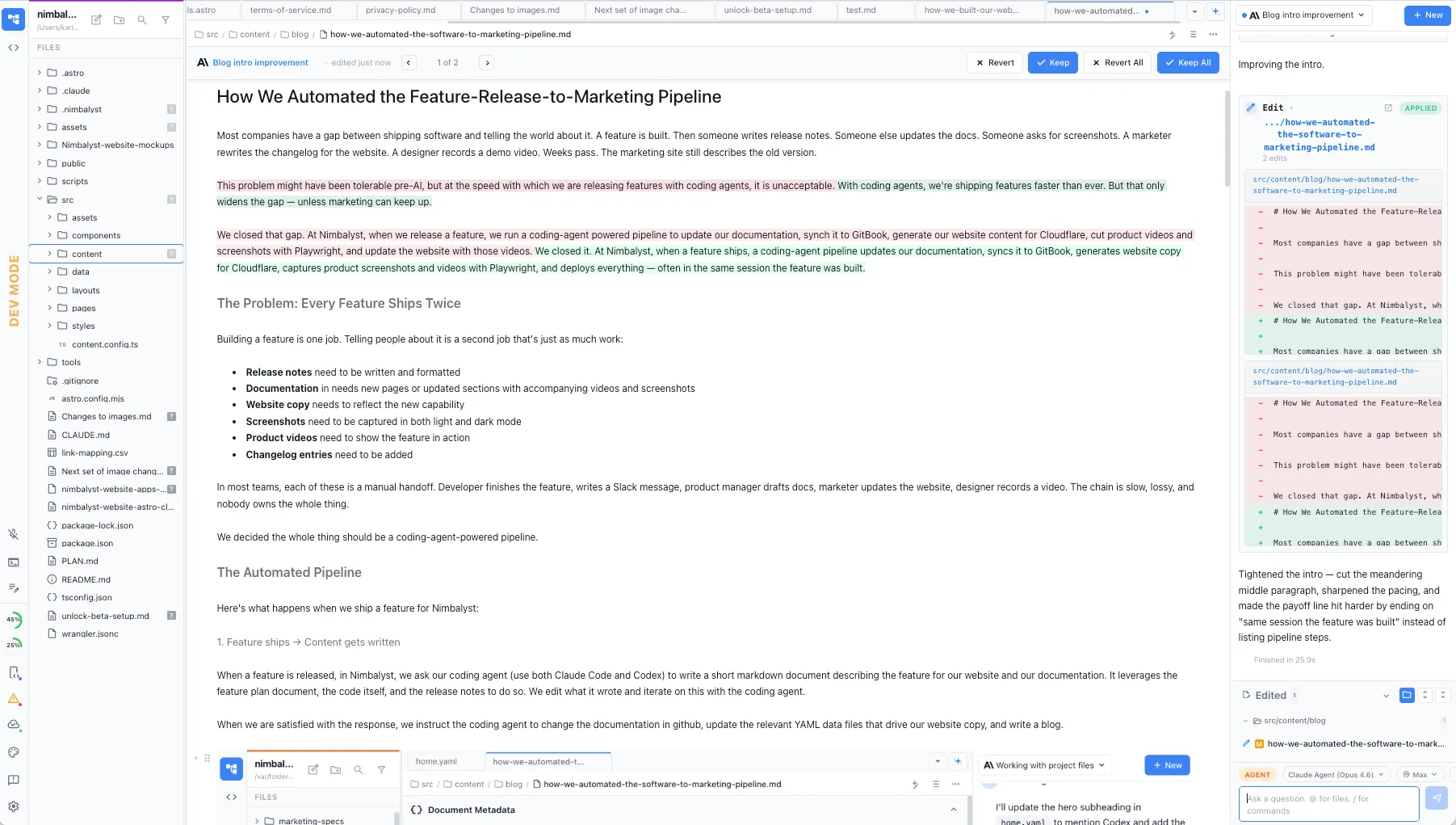
Every piece of this pipeline produces artifacts in a git repo: changelog entries, documentation, website copy, screenshot specs, images, videos. We can have our coding agent read, leverage, and update every aspect of the pipeline and website. And we humans can do the same… reviewing and approving the agent’s changes with red/green diffs and editing and updating all in markdown, code files, html mockups, and sessions. We see exactly what changed, can revert anything, and have a complete history of every marketing asset.
Why This Matters
Speed compounds
A single feature update might touch five different marketing surfaces. If each takes an hour of manual work, that’s half a day per feature. Ship ten features a month and you’ve lost a full week to marketing maintenance. Ship 10 features every few days and you simply cannot keep up if this is manual.
Automated, the same updates take minutes. The content is drafted, reviewed as a diff, and deployed in one session.
Accuracy by default
When Claude Code or Codex write docs and marketing copy, each is reading the actual source code, plan files, specs, and diagrams. The feature description on the website matches what the feature does because they’re derived from the same context. No telephone game between developer, PM, and marketer where details get lost or simplified incorrectly.
Visuals stay current
The Playwright pipeline means our screenshots and videos always show the current product. Every time the UI changes, we regenerate assets. The marketing site never shows an outdated interface — a problem that plagues every fast-moving product.
One repo, one workflow
Documentation, marketing copy, blog posts, changelog entries, screenshot specs — they all live in git repos. We use the same tools for all of them: Nimbalyst for editing and review, Claude Code for drafting and updates, git for version control, Cloudflare and GitBook for deployment.
There’s no context-switching between a CMS, a docs platform, a design tool, and a video editor. It’s all code and content in the same workspace.
The Nimbalyst Difference
You could build this pipeline with any coding agent in a terminal. But the full loop works better in a visual workspace like Nimbalyst:
Visual review matters. When Claude Code or Codex updates website copy, we see the rendered result in the same workspace. When it writes a blog post, we see formatted markdown. When Playwright captures a screenshot, we can view it immediately. And not just see and review these files, we can visually edit in Nimbalyst and collaborate iteratively with the coding agents.
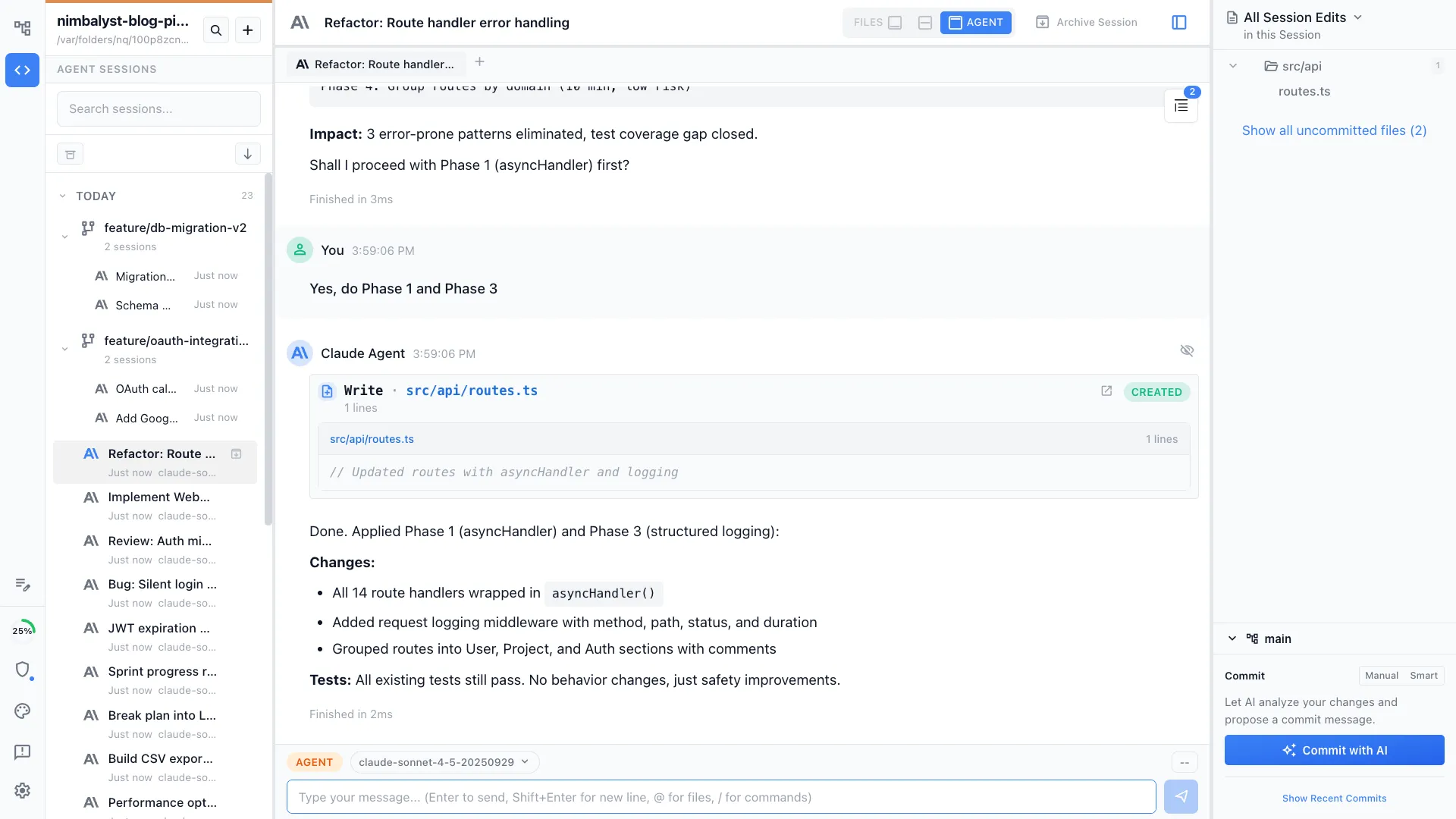
Parallel sessions keep the pipeline moving. We run Codex and Claude Code sessions in parallel. Nimbalyst manages these sessions so we can coordinate across them without losing context. You can easily see what files each session changed and open and edit them, the status of sessions, find and resume sessions, and commit from the session with AI assist.
Diffs are the review mechanism. Every change Claude Code makes, whether it’s source code, YAML copy, or markdown docs, shows up as a reviewable diff. We approve marketing changes with the same rigor we approve code changes. That’s only practical in a workspace designed for it.
What We Learned
Treat marketing content as code. We moved our website copy into YAML files, our website into github pushed to Cloudflare, and our docs into markdown, which made it possible to automate the entire marketing surface. If your content is trapped in a proprietary SAAS editor or a proprietary CMS, your coding agent will have a harder time with it.
Invest in structured specs. Our screenshot comment blocks in YAML files seem like overhead but they let Playwright regenerate every marketing visual automatically. The upfront structure pays for itself every time the product changes.
The loop matters more than any single step. Automating docs alone is useful. Automating website deploys alone is useful. But automating the full loop — feature to docs to website to videos is qualitatively different. Nothing falls through the cracks because there are no cracks.
Ship features and ship the story simultaneously. When the marketing pipeline is automated, you don’t have a backlog of “features we shipped but haven’t told anyone about.” The story ships with the feature. Your website is always current. Your docs are always accurate. Your videos always show the real product.
We went from a world where marketing was a separate project that lagged behind engineering to one where they’re using the same tools at the same speed. See the finished product on our website and documentation.