Developer
AI code review for every branch
Run /review-branch before merging and get a thorough review — architecture concerns, potential bugs, test coverage gaps, and style issues — all without waiting for a human reviewer.
Perform a comprehensive read-only code review of all changes on the current branch. Analyzes diffs, identifies issues, and provides actionable feedback.


Capabilities
Review like a senior engineer
Full branch analysis
Reviews every commit and every changed file on your branch. Understands the overall intent and checks each change against it.
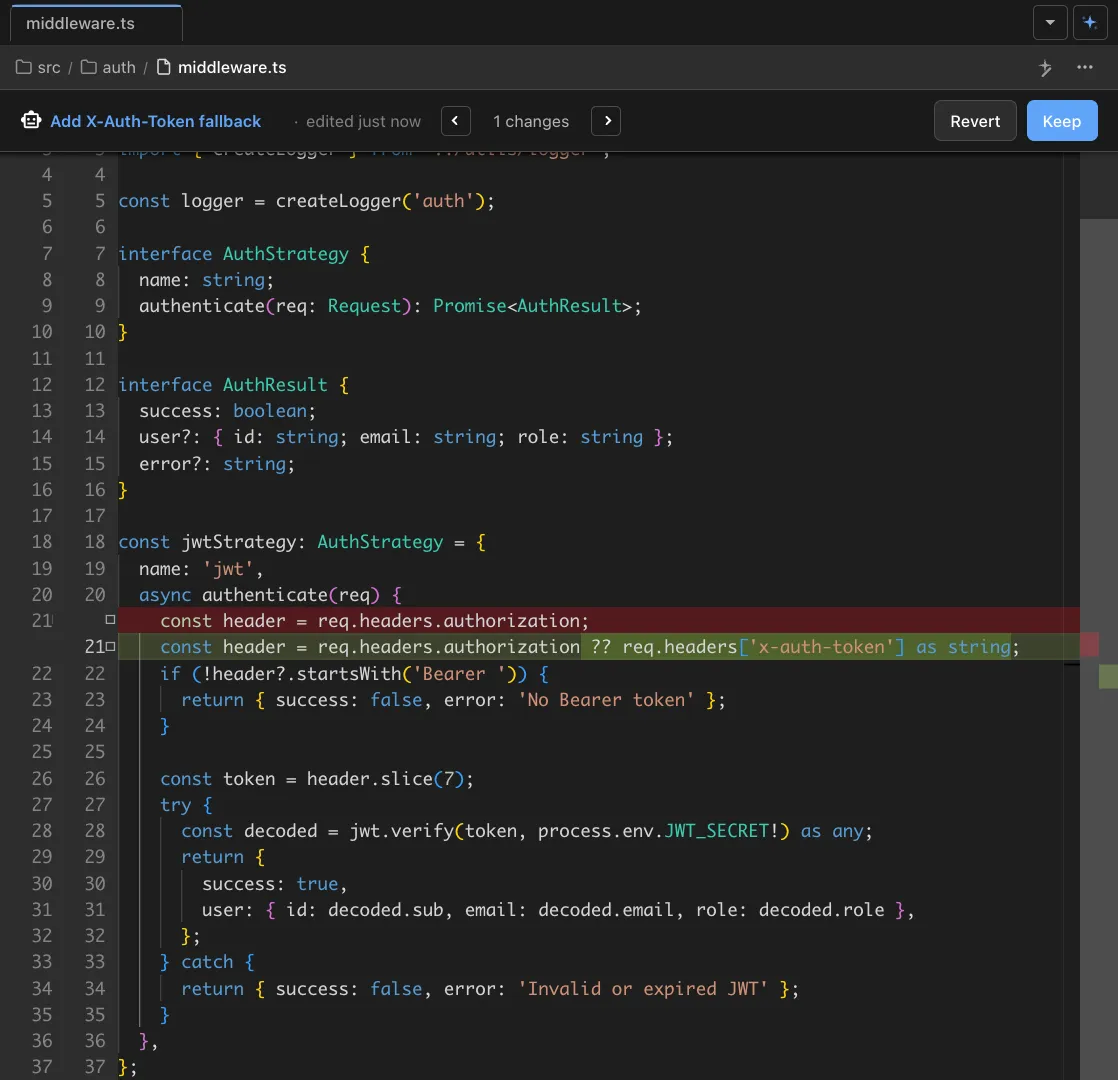
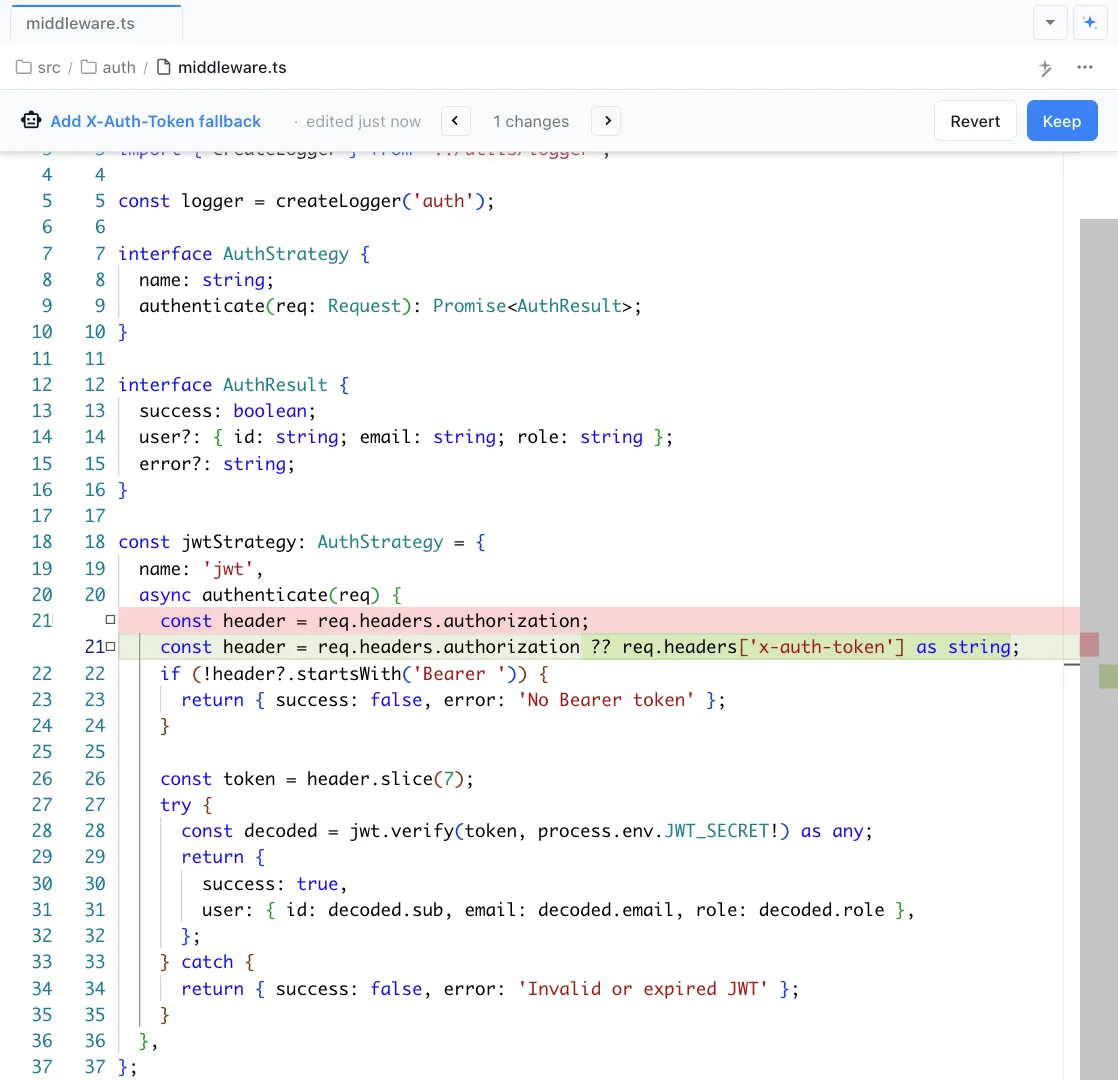
File-by-file feedback
Get specific feedback for each file — potential bugs, edge cases, naming issues, and architecture concerns with line-level references.


Actionable suggestions
Every issue comes with a concrete suggestion for how to fix it. No vague 'consider refactoring' — actual code-level recommendations.
How It Works
How /review-branch works
Type /review-branch
Run the command on any branch with changes. The agent identifies the base branch and collects all diffs.
Agent reviews all changes
Your AI agent reads every file change, understands the overall purpose, and evaluates code quality, correctness, and architecture.
Review the report
Get a structured report with issues categorized by severity. Fix critical issues, acknowledge minor ones, and merge with confidence.
Try It
Example prompts
/review-branch /review-branch focus on security issues /review-branch compare against main Full Skill Source
Use this skill in your project
Copy the full text below or download it as a markdown file. Place it in your project's .claude/commands/ directory to use it as a slash command.
---
name: branch-reviewer
description: Comprehensive read-only code review of branch changes. Use when reviewing a branch before merging or when wanting a thorough code audit.
---

Perform a comprehensive read-only review of code changes.

**Scope:** By default, review the current git branch changes using the command below. However, if the user specifies a different scope (e.g., specific files, a directory, a PR, or a commit range), respect that and adjust your review accordingly.

**CRITICAL: This is a READ-ONLY review. Do NOT:**
- Make any code changes
- Create or modify files
- Run git commands (commit, push, merge, etc.)
- Only exception: You may run git commands to READ information (diff, log, status, show)

**Steps:**

1. **Gather changes** - For default branch review, run this command:
```bash
MAIN_WORKTREE=$(git worktree list | head -1 | awk '{print $1}'); CURRENT_DIR=$(git rev-parse --show-toplevel); if [ "$MAIN_WORKTREE" != "$CURRENT_DIR" ]; then BASE=$(git -C "$MAIN_WORKTREE" branch --show-current); else BASE="main"; fi; echo "=== Base branch: $BASE ===" && echo "" && echo "=== STATUS ===" && git status && echo "" && echo "=== COMMIT LOG ===" && git log $BASE..HEAD --oneline && echo "" && echo "=== COMMITTED CHANGES ===" && git diff $BASE...HEAD && echo "" && echo "=== UNCOMMITTED CHANGES ===" && git diff HEAD
```
  - If in a worktree, this uses the repo root's current branch as the base (not main)
  - If not in a worktree, uses `main` as the base branch (unless the user specifies otherwise)
  - **IMPORTANT**: This includes BOTH committed changes (vs base branch) AND uncommitted/unstaged changes

2. **Parallel Analysis** - After gathering the diff, launch sub-agents IN PARALLEL using the Task tool to analyze each area concurrently:
  - Sub-agent 1: Security Issues analysis
  - Sub-agent 2: Performance Concerns analysis
  - Sub-agent 3: Cross-Platform Compatibility analysis
  - Sub-agent 4: Type Safety and DRY Violations analysis
  - Sub-agent 5: Potential Bugs and Cleanup analysis
  - Sub-agent 6: Analytics Events and CLAUDE.md Documentation analysis
  - Sub-agent 7: Jotai Patterns Compliance analysis (see docs/JOTAI.md for patterns)

   Each sub-agent should receive the diff content and return findings for its specific area. Wait for all sub-agents to complete, then synthesize their findings into the final report.

**Analysis Required:**

Provide your review in the following format:

## Branch Summary
[Brief 2-3 sentence description of what this branch does]

## Detailed Findings

### Database Changes
[List any schema changes, migrations, new tables/columns, or note "None"]

### Security Issues
[List potential security vulnerabilities:]
- XSS vulnerabilities
- SQL injection risks
- Exposed secrets/API keys
- Authentication/authorization gaps
- Unsafe deserialization
- Missing input validation
[Note "None found" if clean]

### Performance Concerns
[List potential performance issues:]
- N+1 queries
- Inefficient loops or algorithms
- Memory leaks
- Missing database indexes
- Large payload sizes
- Unnecessary re-renders
[Note "None found" if clean]

### Cross-Platform Compatibility (OSX/Windows/Linux)
[Check for platform-specific issues that could break functionality on different operating systems:]
- **File paths**: Hardcoded separators (/ vs \) instead of path.join() or path.resolve()
- **Keyboard shortcuts**: Hardcoded 'Meta' or 'Cmd' instead of platform-aware shortcuts (should use 'CmdOrCtrl' or detect platform)
- **Environment variables**: Platform-specific env vars (e.g., HOME vs USERPROFILE)
- **System commands**: Bash/shell commands that don't work on Windows (should use cross-platform alternatives)
- **File system case sensitivity**: Code assuming case-insensitive file systems (macOS/Windows) that will break on Linux
- **Line endings**: Missing .gitattributes or code that assumes LF vs CRLF
- **Native dependencies**: Binaries or node modules that need platform-specific builds
- **Process handling**: Platform-specific process spawning or signal handling
- **File permissions**: Unix-style chmod/permissions that don't translate to Windows
- **Path length limits**: Windows MAX_PATH (260 char) limitations not accounted for
[Note "Fully compatible" or "Not applicable" if clean]

### Dependencies
[Check package.json, package-lock.json for changes:]
- New packages added: [name@version - purpose]
- Version updates: [name: old → new]
- Removed packages: [name]
[Note "No changes" if none]

### Logging Assessment
[Evaluate if logging is appropriate, too verbose, or missing. Note any console.log that should be removed]

### Type Safety Issues
[List any `any` types, missing type definitions, or type assertions that should be reviewed]

### DRY (Don't Repeat Yourself) Violations
[Identify duplicated code that should be extracted into shared utilities, functions, or components:]
- Repeated logic blocks across files
- Copy-pasted code with minor variations
- Similar patterns that could be abstracted
- Missed opportunities to use existing utilities
[Note "None found" if clean]

### Potential Bugs
[List specific scenarios that should be tested, edge cases not handled, null checks missing, etc.]
- Bug 1: [description]
- Bug 2: [description]

### Cleanup Needed
[List commented code, debug statements, unused imports, TODOs, etc.]
- Item 1: [description + file:line]
- Item 2: [description + file:line]

### Other Concerns
[Any additional issues not covered above:]
- Breaking changes to APIs or interfaces
- Missing error handling
- Accessibility issues
- Missing documentation
- Test coverage gaps

### Analytics Events
[Evaluate whether PostHog analytics events should be added for this feature/change. See docs/ANALYTICS_GUIDE.md for implementation details.]

Consider adding analytics for:
- New user-facing features (track adoption/usage)
- New UI interactions (buttons, dialogs, workflows)
- Feature settings or preferences changes
- Error scenarios that would help diagnose issues
- Performance-sensitive operations (with timing categories)

Do NOT add analytics for:
- Internal refactors with no user-visible changes
- Bug fixes (unless tracking the bug occurrence is valuable)
- Test-only changes
- Documentation changes

If analytics should be added, suggest specific events following the naming conventions:
- Use snake_case: `feature_used`, `dialog_opened`
- Use noun_verb pattern: `file_opened`, `session_created`
- Group with prefixes: `ai_*`, `file_*`, `window_*`, `project_*`

[Note "Not needed for this change" if analytics are not applicable, or list suggested events]

### Jotai Patterns Compliance
[Evaluate whether Jotai atom usage follows the patterns documented in docs/JOTAI.md:]

**Check for these issues:**
- **Independent atoms for session state**: Session-related atoms (mode, model, title, etc.) MUST be derived atoms that read from `sessionStoreAtom`, not independent atoms with their own storage
- **Async atoms causing Suspense**: Derived atoms that combine other atoms MUST be synchronous - no `async` keyword or `await import()` inside atom definitions
- **Dynamic imports in atoms**: NEVER use dynamic imports inside atoms - use static imports at the top of the file
- **Component-level IPC subscriptions**: Components should read from atoms, NOT subscribe to IPC events directly (see Centralized IPC Listener Architecture)
- **Lifting state up anti-pattern**: Editor content should NOT be stored in parent components - editors own their state
- **Missing atom families**: Per-session or per-entity state should use atomFamily, not plain atoms with maps/objects

**Good patterns to verify:**
- Atom families for session-keyed state
- Derived read-write atoms for session metadata
- Centralized IPC listeners updating atoms
- Synchronous derived atoms for combining state

[Note "No Jotai changes" if no atom code was modified, "Patterns followed correctly" if compliant, or list specific violations]

### CLAUDE.md Documentation
[Evaluate whether CLAUDE.md should be updated to document new patterns, conventions, or workflows introduced by this change.]

**SHOULD update CLAUDE.md when the change introduces:**
- New architectural patterns or conventions that future development should follow
- New commands, scripts, or workflows (npm scripts, build commands, etc.)
- New environment variables or configuration options
- Changes to important file locations or directory structure
- New IPC channels or API patterns
- New CSS variables or theming conventions
- New database tables, columns, or data patterns
- New error handling patterns or conventions
- Platform-specific behavior or requirements
- New testing patterns or approaches
- Security considerations that affect development
- External tool or dependency setup requirements

**Should NOT update CLAUDE.md for:**
- Bug fixes that don't change patterns or conventions
- Internal refactors with no workflow impact
- New components/features that follow existing documented patterns
- Minor UI tweaks or styling changes
- Test additions following existing test patterns
- Dependency version bumps (unless they change workflows)
- Code cleanup or dead code removal
- Changes already covered by existing documentation

[Note "Not needed for this change" if no documentation updates are required, or specify which sections of CLAUDE.md should be updated and what content should be added]

## Suggested Commit Message
[Provide a well-formatted commit message for the entire branch following the project's commit style, but DO NOT create the commit]

## File-by-File Analysis

**Note:** Include ALL files with changes - both committed and uncommitted/unstaged changes.

| File | Changes Summary |
| --- | --- |
| path/to/file1.ts | [Explain what changed and why - focus on WHAT and WHY, not line-by-line details] |
| path/to/file2.ts | [Explain what changed and why - focus on WHAT and WHY, not line-by-line details] |
| path/to/file3.tsx | [Explain what changed and why - focus on WHAT and WHY, not line-by-line details] |

## Quick Review Checklist

| Category | Status | Notes |
| --- | --- | --- |
| Database Changes | ✅ None / ⚠️ Schema / ⚠️ Migration | [Brief description if any] |
| Security Issues | ✅ None Found / ⚠️ See Below / ❌ Critical | [Count if any] |
| Performance Concerns | ✅ None Found / ⚠️ See Below | [Brief assessment] |
| Cross-Platform Compatibility | ✅ Compatible / ⚠️ See Below / ❌ Blocking | [Issues if any] |
| Dependencies | ✅ No Changes / ⚠️ Added/Updated | [List if any] |
| Logging | ✅ Appropriate / ⚠️ Too Verbose / ⚠️ Insufficient | [Brief assessment] |
| Type Safety | ✅ Fully Typed / ⚠️ Some Any Types / ❌ Missing Types | [Issues if any] |
| DRY Violations | ✅ None Found / ⚠️ See Below | [Count if any] |
| Potential Bugs | ✅ None Found / ⚠️ See Below | [Count if any] |
| Junk/Cleanup | ✅ Clean / ⚠️ See Below | [Items if any] |
| Jotai Patterns | ✅ No Changes / ✅ Compliant / ⚠️ Violations | [See docs/JOTAI.md] |
| Analytics Events | ✅ Not Needed / ✅ Already Added / ⚠️ Should Add | [See docs/ANALYTICS_GUIDE.md] |
| CLAUDE.md Updates | ✅ Not Needed / ⚠️ Should Update | [See criteria below] |

## Selected Actions

Based on the review findings, here are the recommended actions:

1. [First actionable item from findings - e.g., "Fix security issue in UserAuth.ts:45"]
2. [Second actionable item - e.g., "Add null check in processData function"]
3. [Third actionable item - e.g., "Extract duplicate validation logic to shared utility"]
4. [Continue numbering all actionable items identified in the review]

[If no actions needed, state: "No actions required - branch is ready for merge."]

**To proceed:** Reply with the numbers of the actions you want taken (e.g., "1, 3, 5" or "all").

---

**Remember:** This is a review only. Do not make any changes or take any git actions unless explicitly asked by the user.
Explore More