6 Agents. 1 Manager. 0 Chaos.
You wouldn't manage 6 employees without a dashboard. Why are you managing 6 AI agents in separate terminal windows?

The Agent Management Problem Nobody’s Solving
You just finished setting up your sixth Claude Code session. Six terminals. Six tasks. Six agents working in parallel on your codebase.
Session 1 is refactoring the auth module. Session 2 is building the new API endpoint. Session 3 is fixing that CSS bug. Session 4 is writing tests. Session 5 is updating documentation. Session 6 is migrating the database schema.
Now: which session is done? Which one is stuck? Did session 2 and session 6 both touch the same migration file? What was session 3 doing again — you can’t remember because you set it up 90 minutes ago and the terminal has scrolled past the original prompt.
You’re juggling. And you’re dropping things.
The Management Metaphor
When you hire your first employee, you can manage them by walking over to their desk and asking what they’re working on. When you have 6 employees, you need a system. A kanban board. A standup. A way to see the big picture without interrupting everyone.
AI agents are the same. One agent, one terminal — fine. Three agents, three terminals — manageable. Six agents in parallel? You need a management system.
This isn’t a metaphor anymore.

What Agent Management Looks Like
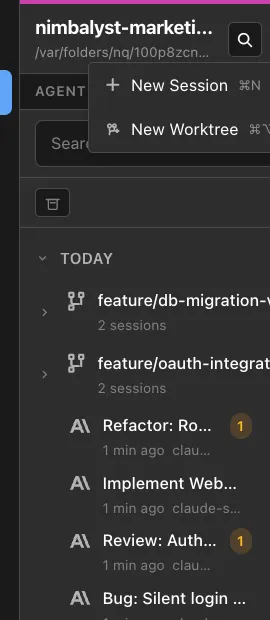
Nimbalyst’s session manager gives you a single view of all your running, completed, and paused Claude Code sessions.
The Dashboard
Every session appears as a card on a kanban-style board:
- Name — what you named the session (or what the AI inferred)
- Status — running, completed, blocked, paused
- Files changed — which files this session has touched
- Duration — how long it’s been running
- Last activity — what the agent did most recently
At a glance, you know the state of all your work.
Session Search
“What was that session where I worked on the auth refactor last week?” Search by name, by files changed, by date. Find it. Open the full transcript. Resume it with full context.
Terminal history scrolls away and gets lost. Nimbalyst sessions persist and are searchable.
File-to-Session Linking
Click any file in your workspace and see which sessions touched it. Click any session and see which files it changed. This bidirectional linking answers the question nobody asks until it’s too late: “Who changed this file, and in what context?”
Workstreams
Group related sessions into workstreams. The “auth refactor” workstream contains 4 sessions across 3 days. See the full picture of a multi-session effort without reconstructing it from terminal history.
Parallel Session Coordination
Running sessions in parallel is powerful. Running uncoordinated sessions in parallel is dangerous. Nimbalyst shows you when two sessions are touching the same files, helping you avoid merge conflicts before they happen.
Workflow
Morning: Open Nimbalyst. See yesterday’s sessions. Session 4 (tests) completed overnight — check the results. Session 5 (docs) is still running. Session 6 (migration) failed with an error — open it, read the error, resume with a fix.
Midday: Launch 3 new sessions for today’s work. Assign them to the “build xyz feature” workstream. Glance at the kanban board between meetings. Two done. One in progress.
End of day: Review all completed sessions. Check the files changed. Approve the diffs. Link sessions to tickets. Push clean changes.
Zero time spent wondering “what’s that terminal doing?” Zero sessions forgotten and left running. Zero surprise merge conflicts from uncoordinated agents.
Scaling Is the Point
Today you run 2-3 agents. Next month you’ll run 6. By next year, your team will be running 20+ agents collectively.
The organizations that figure out agent management early will have a massive advantage. Not because their agents are better — everyone has access to the same models. But because they can coordinate more agents, more effectively, with less overhead.
Agent management is the new skill. And it needs purpose-built tools, not tmux panes.
FAQ
Q: Can’t I just use tmux or screen for multiple sessions? A: You can. But tmux gives you tiled text windows. Nimbalyst gives you a searchable, filterable dashboard with file linking, visual diffs, and workstream organization. The difference is between managing employees via sticky notes vs. using a project management tool.