Codex for Product Managers in a Visual Workspace
OpenAI is bringing Codex to product managers. Here is how to get PRDs, mockups, prototypes, and reviews without bouncing between terminals, IDEs, the Codex app, and design tools.
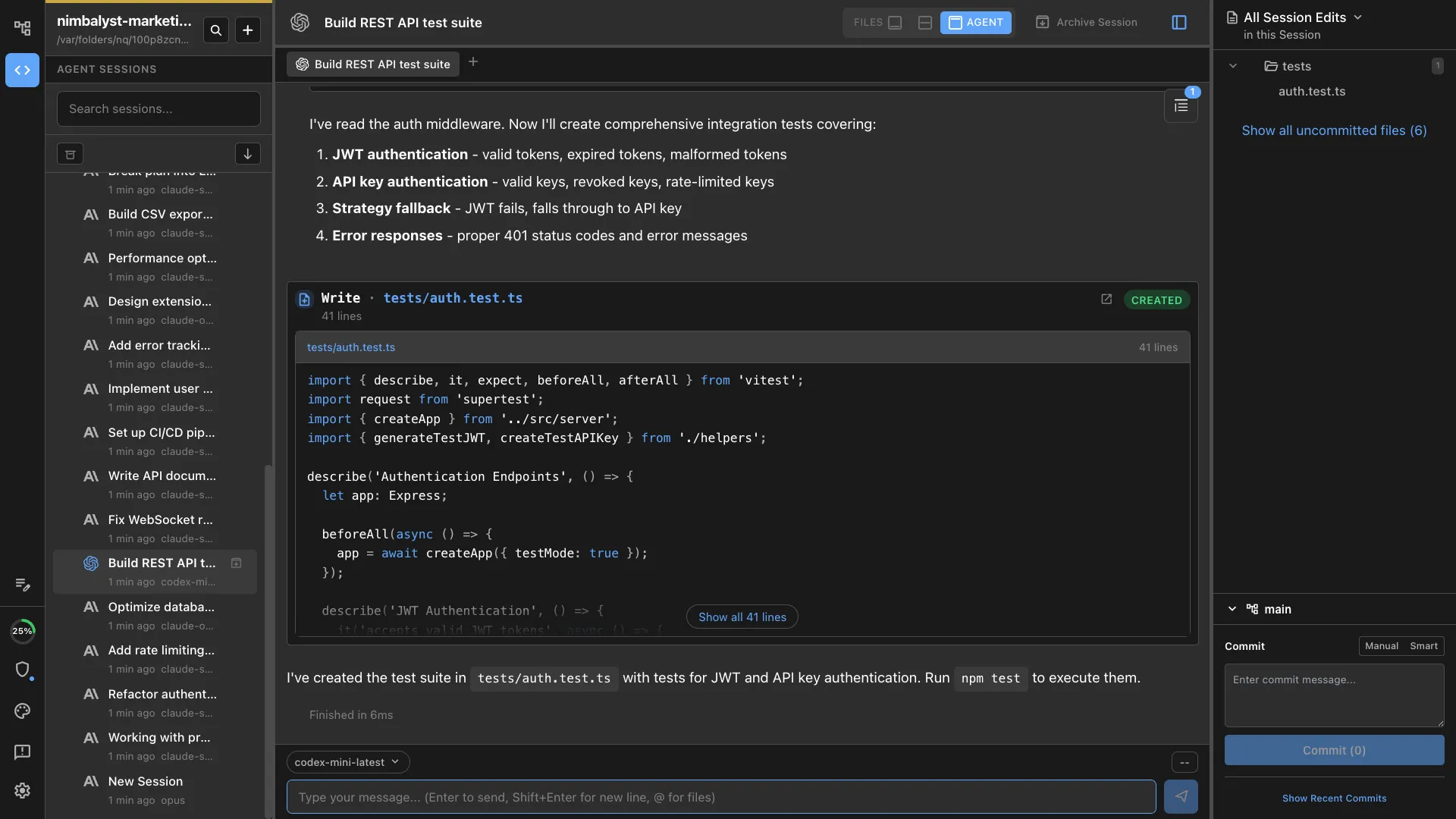
OpenAI now pushes Codex beyond engineering, including product work. Codex is genuinely good at PM jobs: PRDs, competitive research, prototypes, feedback analysis. The problem is the interface PMs are usually handed: a terminal, an IDE, or the Codex app as a provider-owned task surface. Those surfaces can run useful work, but they turn product intent into low-bandwidth chat, task output, and file switching.
You do not have to work that way. A visual workspace like Nimbalyst runs Codex and Claude Code for you, so you get the PRDs, mockups, prototypes, diagrams, and reviews in one place. This guide walks through the PM loop the visual way, step by step.
Codex is for PMs now
OpenAI has been explicit about Codex moving beyond a narrow developer audience. The same product courses that teach Claude Code teach Codex alongside it, because the job is the same: describe what you want, let the agent build it, and review the result.
So the question for most PMs is no longer whether to use Codex. It is how to use it without adopting an engineer’s toolchain, a code-first IDE, or a task-first provider app to get there.
The terminal, IDE, and Codex app are not the workflow
This is not a knock on Codex. The agent underneath is excellent, the terminal is a fine home for engineers who live in one all day, and IDEs are excellent for people editing code all day. The Codex app is useful for provider-owned tasks. For product work, though, those surfaces get in the way in specific, practical ways.
You write a PRD and the agent edits a file you then have to open somewhere else to read. You ask for a mockup and get HTML you cannot see rendered. You want to review what changed and you are paging through a git diff or an IDE code diff. You use the Codex app and get a task transcript, but no first-class visual editor for the project files. You try to run two things at once and you are juggling terminal tabs, IDE panels, and app tasks. All of it is friction for a PM who wants to plan, see, annotate, compare, and decide.
A workspace closes that gap. Here is the same PM loop with the terminal, IDE, Codex app, browser preview, and design handoff pulled into one visual workspace.
The PM loop, done visually
Write the PRD and watch every edit
Draft the spec in a real markdown editor. Ask Codex to expand the problem statement, pull in technical constraints from the codebase, or draft acceptance criteria. Every change it makes shows up as an inline red and green diff. You accept, reject, or edit each one. Reviewing an agent’s edits feels like reviewing tracked changes in a document, not reading terminal scrollback or moving task output into another tool.
Mockup the feature and annotate it
Describe a screen and the agent generates a mockup that renders right in the workspace. Draw on it. Circle the header, add a note next to the empty state, mark the button that should move. Ask the agent to apply your annotations and iterate. You are prototyping the interface without leaving the plan it belongs to.
Diagram the flow
Turn a paragraph into an Excalidraw diagram or a mind map, edited visually. Map the user journey, sketch the system boundaries, lay out the states a feature moves through. The diagram lives next to the spec, so the picture and the words stay in sync.
Run the coding session in your own repo
When you want a working prototype, start a coding session in a git worktree against your actual product repository. The prototype comes out matching your real design system and code, not a generic template on someone else’s servers. That difference matters at handoff: engineering gets a branch they can read and build on, instead of a screenshot they have to rebuild from scratch.
Review the change before it lands
See exactly what the agent changed, file by file, in red and green. Approve the parts that are right, reject the parts that are not, and nothing ships that you did not look at. You stay in control of the change without needing to write the code yourself.
Track the work
Keep tasks, bugs, and decisions on a tracker and a kanban board that the agent reads and updates too. The board reflects what is actually happening in your sessions, so status is something you glance at instead of something you assemble.
Analyze feedback and metrics
Point the agent at a feedback export, a set of interview notes, or your analytics through an MCP connection. It categorizes themes, ranks pain points, and drafts the follow-up tickets. The output lands as an editable doc, a spreadsheet, or a diagram in the workspace, ready to use.
Terminal, IDE, or Codex app vs visual workspace
| PM job | Terminal, IDE, or Codex app | In a visual workspace |
|---|---|---|
| Writing a PRD | Raw markdown in developer tools, or task output you move elsewhere | WYSIWYG editor with red and green diff review |
| Mocking up a feature | Generated files you preview elsewhere, or no first-class mockup editor | Rendered mockups you annotate and iterate |
| Diagramming a flow | Diagram text, IDE extensions, or explanation in task output | Visual Excalidraw diagrams and mind maps |
| Reviewing changes | Terminal git diff, IDE code diff, or app summary | File-by-file visual diff, accept or reject each |
| Working in project files | Developer comfort assumed, or task flow wrapped around files | Open, edit, render, and review the actual project files visually |
| Tracking the work | Split across chat, tickets, IDE tasks, and notes | Tracker and kanban the agent keeps updated |
| Running several tasks | Terminal tabs, IDE panels, or provider-app task lists | Session board with status per agent |
| Prototyping | Possible, but hard to review as a PM | Git worktree, a real branch in your repo |
| Choice of agent | Usually one provider or one tool surface at a time | OpenAI Codex and Claude Code, side by side |
A concrete run: idea to reviewed branch
Here is what the loop looks like end to end. Clone your product repository, or a public demo repo if you are just learning, and point the workspace at it.
- Write a short PRD for a small feature in the markdown editor. Ask the agent to sharpen the goal and flag any technical constraints it sees in the code.
- Ask for a mockup of the main screen. Annotate it, ask for two changes, and settle on a version.
- Diagram the flow so the states are explicit before anyone writes code.
- Start a coding session in a worktree and ask the agent to build the prototype against the real codebase.
- Review the diff. Accept what is right, send back what is not, and repeat until it holds together.
- Hand engineering the branch, with the PRD, mockup, and diagram sitting next to it.
Every step happened in one workspace, instead of switching between a terminal, IDE, Codex app, browser preview, and design tool.
What you still do not need to know
Codebase access does not turn a PM into an engineer, and it does not need to. You are not writing production code, debugging deep technical issues, or making architecture calls. You are reading enough to understand how the product works, asking better questions, prototyping ideas, and reviewing what an agent produced. Think of it like a PM learning to read a financial statement. You are not becoming the CFO. You just make better decisions with the numbers in front of you.
Codex and Claude Code, side by side
You are not locked to one agent. A workspace can run OpenAI Codex and Claude Code together, so you can start a session with either engine, run them in parallel on the same task, and use the same diff review and session board for both. Pick the agent that does the job best and keep your workflow the same. If you want to see the same walkthrough with Claude Code as the engine, read Claude Code for product managers in a visual workspace.
Free, open source, and your OpenAI access
The Nimbalyst desktop and iOS apps are free for individual use, MIT licensed, and the full source is on GitHub. It uses your existing OpenAI access to run Codex, so there is nothing new to buy. If you already pay for ChatGPT with Codex or have an OpenAI API key, you already have what you need.
Product managers who try Codex rarely go back to waiting on an engineer for every technical answer. Doing it in a workspace built for planning, seeing, and deciding is what makes it stick.
Download Nimbalyst free and run your next PRD, mockup, and prototype in one place. For the broader picture, see Codex for product managers and the full guide to AI tools for product managers.
Related posts
-
Claude Code for Product Managers in a Visual Workspace
Product managers are being pointed at Claude Code, Claude's app, Cowork, terminals, and IDEs. Here is how to get PRDs, mockups, prototypes, and reviews without low-bandwidth tool switching.
-
Best AI Tools for Product Managers in 2026
The best AI tools for product managers across research, PRDs, prototypes, and engineering handoff. Compared by use case, pricing, and PM fit.
-
Best MCP Servers for Codex in 2026 (Ranked and Tested)
The best MCP servers for OpenAI Codex in 2026, ranked and tested: GitHub, Context7, Playwright, Postgres, Exa, and the essential picks, with the exact codex mcp add commands and the context-cost tradeoffs of running many at once.