How to Plan Features with AI Agents
AI agents are powerful but chaotic without upfront planning. Learn the plan-first workflow for writing specs, breaking work into agent-sized tasks, and managing parallel agent sessions to ship features faster.

Why planning matters more with AI agents
Vague prompts produce wrong code fast. An agent that misunderstands what you want doesn’t waste a day like a human developer would — it wastes twenty minutes and leaves behind a thousand lines of confident, wrong code you have to untangle.
Planning is what makes agents actually fast.
The plan-first workflow
Here is a good way to plan:
- Write a plan or spec document in plain language
- Enrich it with visual context — diagrams, mockups, data models
- Break the work into agent-sized tasks
- Write test cases for the feature, unit tests and end to end.
- Run agent sessions against those tasks, in parallel where possible
- Review against the plan, diagrams, and test cases. Iterate, merge
Each step feeds the next. By the time an agent starts writing code, it has the goals, the architecture diagram, the database schema, the UI mockup, and a scoped task description. That context is what separates a useful agent session from an expensive one.
Writing specs that agents can actually execute
A spec for an agent is not the same as a spec for a human. Humans fill gaps with institutional knowledge and hallway conversations. Agents fill gaps with guesses.
Write specs that leave no room for interpretation on the things that matter:
- State the goal, not just the feature. “Add a notification system” is a feature request. “Users need to know when a teammate comments on their document, without polling or refreshing the page” is a goal. The goal tells the agent why the feature exists, which helps it make better implementation decisions.
- Include acceptance criteria as concrete checks. Not “notifications should be fast” but “notification appears in the sidebar within 2 seconds of the comment being saved.” Agents can write tests against concrete criteria. They cannot write tests against vibes.
- Specify constraints explicitly. If the notification system must use the existing WebSocket connection and not create a new one, say that. If it must not add new database tables, say that. Agents will happily invent infrastructure you did not want.
- Name the files and modules involved. “This should integrate with the existing
NotificationServiceinsrc/services/notifications.ts” saves the agent from scanning the entire codebase and guessing where to put things.
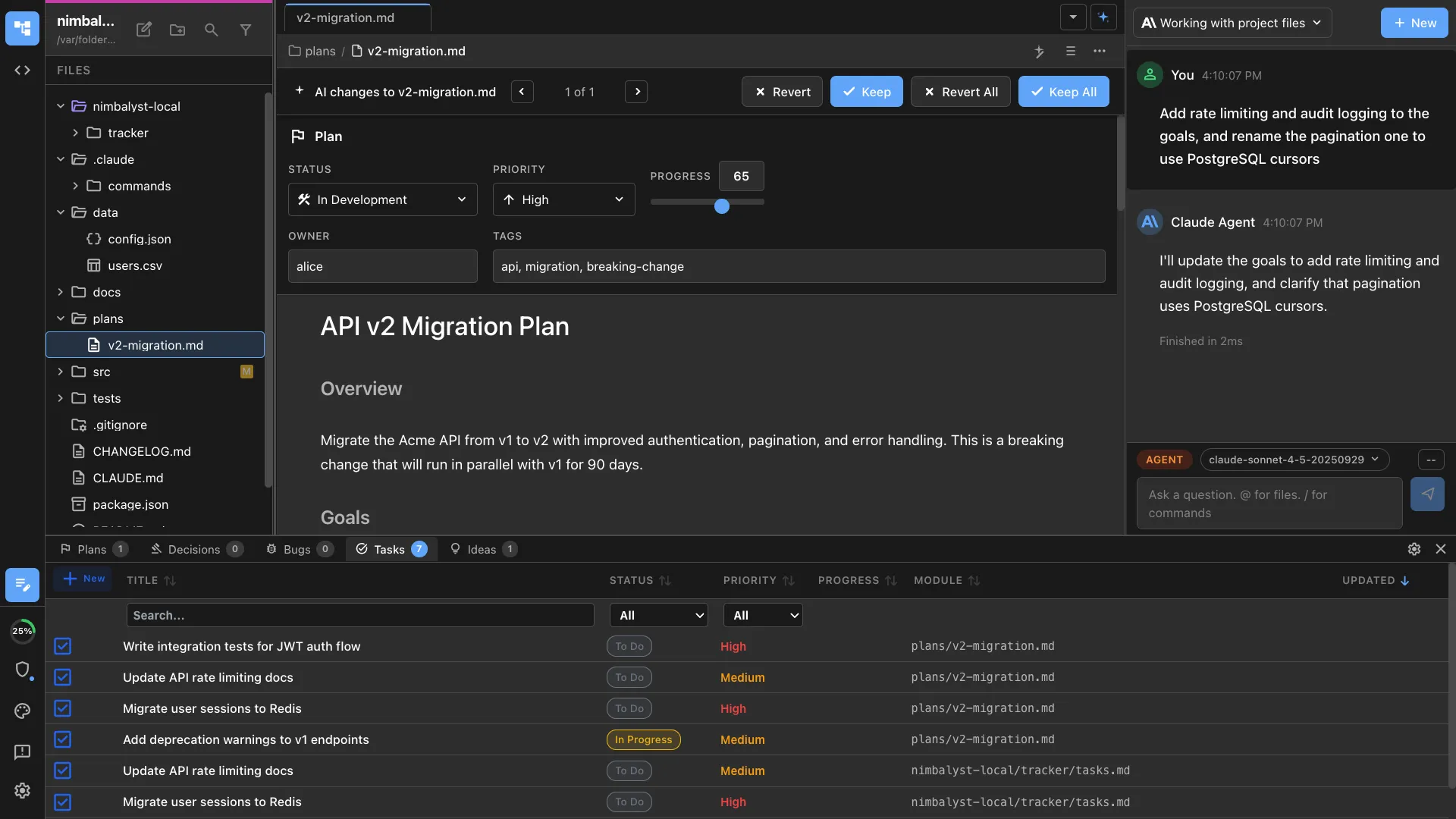
A good spec for an agent reads like instructions you would give a competent contractor who has never seen your codebase. Precise, scoped, and explicit about what not to do. We call this one plan doc for humans and agents — a single living document that keeps everyone aligned.
Breaking work into agent-sized tasks
The right granularity for an agent task is one concern, one session. Too broad and the agent loses focus, makes contradictory decisions across files, and produces work that is hard to review. Too narrow and you spend more time writing task descriptions than you save.
Rules of thumb:
- One task, one area of the codebase. A task that touches the database layer, the API, and the frontend is three tasks. Split them.
- Each task should be reviewable in under ten minutes. If you cannot read the diff and understand what happened in ten minutes, the task was too big.
- Tasks should have clear inputs and outputs. “Implement the WebSocket handler that receives notification events and writes them to the notifications table” has a clear input (WebSocket event) and output (database row). “Set up notifications” does not.
- Sequence tasks that depend on each other. The database migration runs before the API handler. The API handler runs before the frontend. Write them as separate tasks with an explicit order.
- Parallelize tasks that do not depend on each other. The notification preferences UI and the notification delivery backend can run simultaneously on separate branches.
Visual tools make agent output better
Text specs work for logic. They do not work for describing what something should look like, how data should be structured, or how components should connect. This is where visual planning tools change the quality of agent output.
- Mockups for UI intent. When you show an agent a mockup of the notification panel — the layout, the typography, the interaction states — it produces UI code that matches. When you describe the panel in words, it produces something functional but visually wrong, and you burn cycles on revision.

- Diagrams for architecture. An Excalidraw diagram showing the WebSocket connection flow between the client, server, and notification service communicates architecture more precisely than three paragraphs of prose. The agent reads the diagram and implements accordingly.

- Data models for schema. A visual entity-relationship diagram of the notifications schema — tables, foreign keys, field types — eliminates ambiguity about the data layer. The agent generates migrations that match the diagram instead of inventing its own schema.
The key is that these visual artifacts live alongside the spec, in the same workspace, visible to the agent. They are not reference material stored in a different tool. They are part of the context the agent consumes before writing code.
A real example: building a comment notification feature
Say you need real-time comment notifications.
- The spec covers the goal, constraints (use existing WebSocket, no new services), acceptance criteria (notification within 2 seconds, unread count updates, click navigates to comment), and approach (server broadcasts on comment save, client updates notification store)
- You add an architecture diagram of the WebSocket message flow, a data model for the notifications table, and a mockup of the notification panel.
- Five tasks come out of it: database migration, server-side broadcast, client-side listener and store, notification panel UI, and notification preferences page. First three are sequential, last two parallelize after task 3.
- Each task gets its own agent session on its own branch. The agent reads the spec, the relevant diagram or mockup, and the task description. It writes code and tests.
- Each session produces a focused diff you can review in five to ten minutes. Send the agent back with specific feedback when something is off — don’t rewrite its code manually.
- A feature that would take a developer two to three days takes about four hours of active work, most of it front-loaded in planning.

Managing multiple agent sessions on related tasks
When you have three or four agent sessions working on the same feature, coordination matters. Without it, agents make conflicting assumptions and you spend your review time reconciling.
- Give every session the same spec. The spec is the single source of truth. Every agent session should read the same plan document so they share the same understanding of the feature.
- Use separate branches. Each task runs on its own git branch. This prevents agents from stepping on each other’s changes and makes merging predictable. Git worktrees are useful here — they let you run multiple sessions against the same repo without branch-switching overhead.
- Define interfaces between tasks. If the backend task produces an API endpoint, specify the request and response shape in the spec. The frontend task can build against that contract without waiting for the backend to be done.
- Review in dependency order. Merge the database migration first, then the backend, then the frontend. This catches integration issues early instead of discovering them after everything is merged.
- Track status visually. A task tracker that shows which sessions are running, which are waiting for review, and which are done keeps you from losing track of parallel work. This is especially important when you step away and come back — you need to see the state of all your sessions at a glance.

The planning investment pays for itself
Planning a feature before handing it to agents takes thirty to sixty minutes. Skipping that planning and letting agents improvise costs you two to four hours of cleanup, review churn, and rework. Spend the time upfront writing a clear spec, adding visual context, and breaking work into scoped tasks. Your agent sessions will be shorter, their output will be higher quality, and your review cycles will be faster. AI agents did not eliminate the need for planning. They made planning the highest-leverage activity in your workflow — whether you are a developer or a product manager.