IDE for Words, Diagrams, and Mockups
Developers got VS Code. Builders got... a dozen tabs. Until now.

The 80% Nobody Talks About
Ask any product manager, tech lead, or senior developer what they spend most of their time on. It’s not code. It’s words, diagrams, and mockups.
Specs. PRDs. Architecture docs. Decision records. Meeting notes. Status updates. Research summaries. Competitive analysis. User stories. Acceptance criteria. Technical designs. Technical diagrams. API documentation. Runbooks. UI Mockups.
Words. Structured, technical, consequential words that drive every line of code that gets written. Diagrams. Architecture sketches, flowcharts, data models, sequence diagrams — the visual thinking that turns vague ideas into shared understanding. The stuff you currently draw in LucidChart, export as PNG, and paste into a doc where it immediately goes stale.
Mockups. The quick UI sketches that answer “what should this actually look like?” before anyone writes a line of code. The wireframes you currently hack together in Figma or describe in words because switching tools isn’t worth the friction.
And what tools do we have for these words? Google Docs — designed for letter writing. Notion — designed for wikis. Confluence — designed for… nobody knows what Confluence was designed for. Or we write in a code editor that treats markdown as an afterthought, rendering it in a tiny preview pane while we stare at raw syntax. We surveyed the landscape in our complete guide to markdown editors — the gap is real.
Developers got an IDE purpose-built for code. Builders got tools designed for something else entirely and repurposed badly.
What an IDE for Words, Diagrams, and Mockups Actually Means
An IDE for code isn’t just a text editor. It’s an environment that understands code — syntax highlighting, autocomplete, error detection, integrated debugging, version control, refactoring tools. The editor is smart about the content.
An IDE for words, diagrams, and mockups should be the same: an environment that understands sessions, changes, links, planning. Here’s what that looks like:

WYSIWYG That Actually Works
You write in rich text. No raw markdown syntax. Tables render as tables. Headers render as headers. Bold is bold. But underneath, it’s all standard markdown — portable, version-controlled, readable by any tool.
Claude Code can edit your document and you see the changes as inline red/green diffs in the WYSIWYG view. Not in a separate diff viewer. Not in a terminal. Right there in your document. Accept or reject each change with one click.
Diagrams Are First-Class
Mermaid flowcharts, sequence diagrams, and ERDs render live inside your document. You type the Mermaid code (or have Claude Code generate it) and the diagram appears inline. Edit the code, the diagram updates.
Need a whiteboard-style diagram? Excalidraw is integrated. Architecture diagrams, system sketches, relationship maps — all in your workspace, all visible to Claude Code. For a broader look at AI-native editors for markdown, mockups, and diagrams, see our comparison.
Mockups Are Documents
When you’re speccing a feature, you need to show what the UI should look like. In the old world, you’d switch to Figma, create a mockup, export a PNG, paste it into your doc. Static. Disconnected.
In Nimbalyst, you create a .mockup.html file. Claude Code generates a live HTML/CSS mockup. You annotate it with circles, arrows, and text notes. You iterate: “Move the button to the right. Add a search bar.” Claude Code updates the mockup. The mockup lives in your workspace alongside your spec, your diagram, and your code.
Data Models Are Visual
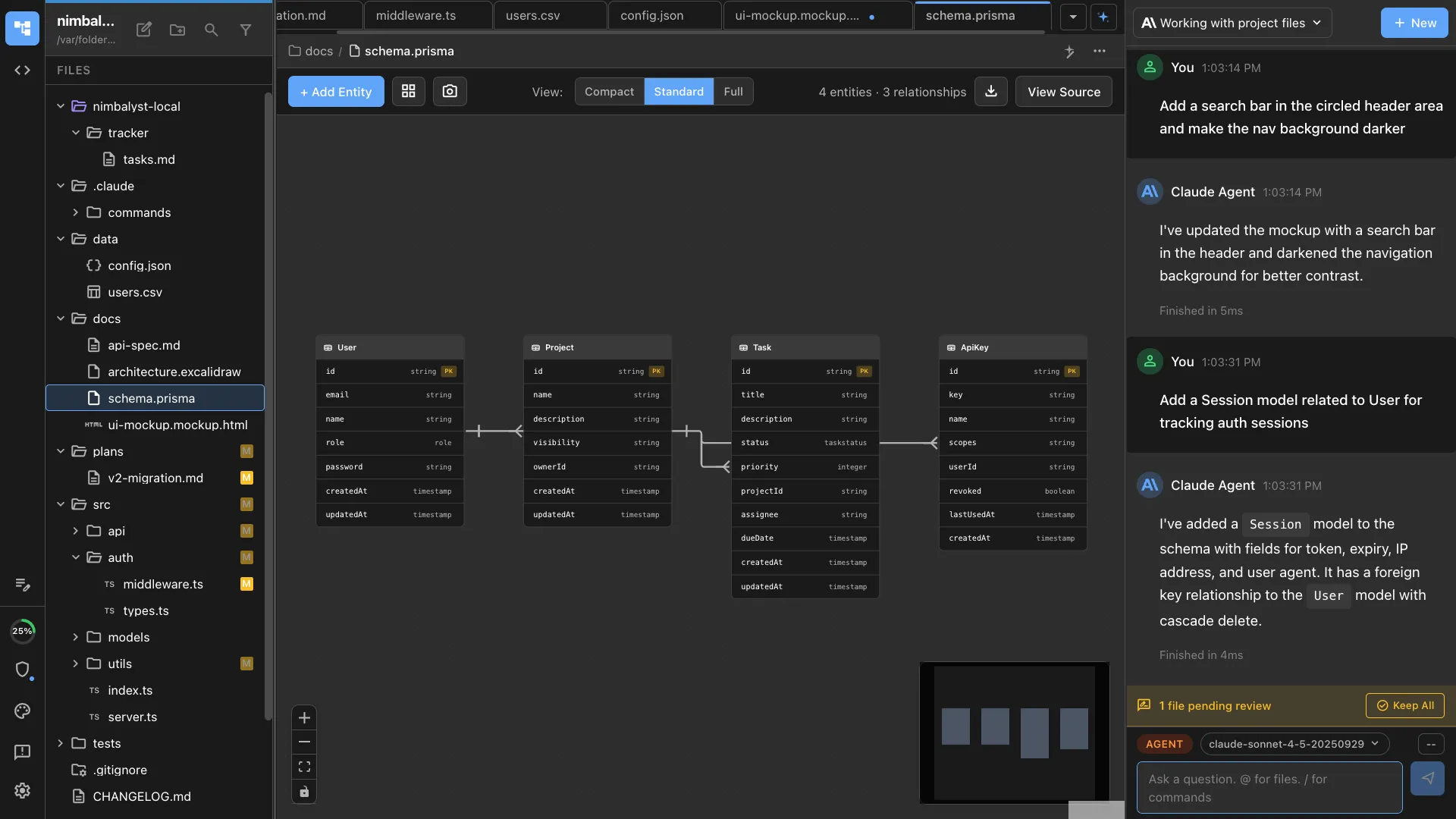
Your spec describes a database schema in words. Wouldn’t it be better as a visual diagram? The DataModelLM editor lets you design schemas visually — entities, relationships, fields, constraints. Export to Prisma or SQL. Claude Code can create and modify the model.
Sessions Are Context
Every conversation with Claude Code is a session. Sessions are searchable, resumable, and linked to documents. “What did we discuss about the auth redesign?” Search your sessions. Find it. Resume it with full context.
The Builder’s Workflow
Here’s a day in the life with an IDE for Words:
Morning: Open your feature spec. The Mermaid architecture diagram is up to date from yesterday’s session. You add a paragraph about edge cases. Claude Code suggests three more edge cases you missed, showing them as green insertions. You accept two, reject one.
Late morning: Create a mockup for the new settings page. “Make it look like our existing settings but add a team management section.” Claude Code generates the mockup. You annotate: “This button should be more prominent.” It iterates.
Afternoon: Design the data model. Open the DataModelLM editor. Add entities, draw relationships. Claude Code suggests indexes and constraints based on your access patterns.
End of day: Open the tracker. Mark your tasks as done. Link the spec, mockup, and data model to the implementation ticket. Everything is connected. Tomorrow’s developer will open the ticket and have full context.
No Google Docs. No Notion. No Figma. No copy-pasting between tools. No context lost in translation.
The Words, Diagrams, Mockups -> Code Pipeline
Here’s the deeper insight: in the age of AI agents, your words ARE your code.
The spec you write becomes the prompt that generates the implementation. The mockup you create becomes the design reference. The data model you build becomes the schema. The acceptance criteria you define become the test cases. This is why one plan doc for humans and agents changes everything.
The quality of your words directly determines the quality of your AI-generated code. An IDE for code optimizes the last mile. An IDE for words optimizes everything that comes before — which, increasingly, is everything that matters.
FAQ
Q: How is this different from Notion? A: Notion is a wiki/database tool. Nimbalyst is an AI-integrated editing environment. Notion doesn’t have inline AI diffs, integrated Claude Code, visual mockup creation, data model editors, or session management. Also: Nimbalyst is local. Your files stay on your machine. See the full feature comparison for details.
Q: Can developers use this too? A: Absolutely. Developers write specs, docs, and architecture decisions. The code editor (Monaco) is the same engine as VS Code. You get both the IDE for words and the IDE for code in one workspace.
Q: Does this replace Figma for mockups? A: Not for pixel-perfect design work. Nimbalyst mockups are for planning — quick HTML/CSS wireframes you iterate on with AI. Think “napkin sketch that actually works” rather than “final design comp.”