Calc Sheets in Nimbalyst
Nimbalyst calc sheets are text-first calculation files in the same family as Soulver and Numi. They keep assumptions, formulas, units, comments, and checks in one editable document, with calculated results beside the source.
Spreadsheets are good at calculation. Documents are good at explanation. A lot of technical work needs both.
That is the idea behind calc sheets in Nimbalyst.
Calc sheets are text-first calculation files in the same family as Soulver and Numi, the Mac notepad-calculator apps. They keep assumptions, formulas, units, comments, and checks in one editable document, with calculated results beside the source.
That makes them useful for the kind of work that gets awkward in both a spreadsheet and a plain doc: pricing models, engineering estimates, capacity plans, scientific calculations, and any model where the assumptions matter as much as the result.
Because the sheet lives as a file in Nimbalyst, you can edit the model directly, change inputs, recalculate immediately, share the result, and work through revisions with an agent in the same workspace.
What a calc sheet looks like
Here is the Falcon 9 example:
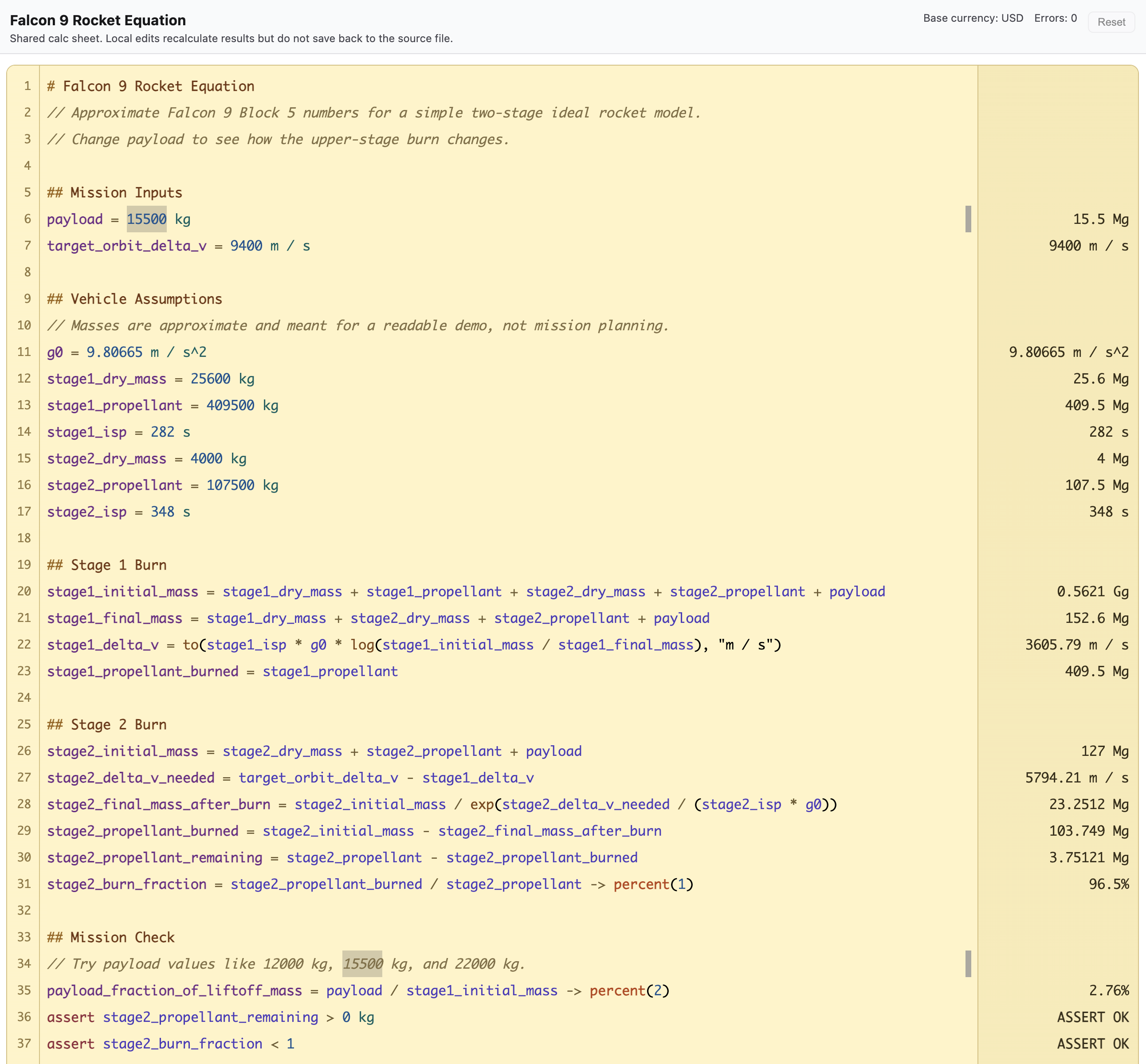
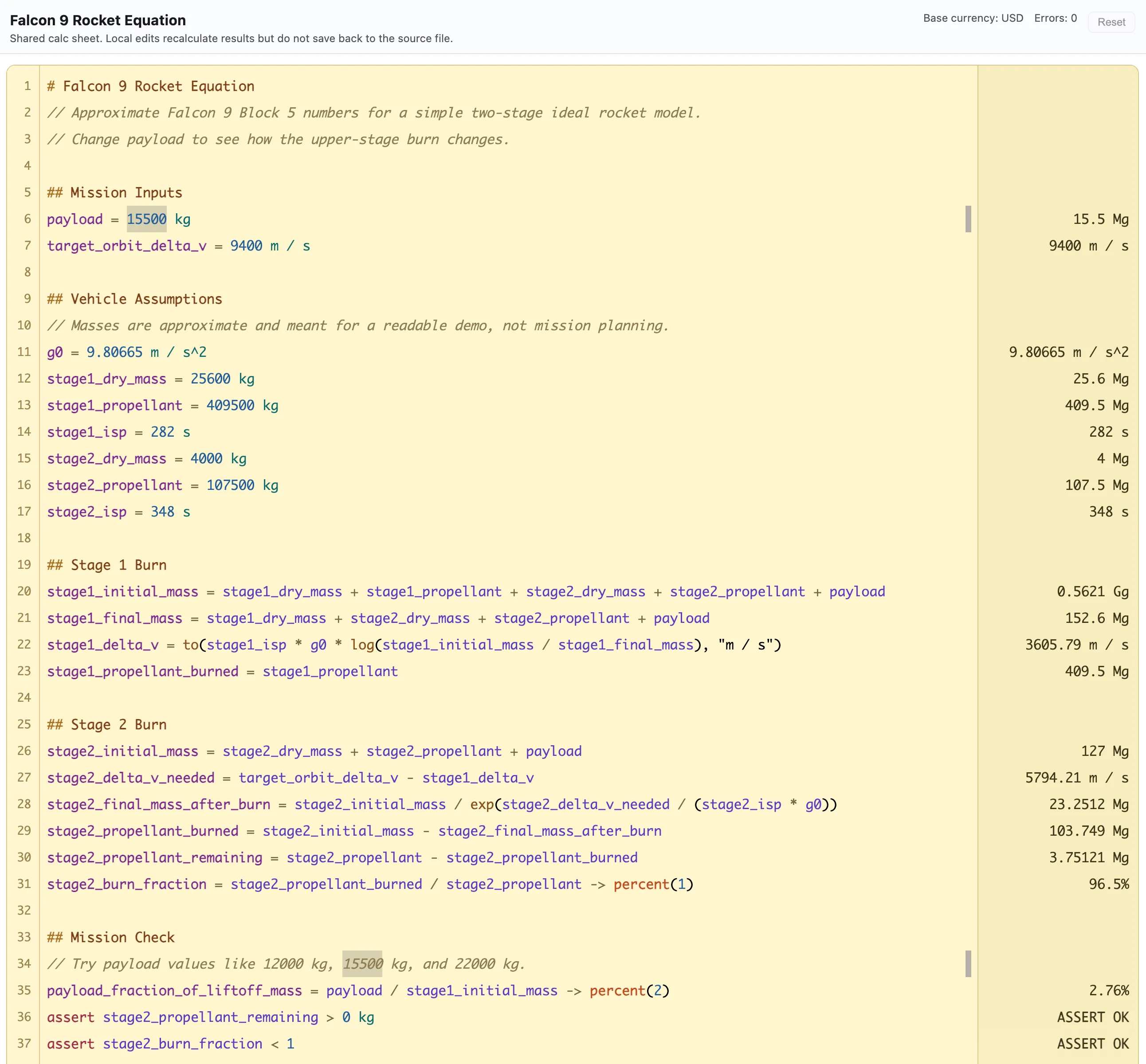
The left side is the source. The right side is the calculated output.
This sheet models a two-stage launch with named mission inputs, vehicle assumptions, derived calculations for each burn, and assertions that fail if the mission no longer closes. Change payload and the rest of the sheet updates.
At 15,500 kg, stage one contributes about 3,605.79 m/s, stage two needs about 5,794.21 m/s, and the upper stage finishes with about 3,751 kg of propellant remaining.
The point is not aerospace. The point is that the model stays readable while you work on it.
The assumptions are visible. The checks live next to the calculation. The source is easy to edit. If a payload target changes, or a stage assumption changes, you update the sheet instead of digging through cells. If you want to explore another scenario, an agent can revise the file, explain the change, or test alternatives in place.
Why this format works
A calc sheet does a few things at the same time:
- It acts like a document, because you can write headings, comments, and context directly into the file.
- It acts like a model, because named inputs and formulas recalculate immediately.
- It acts like source, because it is plain text that can be reviewed, versioned, diffed, and edited by an agent.
That combination matters.
A normal spreadsheet can give you a result without making the reasoning easy to inspect. A plain note can preserve the reasoning without making the model executable. A calc sheet keeps both in one place.
Why it fits Nimbalyst
Nimbalyst is built around files, agents, and reviewable work.
That means a calc sheet is not an isolated calculator surface. It is part of the rest of the workspace. You can keep the model next to specs, notes, mockups, diagrams, code, and transcripts. You can ask an agent to change an assumption, test a scenario, explain a formula, or turn the model into another artifact.
That is a better fit for real work than bouncing between a note, a spreadsheet, and a chat window.
Good use cases
Calc sheets are a good fit for:
- Engineering estimates
- Pricing and margin models
- Unit-aware calculations
- Capacity planning
- Scientific notes
- Scenario analysis
- Investor or customer-facing technical demos
- Any model where the reasoning matters as much as the result
The goal is not to replace every spreadsheet. The goal is to give you a better format for calculations that need to be read, explained, changed, and shared.
A calc sheet turns a model into a document you can work on.
Related posts
-
Cursor Just Picked a Side: What the SpaceX Deal Means for AI Coding
SpaceX's $10B/$60B option on Cursor signals a shift toward vertical AI coding stacks. Lock-in now spans model, harness, and GUI together, not just the model.
-
Obsidian + Claude Code vs. Nimbalyst
A balanced comparison of using Obsidian with Claude Code versus Nimbalyst for AI-assisted planning, specs, and technical writing in markdown.
-
How to Plan Features with AI Agents
AI agents are powerful but chaotic without planning. Learn the plan-first workflow for specs, agent-sized tasks, and parallel sessions.