Claude Code vs Cursor (2026): Which One Should You Use?
Claude Code vs Cursor compared for 2026 on agent autonomy, editing, models, parallel sessions, code review, pricing, and open source. A clear, current guide to picking the right one, with a full comparison table.
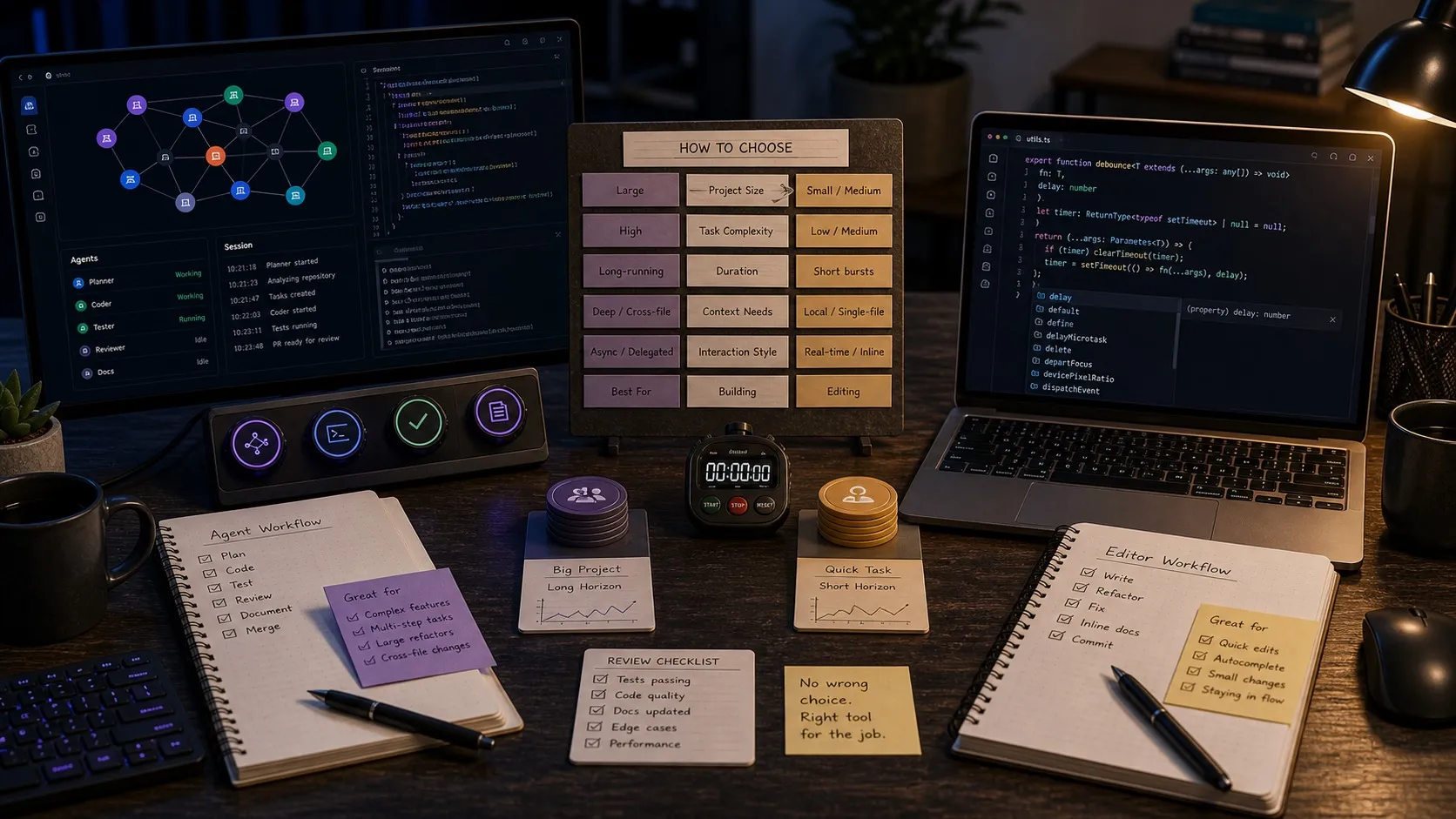
Claude Code vs Cursor is one of the most common decisions developers face in 2026 when choosing an AI coding tool. Claude Code is Anthropic’s agentic coding product, strongest when you delegate a larger task and let an agent explore, edit, test, and iterate. Cursor is an AI-first coding environment built around the editor, strongest when you stay in the driver’s seat with tab completion, inline edits, and multi-model choice. This guide compares them on autonomy, editing, models, parallel work, code review, pricing, and openness, then helps you pick, including how to run Claude Code inside an open-source visual workspace.
Claude Code vs Cursor: quick verdict
| Claude Code | Cursor | |
|---|---|---|
| Primary mode | Agent-first, delegate and review | Editor-first, drive and assist |
| Form factor | Terminal, desktop, web, VS Code, JetBrains | AI IDE (VS Code fork), plus CLI and cloud agents |
| Replaces your editor? | No | Usually yes |
| Models | Claude only (Opus 4.8, Sonnet 4.6, Haiku 4.5) | Multi-provider: Claude, GPT, Gemini, plus Composer |
| Tab autocomplete | Not a core strength | Core strength (Tab v2) |
| Parallel agents | Git worktrees and scriptable workflows | Up to 8 parallel agents, each in its own worktree, plus cloud background agents |
| Code review | CLI and GitHub Actions | BugBot autonomous PR review |
| MCP | First-party (Anthropic created MCP) | Strong support, not the originator |
| Starting price | Claude Pro $20/mo (includes Claude Code) | Cursor Individual $20/mo |
| Open source | CLI open source; desktop apps closed | Closed source |
| Best for | Delegating substantial coding tasks | Staying in-editor while moving faster |
Pick Claude Code when you want an agent to take ownership of multi-step work like refactors, migrations, and build-test-fix loops, and you want to keep your existing editor.
Pick Cursor when you live in the editor all day and want AI on every keystroke, multiple model providers in one place, and built-in parallel and cloud agents.
What each tool actually is
Claude Code is Anthropic’s agentic coding product. It started in the terminal and now officially spans the terminal, desktop, web, VS Code, and JetBrains. Anthropic’s docs position the VS Code extension as the recommended way to use Claude Code inside an editor, while the CLI stays available for power users and automation. Claude Code has first-party GitHub Actions support and deep Model Context Protocol support for pulling in external tools and data. Its center of gravity is delegation: you describe a task, the agent plans, reads across the repo, edits, runs tests, and keeps going with less interruption.
Cursor is an AI-first coding environment built on a VS Code fork. It still feels like an editor, but the product now reaches well past inline editing. Cursor offers tab completion, agent mode, parallel agents, cloud background agents, a CLI, BugBot for pull request review, and a broad model lineup across Anthropic, OpenAI, Google, and Cursor’s own Composer models. Cursor is at its best when you are the primary driver and want AI embedded directly in the act of writing code.
The two products have converged on capabilities. Both now reach into agents, the terminal, and parallel work. The difference that lasts is the default posture: Claude Code assumes you are delegating, Cursor assumes you are editing.
Where Cursor wins
Cursor remains the stronger editing environment. If your day is mostly spent inside files, writing and shaping code, Cursor’s tab completion and inline edits are still central to the product and hard to beat. Tab v2 and the Composer models are tuned for low-latency edits, which keeps the in-editor loop fast.
Model choice is a genuine advantage. Cursor supports several frontier providers and lets you route between them, so you can compare Claude against GPT or Gemini inside one workflow. Claude Code is more opinionated by design: you are buying into Anthropic’s model stack.
Parallel and cloud execution are more mature on the Cursor side. Cursor runs up to eight agents at once, each in its own git worktree, and its background agents run remotely in sandboxed cloud environments. That makes Cursor attractive for teams that want parallel exploration, branch-based agent work, or asynchronous agent queues that produce pull requests while you do other things.
Code review is a dedicated product in Cursor. BugBot reviews pull requests, flags logic errors, security issues, and race conditions, and proposes fixes directly on the PR. Claude Code can review code through the CLI or GitHub Actions, but Cursor packages review as a first-class surface.
Where Claude Code wins
Claude Code is the better fit for agent-first work. Its strength is sustained, multi-step tasks where the quality of end-to-end agent behavior matters more than the editing surface: cross-file refactors, migrations, deep debugging, and long build-test-fix loops. You hand off the task and review the outcome rather than steering line by line.
It works without forcing an editor switch. This is one of Claude Code’s most practical advantages. You can run it in the terminal, inside VS Code, inside JetBrains, on the web, or from the desktop app. Cursor can be an excellent home base, but it still asks you to adopt more of Cursor’s environment.
Anthropic has the first-party advantage around MCP. Anthropic created the Model Context Protocol, and Claude Code leans into it. If your workflow depends on pulling context from issue trackers, design tools, docs, or internal systems, Claude Code sits close to the center of that ecosystem.
GitHub and pipeline automation are straightforward. Anthropic ships an official action and dedicated docs for running Claude Code in GitHub Actions, so the same agent workflow runs locally and in CI with little friction.
Claude subscriptions can be simpler if you already live in Claude. Anthropic bundles Claude Code into paid Claude plans. If you already use Claude across web, desktop, and mobile for writing, research, and product work, Claude Code feels like an extension of that subscription rather than a separate purchase.
Full comparison
| Dimension | Claude Code | Cursor |
|---|---|---|
| Default posture | Delegate a task to an agent | Drive the editor with AI assist |
| Surfaces | Terminal, desktop, web, VS Code, JetBrains | AI IDE, CLI, cloud agents |
| Replaces your editor? | No | Usually yes |
| Models | Claude: Opus 4.8, Sonnet 4.6, Haiku 4.5 | Multi-provider plus Composer models |
| Tab autocomplete | Not the core strength | Core strength |
| Parallel agents | Git worktrees, scriptable workflows | Up to 8 at once, each in a worktree |
| Cloud agents | Available on the web | Sandboxed background agents that open PRs |
| Code review product | CLI and GitHub Actions | BugBot autonomous PR review |
| MCP | First-party; Anthropic created MCP | Strong support |
| Starting price | Claude Pro $20/mo, includes Claude Code | Individual $20/mo |
| Team pricing | Claude Team and Max plans | Teams $40/user/mo |
| Open source | CLI open source; desktop apps closed | Closed source (proprietary fork) |
| Best for | Substantial delegated tasks | Staying in-editor while moving faster |
Pricing note: both products start at $20 per month, but the shape differs. Anthropic’s Pro plan is a broader Claude subscription that now includes Claude Code, while Cursor’s Individual plan is an editor subscription with extended agent limits. Recheck current pricing on each vendor’s site before you commit, since plans and limits change often.
When to use which
Use Claude Code if you want a stronger agent-first workflow, tight alignment with Anthropic’s coding stack, first-party GitHub automation, and the freedom to keep your existing editor. Claude Code fits best when you hand off larger tasks and review outcomes.
Use Cursor if you want AI built directly into the act of editing: autocomplete, inline changes, multi-model choice, cloud agents, and built-in code review. Cursor fits best when you are the primary driver and want AI in the cockpit.
Use both if your week contains both shapes. Cursor can be the editing home base while Claude Code handles the larger delegated tasks. Because Claude Code does not require an editor switch, it slots into a Cursor-centered workflow without friction. The split is usually task-shaped, not a permanent allegiance to one tool.
Where Nimbalyst fits
Cursor gives you an IDE. Claude Code gives you a terminal or an editor extension. Neither one gives you a visual workspace around your agents: a board for managing parallel sessions, planning docs the agent reads, and editors for the diagrams, mockups, and specs that surround real work.
Nimbalyst is the open-source visual workspace for building with Claude Code and Codex. You get a session kanban board for managing parallel agent sessions, a built-in task tracker, WYSIWYG markdown, a Monaco code editor, UI mockup prototyping, Excalidraw diagrams, data model design, and spreadsheets. Inline red and green diffs, git integration, and a terminal round out the workspace, and a native iOS app lets you review sessions from a phone. If open source matters in your stack, that point is worth weighing: Cursor is fully proprietary and Claude Code’s desktop apps are closed, while Nimbalyst is MIT licensed and free for individual use on Mac, Windows, Linux, and iOS. See the Nimbalyst vs Cursor comparison for the feature-by-feature breakdown, or learn more about using a visual workspace for Claude Code.
Frequently asked questions
Is Claude Code better than Cursor?
Neither is universally better. Claude Code is stronger when you delegate a substantial task to an agent that explores, edits, tests, and iterates with less hand-holding. Cursor is stronger when you want AI woven into an editor you actively drive, with tab completion, inline edits, and multi-model choice. Many developers use both depending on the task.
Can I use Claude Code and Cursor together?
Yes. They are not mutually exclusive. A common setup is Cursor as the editing home base and Claude Code for larger delegated tasks in the terminal, in VS Code, or in JetBrains. Claude Code works without forcing an editor switch, so it slots into a Cursor workflow easily.
Does Cursor support Claude models?
Yes. Cursor is multi-model and supports Anthropic Claude alongside OpenAI, Google, and Cursor’s own Composer models. You can route between providers inside Cursor, so you can use Claude in Cursor without using Claude Code itself.
Is Claude Code or Cursor better for running parallel agents?
Cursor has more built-in parallelism, running up to eight agents at once, each in its own git worktree, plus cloud background agents that open pull requests. Claude Code runs parallel work through git worktrees and scriptable workflows. A workspace like Nimbalyst adds a session kanban board so you can manage many Claude Code or Codex sessions visually.
Is Cursor or Claude Code open source?
Cursor is closed source, built as a proprietary VS Code fork. Claude Code’s CLI is open source, but Anthropic’s desktop apps are closed. Nimbalyst is the open-source visual workspace that runs Claude Code and Codex, MIT licensed and free for individual use.
Related reading
Related pages
-
Nimbalyst vs Cursor
The feature-by-feature comparison page for the visual workspace versus the AI IDE.
-
Claude Code GUI and workspace
What a visual workspace adds on top of Claude Code: sessions, editors, planning, and mobile review.
-
Codex vs Claude Code
Useful if you are also weighing OpenAI Codex against Claude Code for agent work.
Related posts
-
Codex vs Cursor (2026): Which One Should You Use?
Codex vs Cursor compared for 2026 on agent autonomy, editing, models, surfaces, parallel sessions, code review, pricing, and open source. A clear, current guide to picking the right one, with a full comparison table.
-
Best AI Agent Orchestration Platforms 2026: Coding vs Workflow
AI agent orchestration means two different products. Compare control planes for your own coding agents (Nimbalyst, Orca, Emdash, Superset, Conductor, Warp) against workflow frameworks like LangGraph and CrewAI.
-
Best Tools for Managing Parallel AI Coding Agents in 2026
Looking for an agent kanban board or a way to manage multiple coding agents? These 10 tools cover multi-agent coding across Claude Code, Codex, terminal multiplexers, and visual workspaces.