Best Conductor Alternatives 2026: Windows, Linux, and Open Source
Conductor is joining Meta and Conductor Cloud shuts down Nov 20. Compare the best Conductor alternatives for Mac, Windows, and Linux by license, agents, and price.

Updated November 12, 2026. Facts were checked against each tool’s own site, documentation, or GitHub repository on that date, and each tool links to its primary source.
Conductor is a macOS app for running Claude Code, Codex, and Cursor agents in parallel, with each task in its own isolated workspace. On November 4, 2026 Conductor announced it is joining Meta, and its cloud product is shutting down this month. The news gives Conductor users a reason to compare alternatives this week, on top of an older one: Conductor has never shipped a Windows or Linux build.
Jump to: Conductor’s status · Comparison table · Windows and Linux · The tools · Moving off Conductor · How to choose · FAQ
Conductor’s Status as of November 12, 2026
Conductor’s own announcement says Conductor is being acquired by Meta, and that the team has a new interface planned for early next year. Its changelog lists the same news as version 0.93.0, “Conductor is joining Meta,” dated November 4.
What the announcement states directly:
- Conductor Cloud will shut down over the next few weeks.
- The local Conductor app keeps working as normal until the new product arrives.
- You can move a cloud workspace to your machine by right-clicking it and choosing Transfer to local, and you can export an archive of all your Conductor data from Settings, Account, Export data.
- Conductor has never sold or trained on user data and says it will not start.
Press coverage of the announcement (Axios, SiliconANGLE) adds the specific dates and terms. Those details come from the press reports, not from the announcement page itself:
| Date | Reported event |
|---|---|
| November 4, 2026 | Acquisition announced. New sign-ups and downloads stop. Pro subscribers get paid features free. |
| November 13, 2026 | Conductor Cloud becomes read-only. |
| November 20, 2026 | Conductor Cloud shuts down and cloud data deletion begins. |
| Early 2027 | The local Mac app is expected to be replaced by a new interface. The press reports say local user data will then be deleted. |
Active subscribers are reported to receive refunds. Meta has not described what the new product will be, and financial terms were not disclosed. If you depend on the Conductor API or on automations built around it, plan for them to stop working with the cloud, because neither source says otherwise.
Best Conductor Alternatives: Quick Answer
- Best cross-platform alternative with the workspace around the agents: Nimbalyst. Claude Code and Codex sessions on a kanban board, optional worktrees, visual diff review, plans, and visual editors, on macOS, Windows, and Linux, with an iOS companion app.
- Best open-source pick overall: Orca. MIT licensed, desktop apps for macOS, Windows, and Linux, mobile apps, and a long agent list.
- Closest in shape on Windows: Pane. Keyboard-first, agent-agnostic, built around Windows and WSL.
- Best for self-hosting and phones: Paseo. Apache-2.0, with a daemon you run yourself and native mobile clients.
- Closest to Conductor on a Mac: Paradev, formerly Superset. MIT licensed, macOS first, with an experimental Linux build and no Windows build.
- Best first-party options: Claude Code desktop for Claude, the Codex app for Codex.
Comparison Table
| Tool | Platforms | Open source | Agents | Worktrees | Diff review | Mobile | Price |
|---|---|---|---|---|---|---|---|
| Conductor | macOS | No | Claude Code, Codex, Cursor | Yes | Yes | iOS app | Free tier; Pro $50/mo; sign-ups closed Nov 4 |
| Nimbalyst | macOS, Windows, Linux | Yes, MIT (desktop and iOS) | Claude Code, Codex, OpenCode, Cursor Agent, Copilot CLI, Grok Build, Gemini via Antigravity | Optional, one click | Yes, file by file | iOS | Free for individuals |
| Orca | macOS, Windows, Linux | Yes, MIT | Claude Code, Codex, Cursor, Copilot, OpenCode, Grok, any terminal agent | Yes | Yes | iOS and Android | Free, bring your own subscriptions |
| Pane | Windows, WSL, macOS, Linux | Yes, AGPL-3.0 | Any terminal agent | Yes | Yes | Via Remote Pane | Free |
| Emdash | macOS, Windows, Linux | Yes, Apache-2.0 | Claude Code, Codex, Cursor, OpenCode, Amp, Devin, and more | Yes | Yes | No | Free |
| Paseo | macOS, Windows, Linux | Yes, Apache-2.0 | Claude Code, Codex, Copilot, OpenCode, Pi, and more | Optional | Yes | iOS and Android | Free, sponsor funded |
| Paradev | macOS; Linux experimental | Yes, MIT | Any CLI agent | Yes | Yes | iPhone and iPad app | Free; Pro $20/user/mo; Team $60/user/mo |
| T3 Code | macOS, Windows, Linux | Yes, MIT | Claude Code, Codex, Cursor, OpenCode, and more | Yes | Yes | iOS and Android | Free, uses your agent logins |
| Claude Code desktop | macOS, Windows, Linux beta | No | Claude Code | Optional | Yes | Claude mobile apps | Included with Claude plans |
| Codex app | macOS, Windows | No | Codex | Yes | Yes | Not verified | Included with ChatGPT plans |
| Claude Squad | Wherever tmux and gh run | Yes, AGPL-3.0 | Claude Code, Codex, Gemini, Aider | Yes | Terminal | No | Free |
Vibe Kanban is left out of the table because it is sunsetting; see the note below.
Find Your Platform
Conductor is macOS only, so the shortlist depends first on your operating system.
Conductor alternatives for Windows
| Tool | Windows support | Notes |
|---|---|---|
| Nimbalyst | Native desktop build | Same workflow as macOS, including worktrees and the session board |
| Orca | Native desktop build | MIT, with mobile apps |
| Pane | Native, plus WSL | Built around Windows and WSL |
| Emdash | MSI installer and portable EXE | The portable build suits locked-down machines |
| Paseo | x64 and ARM64 installers | Self-hostable daemon |
| T3 Code | Native desktop build | Installs through winget or Scoop |
| Claude Code desktop | x64 and ARM64 installers | Claude only; also runs against a WSL 2 distribution |
| Codex app | Native Windows app | Codex only; can run in WSL 2 |
| Paradev | Not available | Its site lists Windows as not yet available |
If you run your agents inside WSL, weight WSL awareness heavily. Pane advertises it directly, Claude Code desktop can connect to a WSL 2 distribution, and the Codex app can be configured to run in WSL 2.
Conductor alternatives for Linux
| Tool | Linux support | Notes |
|---|---|---|
| Orca | AppImage, DEB, and RPM, x64 and ARM64 | Also ships a Linux server build |
| Paseo | AppImage, DEB, and RPM | Self-hostable |
| Emdash | AppImage, DEB, and RPM, x64 and ARM64 | SSH to remote machines |
| Nimbalyst | Linux desktop build, including a .deb for Ubuntu and Debian | The .deb is the route on Ubuntu 24.04 and later, where AppArmor blocks the AppImage |
| T3 Code | Desktop build; AUR, Nix, and .deb installs | MIT |
| Pane | Linux listed alongside Windows and macOS | AGPL-3.0 |
| Claude Code desktop | Beta for Ubuntu and Debian, via apt or .deb | Claude only |
| Claude Squad | Terminal, needs tmux and gh | Suits remote Linux servers over SSH |
| Paradev | Experimental AppImage | macOS is the supported platform |
| Codex app | Check OpenAI’s current download page | OpenAI’s quickstart now says to download ChatGPT for macOS, Windows, or Linux, with Codex inside it |
The Best Conductor Alternatives
1. Nimbalyst
Best for: Developers who want parallel sessions plus the workspace around them, on any desktop OS.
Nimbalyst is a desktop app built on top of Claude Code and Codex. Both run as first-class engines side by side, and OpenCode, Cursor Agent, GitHub Copilot CLI, Grok Build, and Gemini through Antigravity are supported as additional lanes. Each session has its own transcript and changed-file list, and sessions sit on a kanban board organized by phase, so parallel work stays legible.
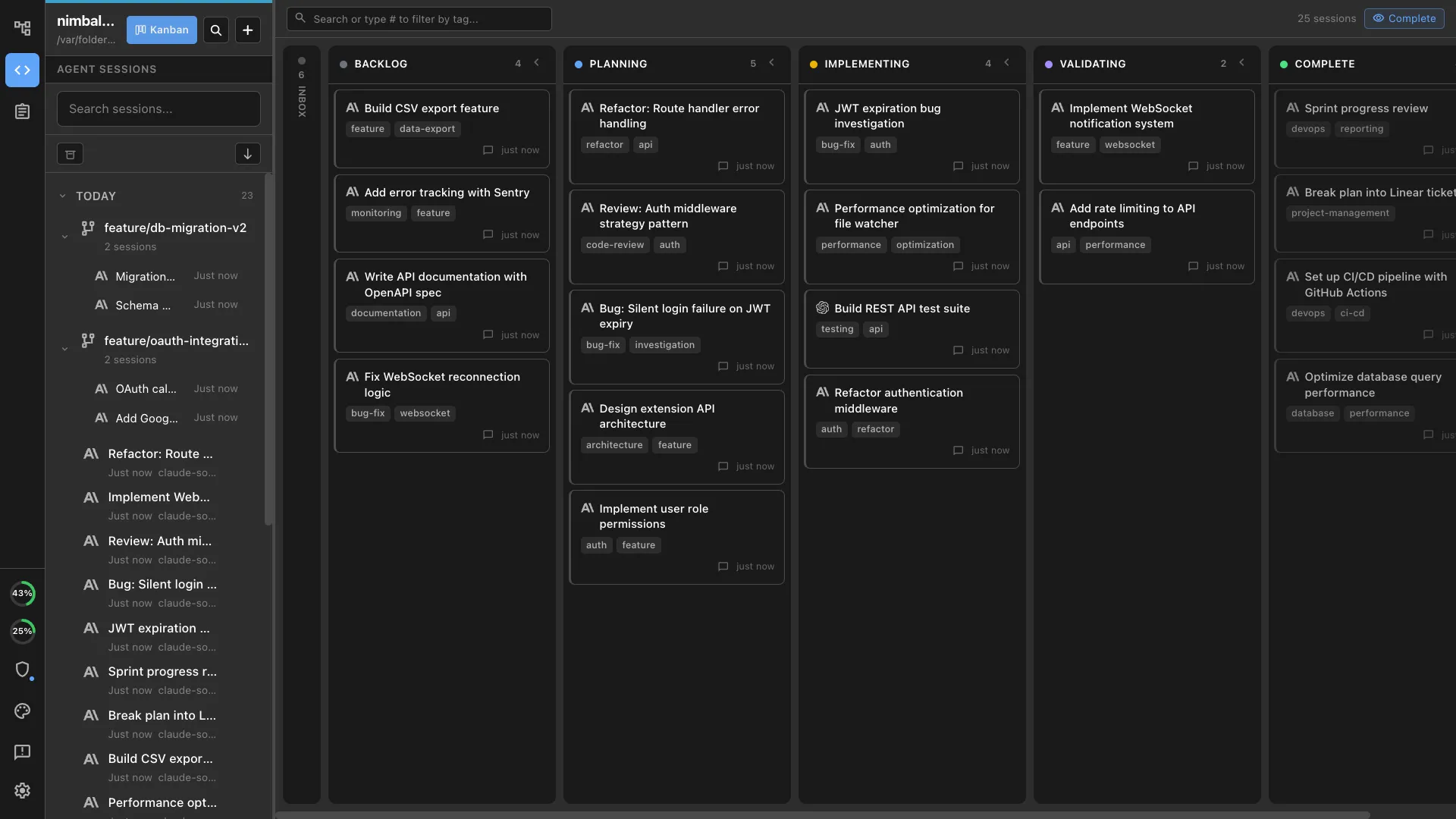
What it does well:
- Desktop builds for macOS, Windows, and Linux, with an iOS companion app that pairs with a desktop
- Optional one-click git worktrees per session, with merge back to the base branch and worktree archiving
- File-by-file visual diff review with approve and reject before anything lands
- Editors for markdown, mockups, Excalidraw diagrams, data models, spreadsheets, and code, so the artifacts around the code are editable in the same app
- Plans and trackers linked to sessions, so a plan can be split into items and each item launched as a session
- Agent-to-agent session spawning, so one session can launch and supervise workers
- The desktop and iOS apps are MIT licensed and free for individual use
The tradeoffs:
- It is a full workspace, which is more product than someone who wants a lean session launcher needs
- It is Electron-based, with the memory and startup profile that implies
- Remote execution runs in a Cloudflare sandbox you deploy from your own account, with documented limits, and there is no SSH-to-your-own-server flow like Pane and Emdash offer
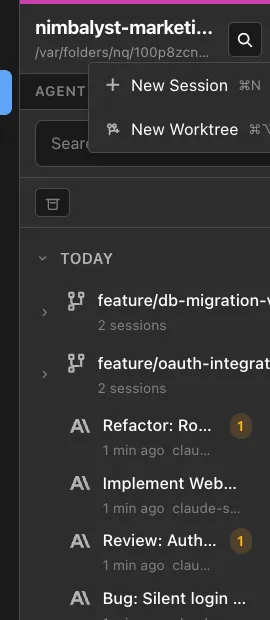
Nimbalyst vs Conductor covers the head-to-head in detail.
2. Orca
Best for: An open-source orchestrator with the broadest platform and mobile coverage.
Orca is MIT licensed and ships desktop apps for macOS, Windows, and Linux, plus iOS and Android apps that pair with the desktop for notifications and replies. Its README lists Claude Code, Codex, Cursor, GitHub Copilot, OpenCode, Grok, and Antigravity, and says it works with any CLI agent that runs in a terminal. Parallel worktrees keep agents isolated, and a worktree can be given its own cloud VM. It is free, and you bring your own agent subscriptions. The repository is very active, with a release on the day this page was updated.
The tradeoff to know: Orca is an agent environment, and it does not include the planning, document, and diagram editors that Nimbalyst puts around the agents.
3. Pane
Best for: Windows and WSL users who want the closest structural match to Conductor.
Pane describes itself as a keyboard-first app for running AI coding agents in parallel, local or remote. It lists Windows, WSL, macOS, and Linux, and works with Claude Code, Codex, Aider, Goose, or any terminal agent. Each feature gets its own git worktree, and you review diffs before deciding what ships. It is AGPL-3.0, made by Dcouple, and its pricing page states there is no paid plan or seat fee. A self-hosted Remote Pane daemon and browser client are free as well.
The tradeoff to know: AGPL-3.0 is a strong copyleft license, which some companies restrict, and you pay for any remote machine you run it on.
4. Emdash
Best for: A permissively licensed, YC-backed option with SSH to remote machines.
Emdash is Apache-2.0 and a Y Combinator W26 company. It runs on macOS (Apple Silicon and Intel), Windows (MSI and portable EXE), and Linux (AppImage, DEB, and RPM for x64 and ARM64). Each task runs in its own git worktree and branch, and the README names Claude Code, Codex, Cursor, OpenCode, Amp, Devin, Qwen Code, Droid, and GitHub Copilot among the supported agents. It connects to remote machines over SSH and SFTP with agent, key, password, and OpenSSH certificate authentication.
The tradeoff to know: no mobile app is listed, and the README does not state pricing.
5. Paseo
Best for: Self-hosting, and driving agents from a phone.
Paseo is Apache-2.0 and runs a daemon on your own machine or server that desktop, web, iOS, and Android clients connect to over TCP, Tailscale, a VPN, or an end-to-end encrypted relay. Release v0.15.4 (November 10, 2026) ships Windows x64 and ARM64 installers, macOS DMGs, and Linux AppImage, DEB, and RPM packages. It supports Claude Code, Codex, GitHub Copilot, OpenCode, Pi, Antigravity, and others, and agents can optionally work in their own worktrees. It is free, collects no telemetry, and is funded by sponsorships.
The tradeoff to know: its own site says it is maintained by one person, which matters if you are standardizing a team on it.
6. Paradev (formerly Superset)
Best for: Mac users who want a Conductor-shaped app they can inspect.
Superset renamed itself Paradev in 2026, and the old superset.sh addresses now point to paradev.com. Its site says each task gets its own git worktree and branch, and that it works with any CLI-based coding agent. The code is public on GitHub under the MIT license, which differs from older write-ups that described it as source-available under the Elastic License. The site lists the macOS app as the main product, an experimental Linux AppImage, Windows as not yet available, and an iPhone and iPad app. Pricing from its pricing page: Free at $0, Pro at $20 per user per month, Team at $60, Ultra at $200, and custom Enterprise.
The tradeoff to know: with no Windows build, it does not solve the platform problem.
7. T3 Code
Best for: A free, MIT-licensed app with desktop, web, and mobile clients.
T3 Code is MIT licensed with desktop apps for macOS, Windows, and Linux, a t3 command that serves a web app, and iOS and Android apps. It drives Claude Code, Codex, Cursor, OpenCode, Grok Build, Antigravity, Kiro, Pi, and any ACP agent you are already signed in to, so it does not resell tokens. Each thread can work in its own worktree, and you can review the diff, then commit, push, and open a pull request from the app.
The tradeoff to know: the README does not describe planning or document tooling, so it stays focused on running agents.
8. Claude Code Desktop and the Codex App
Best for: People who use one vendor’s agent and want the vendor to own the app.
Claude Code desktop runs on macOS, Windows (x64 and ARM64), and Linux in beta for Ubuntu and Debian, per Anthropic’s desktop documentation. It runs parallel sessions, with worktrees off by default and switched on per session, plus inline diff review with comments. Sessions can run locally, over SSH on a remote machine, in WSL 2, or on Anthropic-managed cloud infrastructure that keeps running when you close the app. It runs Claude only.
The Codex app runs on macOS and Windows with built-in worktree support, and OpenAI’s documentation says it can run natively on Windows or in WSL 2. OpenAI’s current quickstart now describes Codex as a mode inside the ChatGPT desktop app, with downloads for macOS, Windows, or Linux, so check the official page for the current Linux status. It runs Codex only.
If you want to use both Claude Code and Codex in one place, that is where a tool like Nimbalyst, Orca, or Pane fits on top of these agents.
9. Claude Squad
Best for: Terminal users whose code lives on a remote Linux box.
Claude Squad is an AGPL-3.0 terminal program that manages multiple agents in tmux sessions with worktree isolation. It needs tmux and the GitHub CLI, installs through Homebrew or a script, and runs Claude Code by default, with Codex, Gemini, and Aider supported. Because it is a terminal tool, it works over SSH on a headless server.
A note on Vibe Kanban
Vibe Kanban’s README states that the project is sunsetting. Its shutdown announcement is dated April 10, 2026: remote services stayed up for 30 days, the latest version includes data export, and local workspaces keep running. The Apache-2.0 repository is still public. It is reasonable to keep using locally and a poor thing to standardize a team on. Our Vibe Kanban after Bloop post has the detail.
What about cloud agents?
Conductor Cloud ran agents in managed sandboxes. The closest first-party equivalent in this list is Claude Code’s cloud sessions, which run on Anthropic-managed infrastructure and can be monitored from the web or the Claude mobile app. For self-managed remote hosts, Pane, Emdash, Paseo, and Claude Squad connect to machines you provision, and Nimbalyst can run sessions in a Cloudflare sandbox you deploy from your own account. All of the desktop apps above are local-first.
How to Move Off Conductor
Do these before November 20, when Conductor Cloud is reported to shut down.
- Transfer cloud workspaces to local. Right-click each cloud workspace and choose Transfer to local, per Conductor’s announcement.
- Export your data. Open Settings, then Account, then Export data, and keep the archive somewhere outside Conductor.
- Push your branches. Work you want to keep lives in git. Push every branch with unmerged agent work to your remote so any tool can pick it up.
- Note your setup. Write down the agents, models, and setup scripts you used per repository, and any automation that called the Conductor API, since those need a new home.
- Open the repo in the new tool. Every alternative above starts from a git repository and your own agent logins, so there is no account to migrate. In Nimbalyst, add the project, start a session on a branch, and enable a worktree per session if you want the same isolation Conductor gave you.
Staying on the local Conductor app is also an option for now, since Conductor says it keeps working as normal until the new product arrives in early 2027. The cloud half is the part with a deadline.
What Conductor Does Better
Conductor is well built, and a few things set it apart.
- A single-platform app. Being Mac-only lets Conductor lean into macOS conventions, where the Electron-based alternatives, Nimbalyst included, carry that tradeoff.
- Focus. It does one job. Some alternatives, Nimbalyst included, are broader products, and breadth is a cost if you only wanted a session launcher.
- Managed cloud and multiplayer. These were its differentiators, and they are the part being shut down, so they are no longer a reason to choose it.
If everyone on your team is on a Mac and the local app covers what you need, staying on Conductor through early 2027 is defensible.
How to Choose
- You need Windows: Nimbalyst, Orca, Pane, Emdash, Paseo, or T3 Code.
- You need Linux: Orca, Paseo, Emdash, T3 Code, or Nimbalyst. Claude Squad if you work over SSH.
- You want the most workspace around the agents (plans, trackers, diagrams, mockups, review): Nimbalyst.
- You want a permissive open-source license: Orca, T3 Code, Paradev, or Nimbalyst for MIT; Emdash or Paseo for Apache-2.0.
- You want to self-host or use a phone: Paseo, Orca, T3 Code, or Pane’s Remote Pane.
- You use one vendor’s agent only: Claude Code desktop or the Codex app.
- You are on a Mac and want a close Conductor stand-in: Paradev.
- You want to stay put for now: local Conductor works until early 2027, but plan the move.
Conductor, or the Other Conductor?
Search results for this term mix two unrelated products. Conductor at conductor.build is the macOS coding-agent app this guide covers. Netflix Conductor is a workflow orchestration platform under Apache-2.0, now maintained by Orkes and the Conductor OSS community. If you arrived here looking for microservice orchestration, none of the tools above are what you want.
Disclosure and Corrections
Nimbalyst makes one of the tools in this list. Every claim above links to the product’s own site, documentation, or repository, and where a detail came from press coverage rather than a primary source, the text says so. If something here is out of date, tell us at the contact page and we will correct it.
Frequently Asked Questions
Is Conductor shutting down?
Part of it. Conductor announced on November 4, 2026 that it is joining Meta, and its announcement page says Conductor Cloud will shut down over the next few weeks. Press coverage of the announcement (Axios, SiliconANGLE) reports Conductor Cloud going read-only on November 13 and shutting down on November 20, with cloud data deleted afterward. Conductor says the local Mac app keeps working as normal until a new product arrives early in 2027.
Did Meta acquire Conductor?
Yes. Conductor’s own announcement says it is being acquired by Meta, and Axios first reported the deal on November 4, 2026. Financial terms were not disclosed. Conductor says it has never sold or trained on Conductor user data and will not start.
How do I export my data from Conductor?
Conductor’s announcement describes two routes. To keep a cloud workspace, right-click it and choose Transfer to local. To keep everything else, open Settings, then Account, then Export data, which produces an archive of all your Conductor data. Do both before Conductor Cloud shuts down on November 20, and push any branches you care about to your git remote.
Is Conductor Mac only?
Yes. Conductor’s homepage describes it as running agents in isolated workspaces on your Mac, and its installation documentation says it is not available for Windows or Linux. Conductor Cloud ran agents in Linux sandboxes, but those workspaces were reached through the Mac app, so a Windows or Linux desktop never had a client.
What is the best Conductor alternative for Windows?
Four open-source apps ship Windows builds with a worktree-per-task workflow: Nimbalyst, Orca, Emdash, and Paseo. Pane is built around Windows and WSL. T3 Code also supports Windows. Claude Code desktop and the Codex app run on Windows too, but each runs only its own vendor’s agent.
What is the best Conductor alternative for Linux?
Orca, Paseo, Emdash, T3 Code, and Nimbalyst all publish Linux desktop builds. Orca and Paseo publish AppImage, DEB, and RPM packages, and Emdash publishes AppImage, DEB, and RPM for x64 and ARM64. Pane lists Linux alongside Windows, WSL, and macOS. If your code lives on a Linux server, Claude Squad runs in the terminal over SSH.
What is the best open-source Conductor alternative?
Conductor is closed source, so every open-source option is a change in kind rather than a like-for-like swap. Orca (MIT), T3 Code (MIT), Paradev (MIT), and Nimbalyst’s desktop and iOS apps (MIT) use the MIT license. Emdash and Paseo use Apache-2.0. Pane and Claude Squad use AGPL-3.0.
Is Conductor free?
Conductor had a free tier for local workspaces, with Pro at $50 per month and Teams at $60 per user per month for cloud and multiplayer (prices checked August 22, 2026). Press coverage reports that new sign-ups and downloads stopped on November 4, that Pro subscribers get paid features free, and that active subscribers receive refunds.
Which agents does Conductor support?
Conductor’s homepage lists Claude Code, Codex, and Cursor. Orca, Emdash, Paseo, Paradev, and T3 Code each support a wider list, and Pane and Paradev run any CLI agent that works in a terminal.
Is Conductor the same as Netflix Conductor?
No. Conductor at conductor.build is a macOS app for running parallel coding agents. Netflix Conductor is an unrelated Apache-2.0 workflow orchestration platform, now maintained by Orkes and the Conductor OSS community. This guide covers the coding-agent app only.
Related Reading
- Conductor for Windows and Linux: the platform answer in one page.
- Nimbalyst vs Conductor: the head-to-head comparison.
- Best Codex GUI tools and desktop apps 2026: the same landscape from the Codex side, including Linux.
- Best Vibe Kanban alternatives in 2026: where the other big name in this category went.
- Best tools for running parallel AI coding agents: the wider category.
- Best session managers for Claude Code and Codex: session management specifically.
Related pages
-
Conductor for Windows and Linux
The platform answer for developers who cannot install a macOS-only app.
-
Nimbalyst vs Conductor
The head-to-head comparison on session management, worktrees, review, and workspace depth.
-
Best Codex GUI Tools and Desktop Apps 2026
The same comparison for the Codex side of the category, including Linux options.
-
Parallel Claude Code Sessions
How the multi-session worktree workflow works in practice.
Related posts
-
Best Vibe Kanban Alternatives in 2026
Vibe Kanban is sunsetting. Compare Nimbalyst, Conductor, Claude Code Desktop, and Cursor as replacements for multi-agent coding, git worktrees, and review.
-
Best Multi-Agent Desktop Apps (2026)
Compare every multi-agent desktop app for AI coding in 2026 — VS Code, JetBrains Air, Claude Squad, and Nimbalyst — for Claude Code and Codex.
-
Best AI Agent Orchestration Platforms 2026: Coding vs Workflow
AI agent orchestration means two different products. Compare control planes for your own coding agents (Nimbalyst, Orca, Emdash, Paradev (formerly Superset), Conductor, Warp) against workflow frameworks like LangGraph and CrewAI.