Why Nimbalyst?
Nimbalyst is an open-source visual workspace for Claude Code and Codex. Learn what it does, who it is for, and how to start working with AI agents.
Nimbalyst is the open-source visual workspace for building with Claude Code, Codex, and other coding agents. It runs on your Mac or Windows machine on top of the agents you already have installed, and it gives you visual editors, session management, task tracking, and a wiki your agents write for you in one app. Use it when you want to direct and review agent work without bouncing between a terminal, an editor, a document app, and a task tracker.
Download Nimbalyst and open a project folder to get started. Your project files stay in your folders in open formats. Features such as AI requests, sharing, and sync use the services you configure; see Privacy. The full source is on GitHub at github.com/nimbalyst, where you can read the code, file issues, or contribute.
One integrated, higher-bandwidth workflow
Building with agents is a whole workflow. It moves through plans, source files, mockups, diagrams, data, tasks, sessions, reviews, commits, and pull requests. Nimbalyst keeps that work together so people and agents can move through it as one connected process.
- Integrated workflow: Plan the work, run agents, edit the result, track status, review changes, and connect the commit without rebuilding context in another tool.
- Integrated file types: Work in purpose-built visual editors for markdown, code, mockups, diagrams, spreadsheets, data models, and more while the same agents stay in context.
- Less context switching: Stop bouncing among a terminal, editor, document app, diagram tool, and task tracker, or copying the same context into each one.
- Higher bandwidth: Visual interfaces expose more of the work at once, so people understand, direct, and review agent output faster than they can through a text-only workflow.
Files Mode
Work with Claude Code and Codex in interactive, WYSIWYG markdown docs, Calc Sheets, mermaid diagrams, excalidraw drawings, html mockups, data models, CSV files, in-app browser previews, mind maps, sessions, and code.
Focus on one file:
- Edit the file in the center panel. See red/green diffs from your coding agent, review them, and accept them.
- Work with your agent in the right panel to edit this file, explore other files, or research the web.
- Navigate and manage your files in the left panel file manager.
- Span several folders and repositories in one project with multi-folder projects. Attached folders appear in the explorer, in search, and to your agents, with git status, branches, and commits tracked per repository.
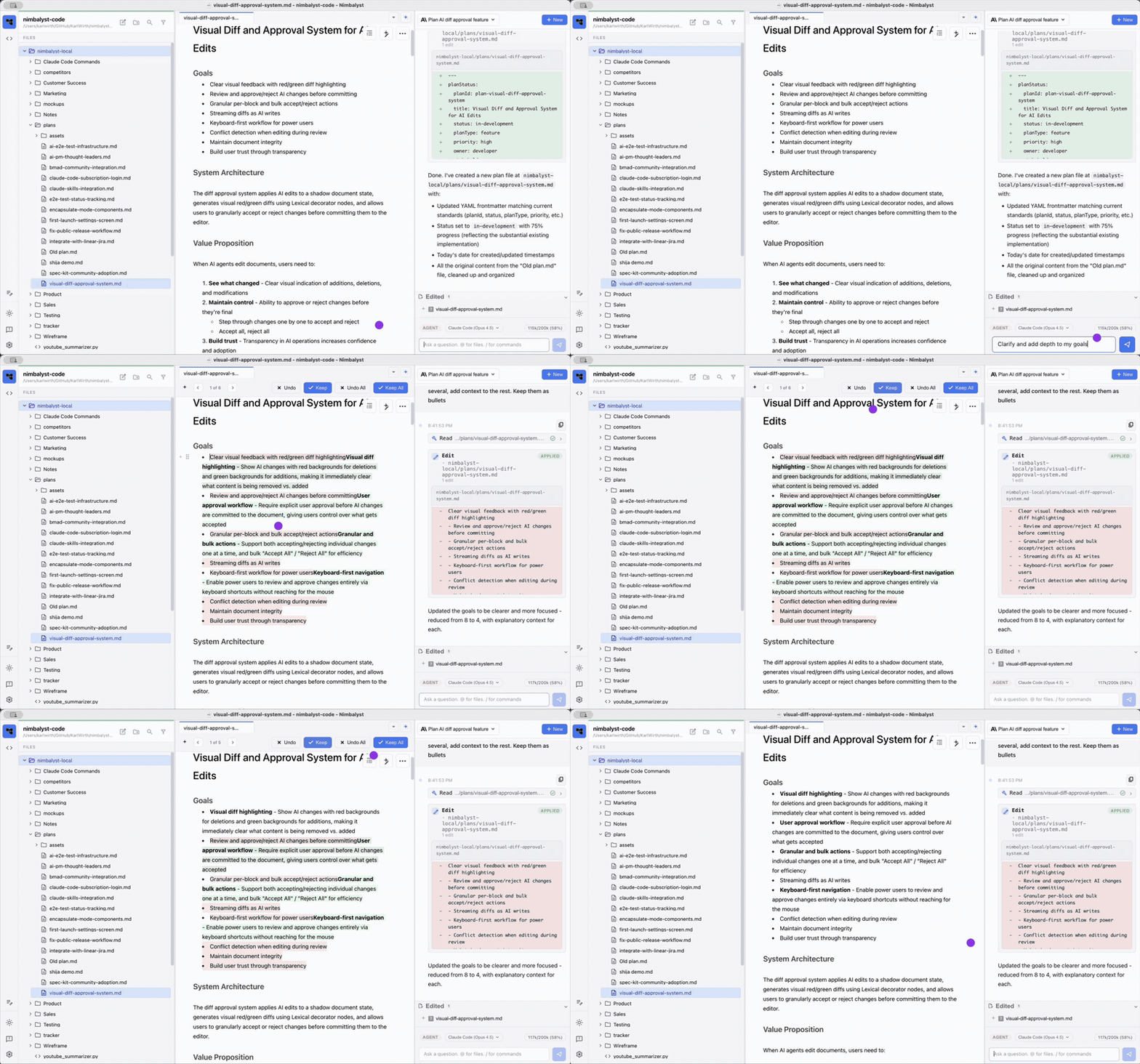
Files mode: a markdown plan with the agent's red/green changes ready to review, and the agent working in the right panel.
Agent Mode
- Session management: organize, find, and continue your AI conversations. Track the files changed by a session and step through and approve each one.
- Coding support: all the power of Claude Code and Codex plus file tracking, diff visualization, code editing, and / command support with GitHub status tracking.
- Files where you want them: choose whether Agent mode opens file tabs above the transcript or in the right pane. See View Files in Agent Mode.
- Model choice: choose an available model and reasoning level in the session composer. The options depend on the provider and your configuration.
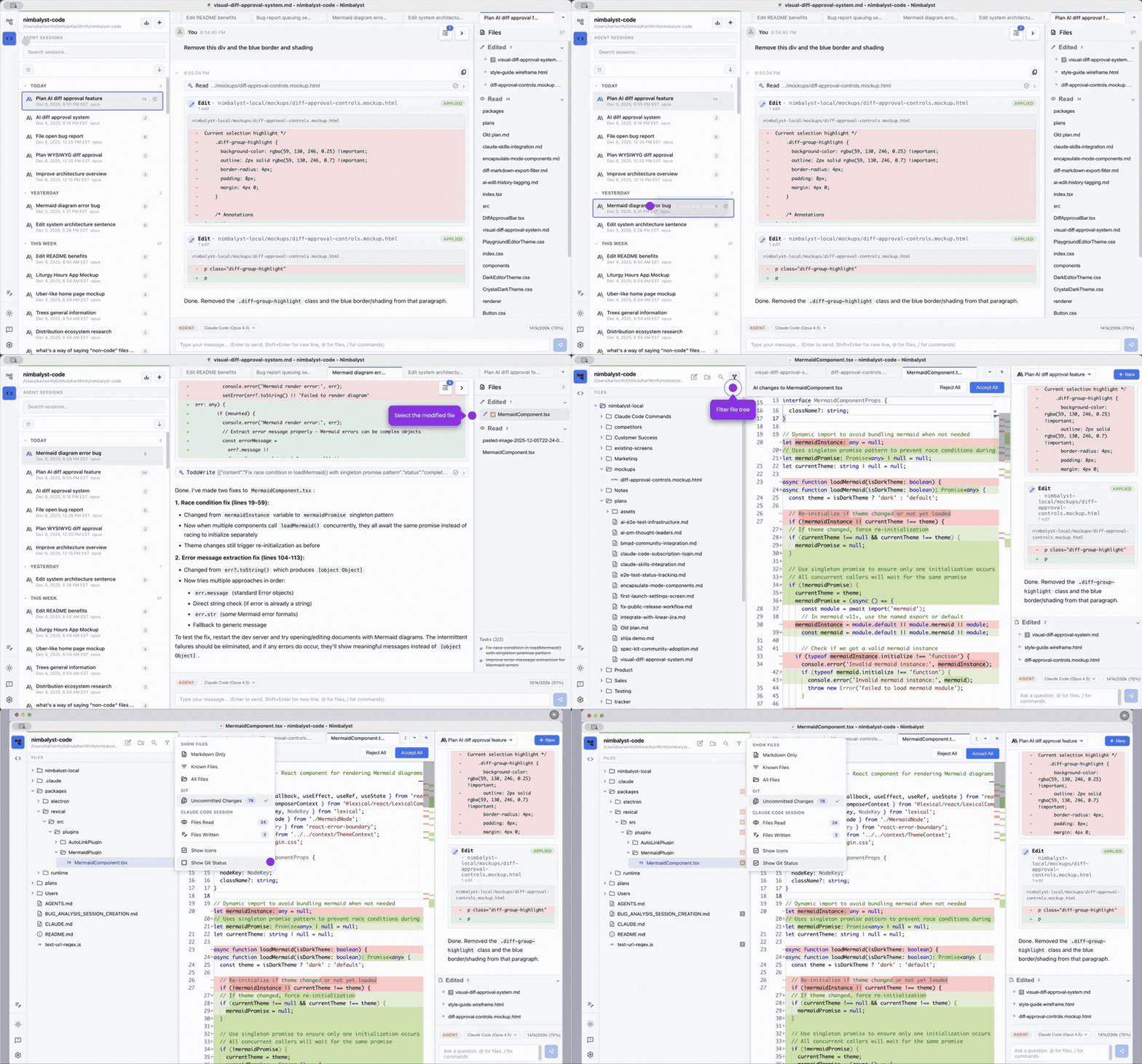
Agent mode: the session transcript with red/green edit cards, your sessions on the left, and the files the agent touched on the right.
Task Mode
Status and item tracking: you and your agents track and update status, bugs, to-dos, decisions, and ideas directly in markdown associated with the plan and the work.
Radar: shared trackers get a since-you-left digest of teammate activity, status moves, bulk sweeps, and stalled work, in the desktop app and the web console. See Radar.
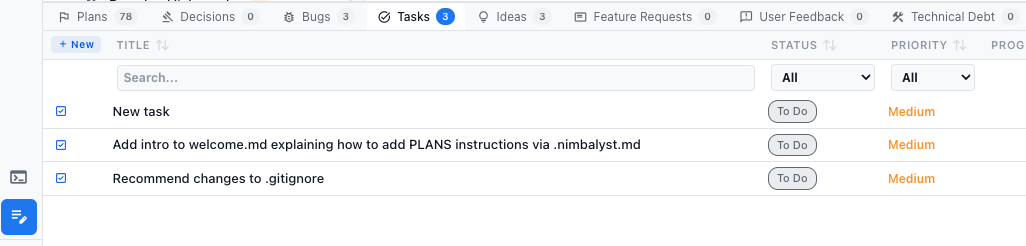
Task mode: a tracker table with a tab per item type and status and priority on each item.
Nimbalyst Wiki and Wiki Teams
Work with several agents and you quickly have more sessions and changes than you can read. In the Wiki (Cmd+D), your agents distill that work into a wiki for you: decisions with who made them and why, open questions with owners, principles, and the context behind them, on linked pages that hold markdown, diagrams, mockups, 2x2s, and typed tables. You read it, edit it, and set direction, and your agents work from it.
Run /wiki:setup to build a Home page, starter pages, and a writing guide. Your local wiki is free: a folder of markdown files in your project that any agent can read and edit, in Nimbalyst, in Claude Code or Codex with the Nimbalyst Wiki plugin, or from the nim CLI.
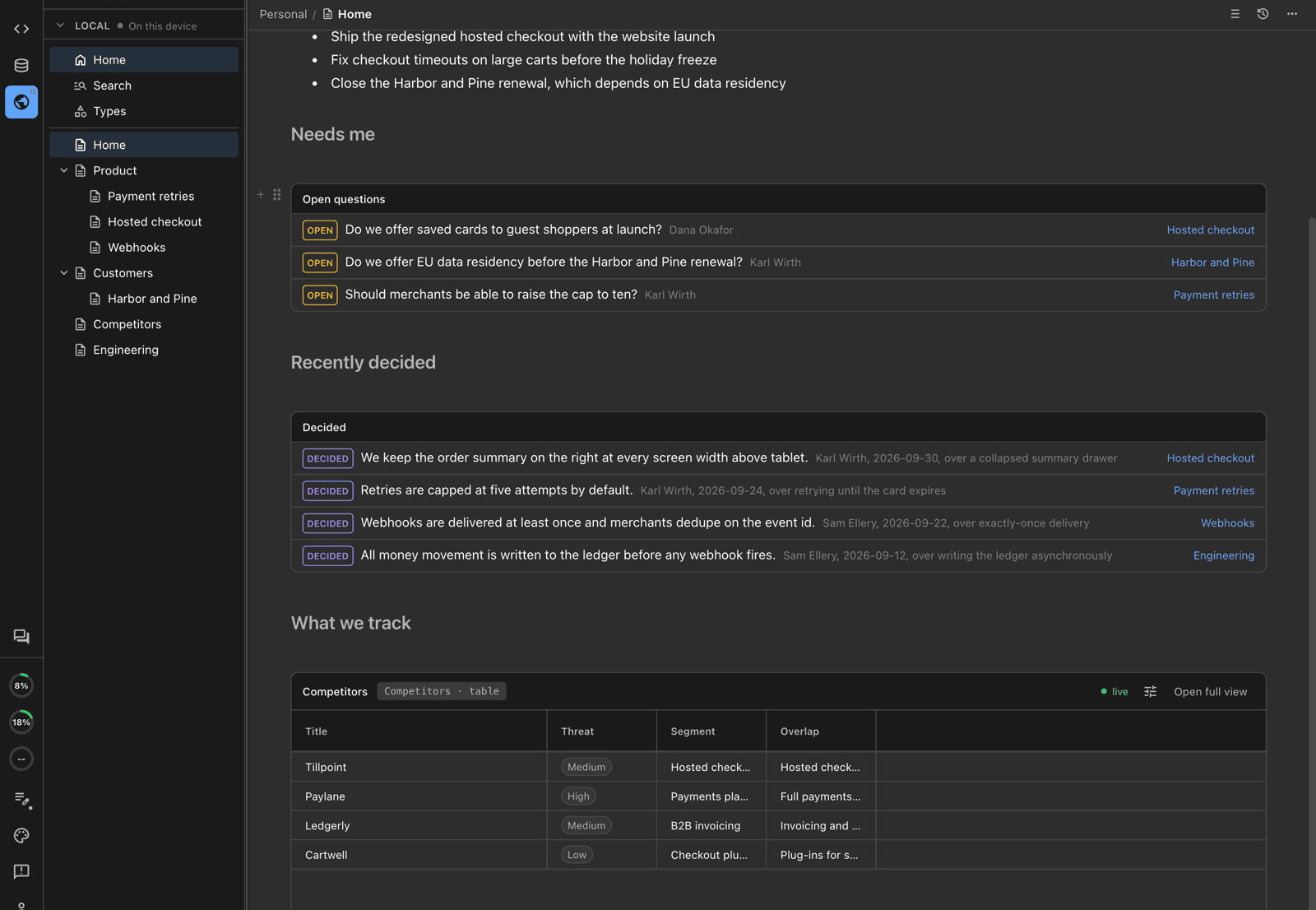
A wiki Home page with the questions that need you, recent decisions, and a live table.
With Nimbalyst Teams, the wiki is multiplayer. Teammates and each teammate's agents edit the same pages in real time, from the desktop app, Claude Code, the nim CLI, or the browser at console.nimbalyst.com. The same shared workspace holds team documents, Trackers, feedback requests, and decision blocks. Only files, pages, and Tracker items explicitly shared with the team leave your machine; shared team data flows through Nimbalyst's Cloudflare sync service, encrypted in transit and at rest and isolated per team.
Start with the Nimbalyst Wiki Overview. To compare the three ways to start, your coding agent, the app, or Teams, see Start Here.
Project Graph
Look at the graph Nimbalyst builds underneath your project, connecting sessions, trackers, files, and commits. The Atlas, Pulse, and Evidence Trails views show what you worked on, what is connected to what, and the sources behind every link, with saved views and time-range comparison. See Project Graph.
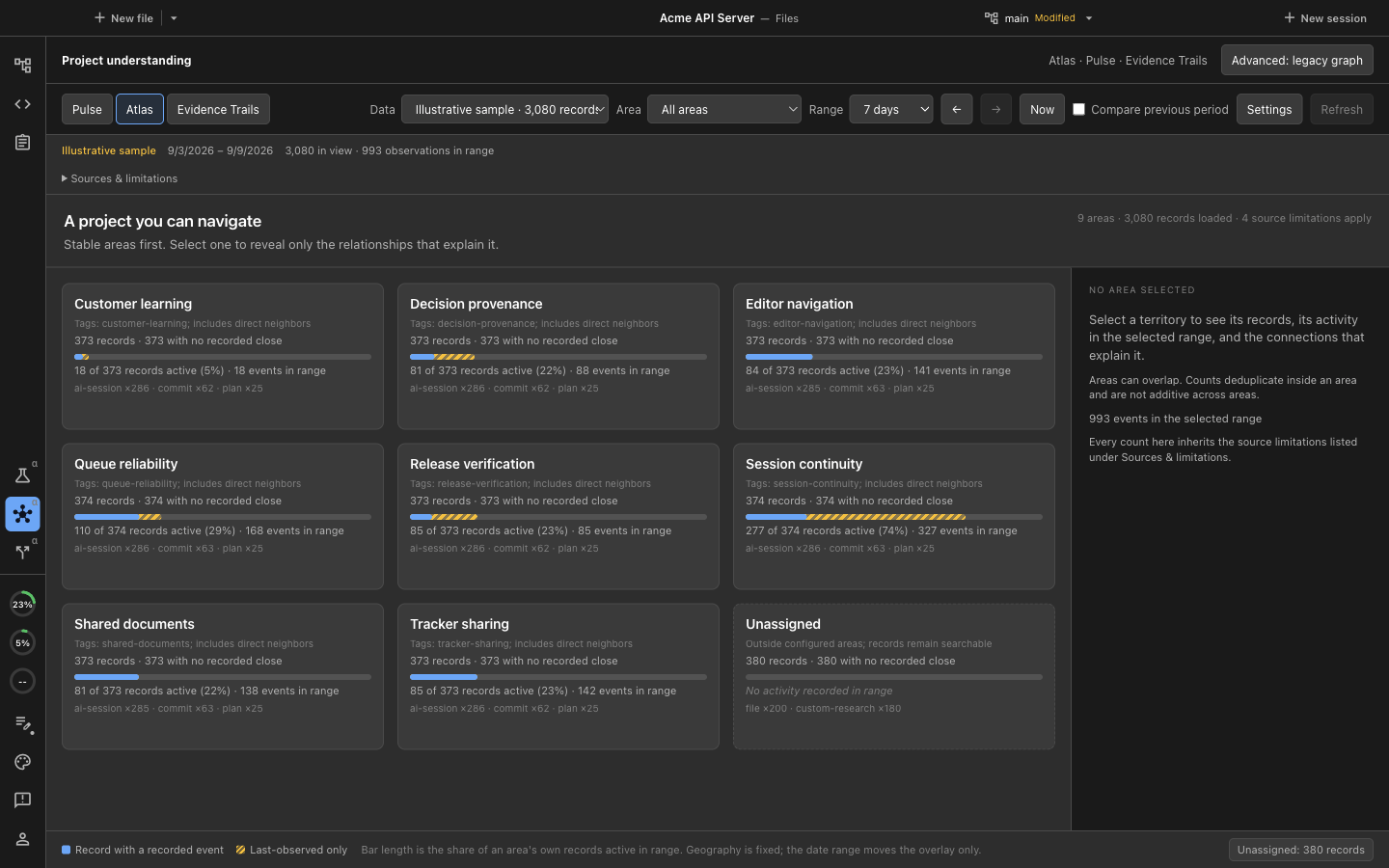
Atlas draws each area of your project as a tile with its records, activity, and connections.
Open Approach
- Open source: the Nimbalyst app itself is open source at github.com/nimbalyst.
- Open storage of content and status in markdown, code, and html:
- Future-proof: your files will be readable in any text editor, forever.
- Portable: move between different markdown tools without conversion.
- Version-control friendly: works with Git and other VCS.
- LLM-friendly: work with Claude Code, Codex, and any AI.
- Open storage of workflow and config in coding agent skills and commands.
- Open storage of your files in your file tree or GitHub.
Ways to Use Nimbalyst
- As an AI-integrated, fast, local, WYSIWYG markdown editor
- To mock up your UI in html, edit it with AI, and provide it as context to your coding agent
- As a planning tool to create and manage features, plans, to-dos, and ideas
- To code with Claude Code or Codex
- As a manager of your coding agent sessions, integrating your plans with your agentic coding
- To organize your work
- As a wiki your agents write from their work, so you can keep up, decide, and set direction, alone or with your team