Nimbalyst Wiki Overview
The Nimbalyst Wiki is a wiki your coding agents write for you from their work, so you can keep up, think, prioritize, and set direction. A free local wiki of markdown files, multiplayer with Nimbalyst Teams.
Work with a few coding agents at once and you quickly have more sessions, plans, and changes than you can read. The Nimbalyst Wiki is where your agents distill that activity for you: the decisions you made, the questions still open, the principles you set, and the context behind them, organized into linked pages you can read in a few minutes.
You read it, edit it, and think in it. When you settle a question or set a priority, it goes into the wiki, and your agents work from it.
Guides: why working with several coding agents gets overwhelming, and how the wiki differs from Claude Code memory and CLAUDE.md.
Your local wiki is free and needs no account. A shared team wiki is part of Nimbalyst Teams, which is in beta; see Nimbalyst Wiki Teams.
Three ways to use it
The wiki is one set of pages, and you can switch between these at any time:
| What you get | Cost | |
|---|---|---|
| Your coding agent and browser | Claude Code, Codex (CLI or app), Cowork, Cursor, VS Code, or any other MCP agent writes the wiki as files in your repo. You read and edit it in your browser. | Free, no app or account |
| The Nimbalyst app | Wiki mode, with visual editing of mockups, diagrams, and 2x2s next to your sessions, tasks, and code. | Free |
| Nimbalyst Wiki Teams | One shared wiki that you, your teammates, and all of your agents edit in real time. | Paid, free during beta |
Each way has its own guide: Wiki in Your Coding Agent, Wiki in the Nimbalyst App, and Nimbalyst Wiki Teams. For how a wiki moves from one to the next, see From Your Agent to the App to Your Team. The rest of this page covers what is the same everywhere.
In the first two, the wiki is a folder of files in your project (markdown for text pages, and their own formats for drawings, mind maps, spreadsheets and other editor pages), nimbalyst-local/wiki by default, so every agent and editor works on the same pages. See Local Wiki Files and Location.
What goes in it
The wiki holds what someone needs to understand the project and decide what comes next:
- Decisions and their reasons: what was chosen, who chose it, when, and what was not chosen.
- Open questions: what is not settled yet and who owns it.
- What people asked for: preferences, constraints, taste, and the quality bar, in the words of the person who set them.
- Context: the modules, customers, competitors, and technologies you weigh when you decide, with sources and dates.
- Hard-won lessons: a failure someone would repeat, with the rule it taught.
The work itself stays in your sessions, files, and trackers, and the wiki links to it. Task lists, status updates, meeting notes, and anything the code already says do not belong in the wiki.
What a page can hold
Pages are rich documents. A page can contain:
- Markdown text with decided and open marks on individual sentences.
- Mermaid diagrams, mockups, Excalidraw drawings, and images.
- Interactive HTML pages, such as a map of your product whose boxes open each area's page. See Interactive HTML pages.
- Charts, callouts, columns, tabs, a table of contents, transclusions,
@mentions of people and dates, link previews, videos, and buttons that start an agent session. - Attached files: drop or paste a file into a page, and images show inline while other files become links.
- 2x2 charts and live tables, boards, lists, and timelines of a type.
- Citations to the prompt, answer, or comment a statement came from, and links to sources.
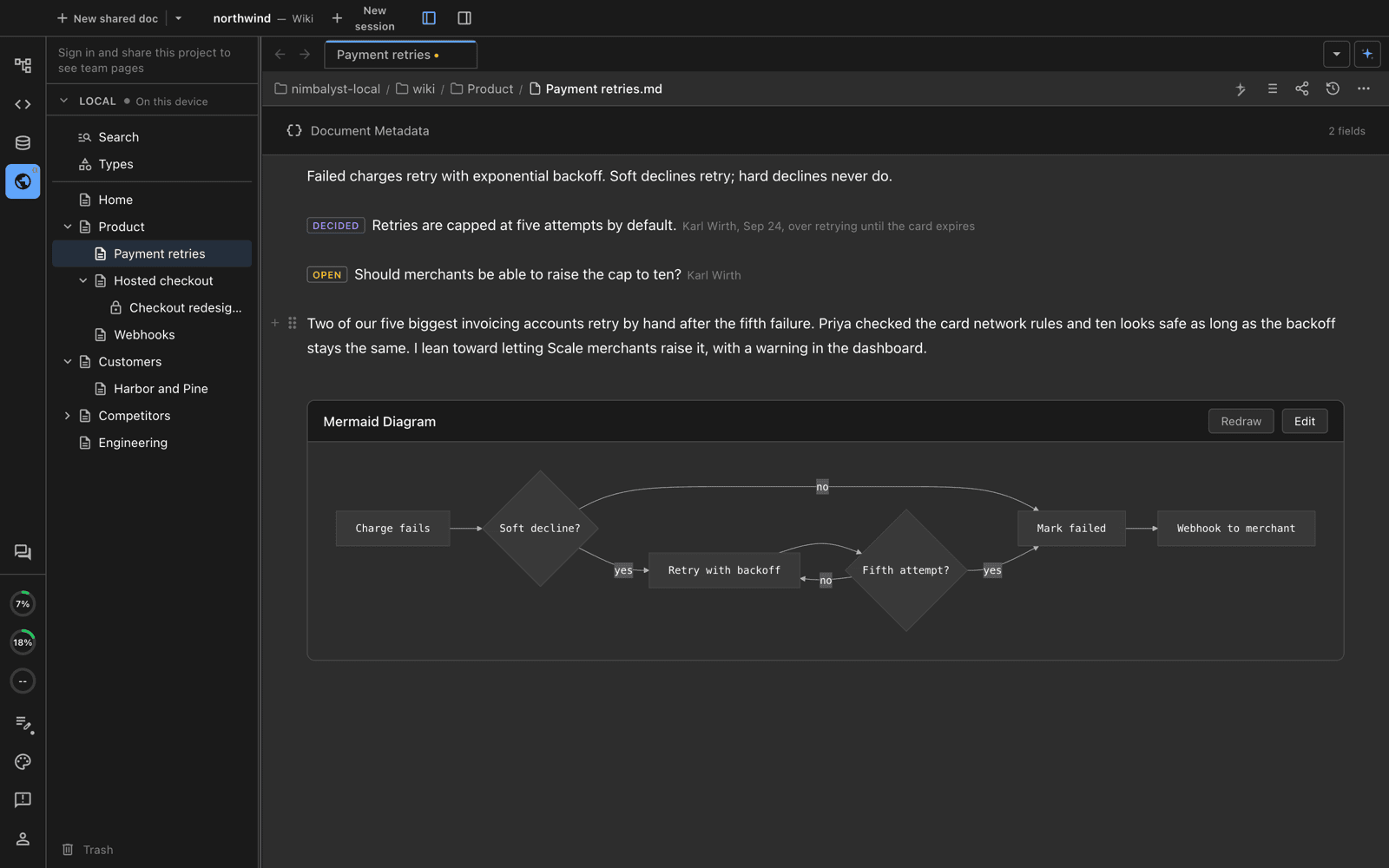
One page with a decision, an open question, the context behind them, and a diagram.
A page can also be a whole drawing, mind map, data model, mockup, canvas, spreadsheet, or other editor file. See Pages, Types, and Fields.
Your agents write it
Agents in Nimbalyst can read, create, and edit pages with the same tools you use. Outside the app, Claude Code and the Codex CLI do the same with the Nimbalyst Wiki plugin, and the Codex app, Cowork, Cursor, VS Code, and other MCP agents do it through nim mcp. They write as they work: when a session settles a decision or raises a question, the agent records it on the page it affects. Every page keeps a history you can compare and restore.
To start a wiki, run /wiki:setup in the app or the plugin's nimbalyst-wiki:setup in Claude Code or Codex. The agent asks a few questions about the project, then builds your Home page, starter pages, and a "How we write this wiki" guide. See Set Up Your Wiki.
Organize the work with types
When you keep several things of one kind, such as competitors, customers, or modules, your agent can create a type for them. Each item becomes a typed page with a few fields in its header (in a Local wiki, a markdown file with those fields in its frontmatter), and the type gets a table of every item. Place that table in any page.
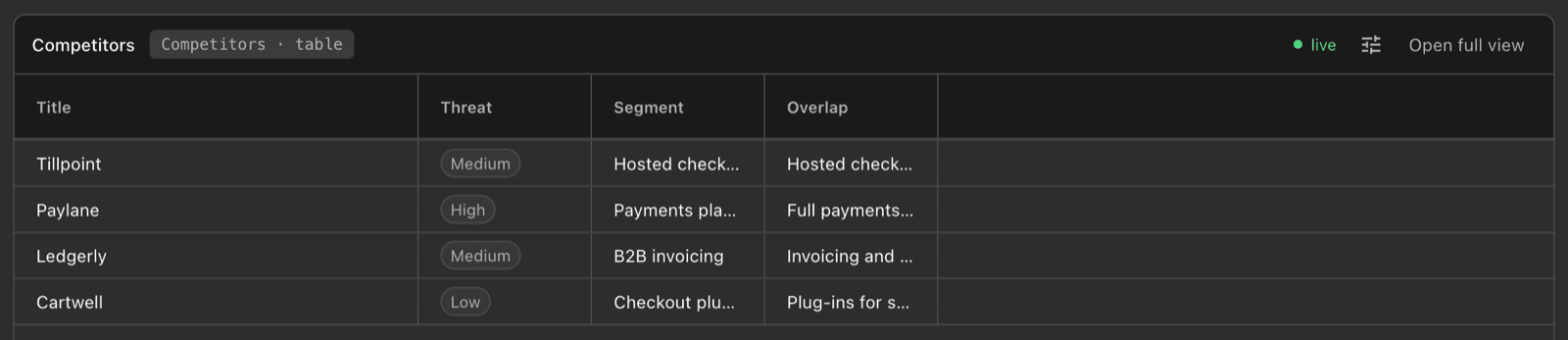
A Competitors type placed as a live table inside a page.
See Pages, Types, and Fields and Decisions, Questions, Links, and Views.
Bring your team in
With Nimbalyst Teams, the Team section is one shared wiki. Everyone edits the same pages in real time, each teammate's agents keep them current, and teammates without the app can read and edit in the browser at console.nimbalyst.com. See Nimbalyst Wiki Teams.
In this section
Three ways to use the wiki
- Wiki in Your Coding Agent: Claude Code, Codex, Cowork, Cursor, VS Code, and your browser, without the app.
- Wiki in the Nimbalyst App: Wiki mode, visual editing, and agents in the app.
- Nimbalyst Wiki Teams: one shared wiki for your team and all of its agents.
- From Your Agent to the App to Your Team: what each step adds and how to move up.
How the wiki works, everywhere
- Set Up Your Wiki: the setup command, step by step.
- Pages, Types, and Fields: page kinds, types, fields, and organizing the tree.
- Decisions, Questions, Links, and Views: marks, relations, citations, 2x2s, and placed views.
- Everything a Page Can Hold: every block, embed, and editor a page can use.
- Capture Decisions at the End of a Session: how your agent records what a session decided.
- Ask the Wiki What Was Decided: answers from decisions and the pages that cover your code.
- Read and Edit the Wiki in Your Browser: the local browser view, without the app.
- Local Wiki Files and Location: the file layout, frontmatter, and choosing a folder.
- Wiki Plugin and nim CLI Reference: every plugin command and
nimoption.