Nimbalyst Wiki Teams
One shared Nimbalyst Wiki for your team: everyone and their coding agents edit the same pages in real time from Claude Code, Codex, the browser, or the Nimbalyst app. Move your local wiki up in one step.
When every teammate runs several agents, the work moves faster than anyone's notes. Nimbalyst Wiki Teams gives the team one wiki that everyone's agents write as they work: the team's decisions, open questions, and principles, organized by area, with the reasons and the people behind each one. Everyone reads the same pages, decides together, and works from the same answers.
Nimbalyst Wiki Teams is part of Nimbalyst Teams, which is in beta. Organizations are free during beta and will require a paid Nimbalyst Teams subscription after launch. Your local wiki stays free.
What changes when the wiki is shared
A team wiki has everything a local wiki has, from Pages, Types, and Fields to Decisions, Questions, Links, and Views, plus:
- Real-time editing. Teammates and their agents edit the same page at once, with a live cursor for each person.
- Every teammate's agents write to it. Claude Code and Codex with the Nimbalyst Wiki plugin, and the agents your team runs in the Nimbalyst app, record decisions in the same pages.
- Shared types. Types and their fields are defined once for the whole team, so everyone's tables and boards agree.
- Attributed decisions. Each decision mark names the teammate who decided, with their email, so you can list every decision one person made.
- Comments. Comment on any team page and @mention a teammate; mentions reach their inbox.
- History. Every page keeps its history, with compare and restore.
- Nothing to install for readers. Teammates read and edit the wiki in their browser at console.nimbalyst.com.
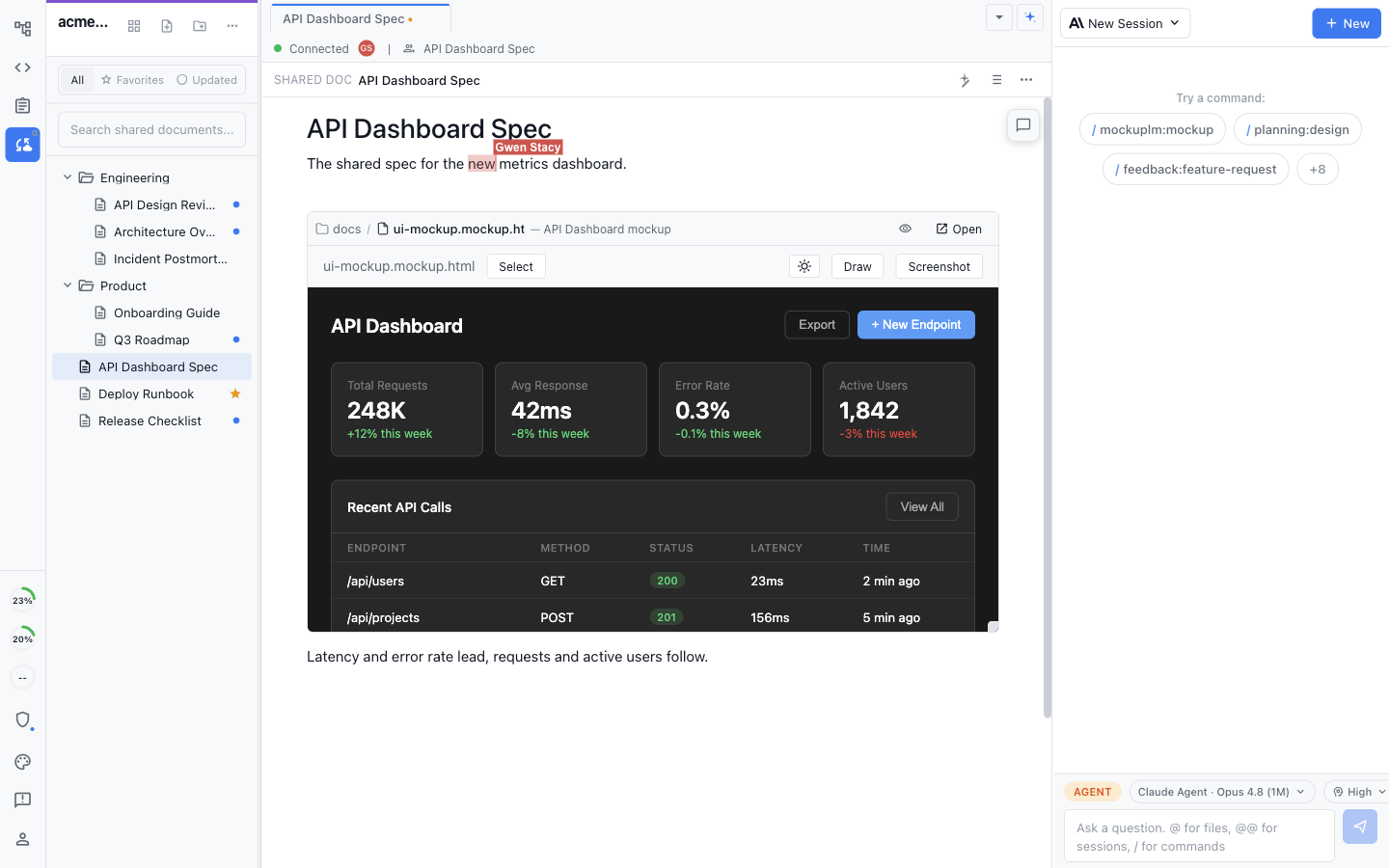
Teammates and their agents edit the same pages, with live cursors.
Upgrade from your local wiki
Most team wikis start as one person's local wiki. In Claude Code, run:
/nimbalyst-wiki:teamIn Codex, ask "move this wiki to Nimbalyst Teams." Your agent installs the team add-on if you don't have it, signs you in, creates the team or picks one you already have, moves every page with its drawings, typed pages, types, and images, opens the team wiki in your browser, and offers to invite your teammates. Your local files stay where they are, marked as moved. See Move Your Local Wiki to Teams.
No local wiki yet? The same command creates an empty team wiki, and /nimbalyst-wiki:setup then builds its Home page, writing guide, and starter pages. See Set Up Your Wiki.
Where your team works
The team wiki is one set of pages that every teammate reaches from wherever they work:
| Where | What they do | Needs |
|---|---|---|
| Browser | Read, edit, comment, and record decisions at console.nimbalyst.com | An invite. Nothing to install |
| Claude Code or Codex | Their agent reads the team's pages and records decisions as it works | The Nimbalyst Wiki plugin and its nimbalyst-wiki-team add-on, signed in to nimbalyst-team |
| Cursor, VS Code, Cowork, and other agents | Their agent runs nim wiki commands to read and edit the team's pages | The nim CLI, signed in with nim login. See In Cursor, VS Code, Cowork, and other agents |
| Command line | nim wiki reads, searches, and edits team pages from a shell or a script | The nim CLI, signed in with nim login |
| Nimbalyst app | The Team section of Wiki mode, next to shared documents, trackers, sessions, and code | The free app. See Use the Nimbalyst App with Your Team |
See Invite Your Team for getting each teammate connected.
Which project's pages you see
A team holds one or more projects, and each project has its own pages. A repository connects to one project through its git remote, so every clone of the repository reaches the same pages. A link to a page in another project of the same team still opens it, and an agent can read another project's pages by naming it, but its edits stay in the current project.
In the browser
The web console at console.nimbalyst.com has a Pages item with the full wiki: Home, pages, typed pages with their fields and Links, type pages with their tables, Set type, New page, decisions and open questions, citations, placed views, history with compare and restore, Trash, Search, the Types map, and New type. Drawings, mockups, and interactive HTML pages embedded in a page show live, and links inside an HTML page open other team pages. Relations can be written as links in the browser; picking a named relation for a link needs the desktop app. See Web Console.
Keeping a private wiki next to the team wiki
A local wiki can stay next to the team wiki. Keep personal notes there and team decisions in the team wiki. When a repository has both, the plugin in Claude Code or Codex asks once per session which one to use, and nim wiki takes --local or --team.
Security and privacy
- Only what you share. Local wiki pages, other local files, and code stay on your machine. Only the team wiki and what you move or copy into it sync.
- Encrypted and isolated. Team pages flow through Nimbalyst's Cloudflare sync service, encrypted in transit and at rest and isolated per team. Access requires an authenticated, authorized team membership.
- Server-managed keys. Hosted Teams uses server-managed encryption keys so authorized web, CLI, and agent access works. Team data is encrypted but not zero-knowledge.