Decisions, Questions, Links, and Views
Mark decisions and open questions on a sentence, link pages with named relations, cite people and sources, and place live tables, boards, 2x2s, and decision lists in Nimbalyst Wiki pages.
A wiki page is most useful when you can see at a glance what is settled, what is still open, and why. Nimbalyst marks those on the sentence itself, links pages with relations that read both ways, and lets you place live views of your data anywhere in a page.
Mark a decision
Select a sentence and choose Mark decided from the selection toolbar. The mark records:
- Who decided, with their email, so you can find every decision one person made.
- When it was decided.
- What was not chosen, the alternative the decision rejected.
The sentence shows a DECIDED badge followed by the person, the date, and the rejected option.
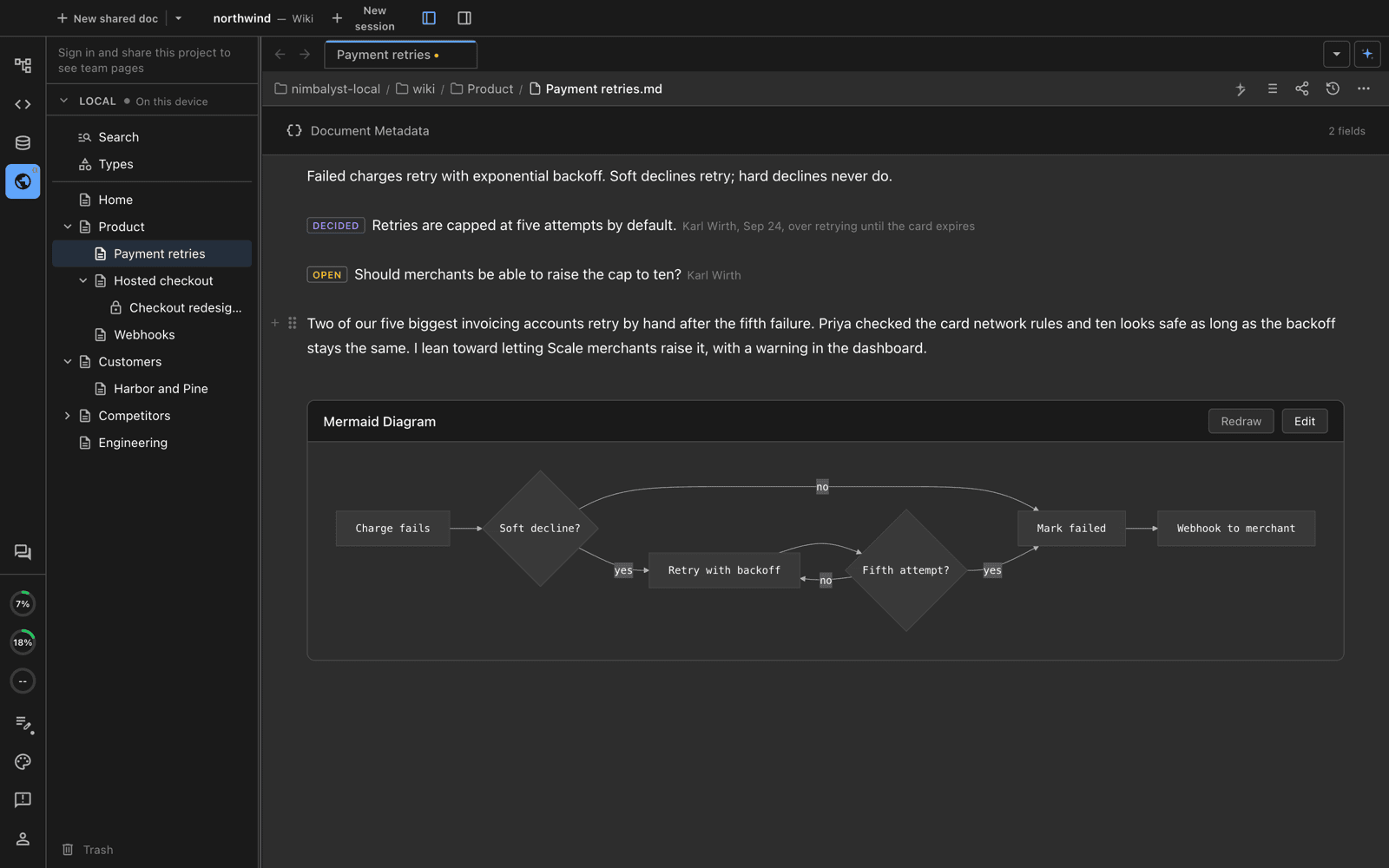
A decision with who, when, and what it was chosen over, and an open question with its owner.
In markdown, which is how agents write it, a decision mark looks like this:
[Retries are capped at five attempts by default.]{decided by="Karl Wirth" [email protected] on=2026-09-24 over="retrying until the card expires"}Write the decision as one sentence on the page it affects. When a decision changes, rewrite the sentence and say what it replaced and when, instead of adding a second page.
Mark an open question
Select a question and choose Mark open question. The mark records who owns it, and the sentence shows an OPEN badge. When the question is answered, mark the answer decided.
[Should merchants be able to raise the cap to ten?]{open by="Karl Wirth" [email protected]}Lists of decisions and open questions
Type / in a page and choose Decisions list or Open questions list to place a live list of every marked sentence across the wiki. Each row links to the page that owns it, and you can filter by person. Put these on Home to see what needs you and what was recently settled.
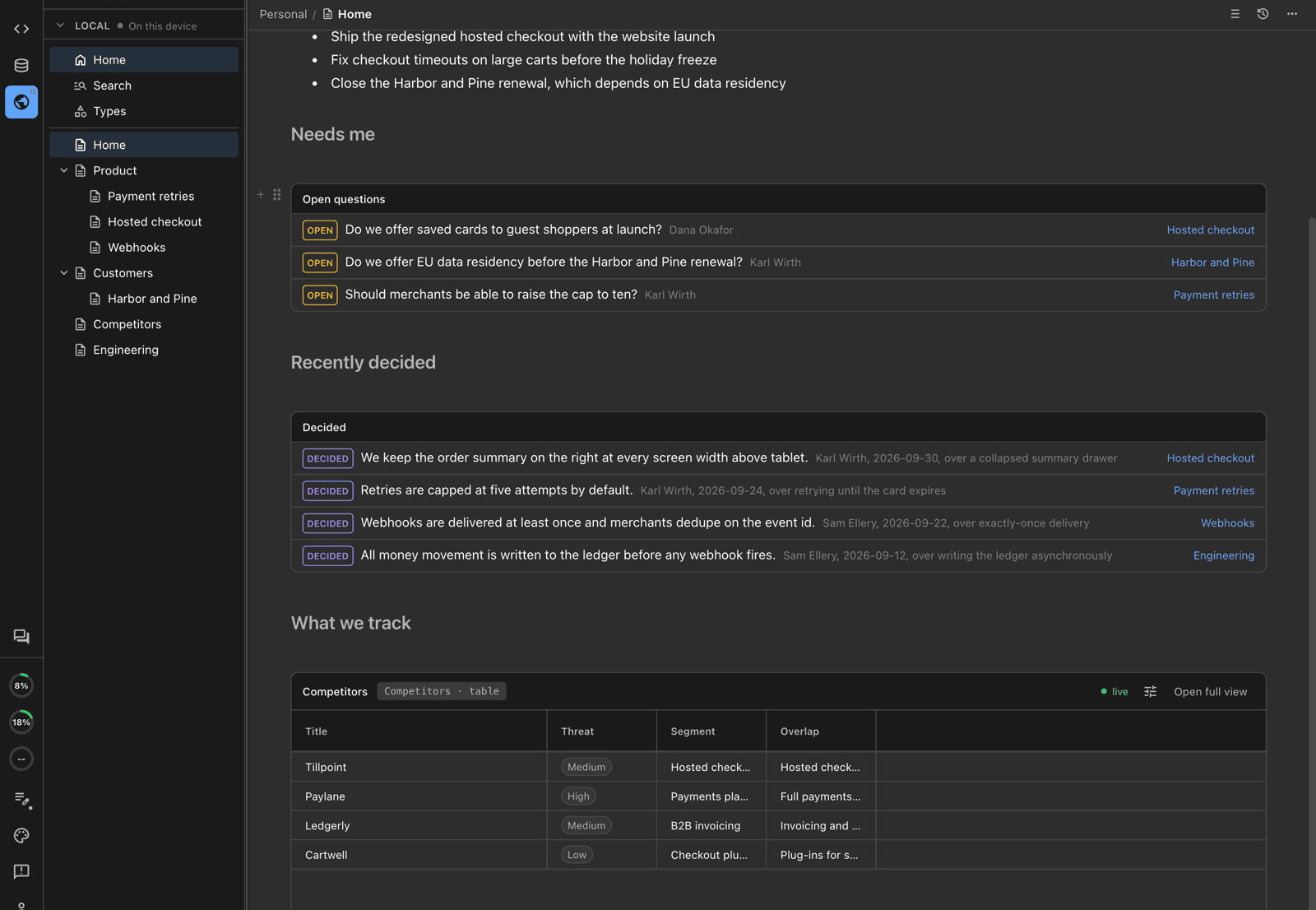
Open questions and recent decisions placed on Home, each linked to the page it lives on.
Link pages
Links between pages are ordinary links in the prose. New links are console.nimbalyst.com links that open in the desktop app when it can show the page, and in the browser otherwise.
In a Local wiki, links between pages are relative markdown links to the other page's file, so they also work on GitHub and in any editor. See Local Wiki Files and Location.
Named relations
When a typed page links to another typed page, hover or click the link to give it a named relation, such as "built on" or "competes with," or keep it a Plain link. Each relation has a name for the other direction, so "built on" on one page reads as "underlies" on the other. Your project defines its relations; your agent can add them during setup or when you ask.
The Links section
The bottom of every page lists its connections: each relation on one line, incoming relations under their inverse name, plain links under Mentions, and links from relation fields. Expand a line to see the sentence that made the link, or click it to open the linked page. Together these links form a graph across the whole wiki, which the Types map draws at the type level.
Cite people and sources
A statement that came from a person can cite them. The citation appears as a chip with their words and links to the prompt, answered question, or page comment it came from. Agents find these in the session's citable inputs, so a decision you made in chat keeps your exact words.
Cite web pages and documents as you write; they are listed under Sources in the page's Page info panel, opened from the info button in the page header. Facts that change, such as pricing or limits, carry a date and a source.
Place live views
Type / in any page to place a live view of a type. The view stays current as items change, and editing a cell edits the item's page.
| Slash command | What it places |
|---|---|
| Table: Type | A table of every item of the type. Choose columns, sort, and filter. |
| Board: Type | The items as cards grouped by a select field. Drag cards between lanes. |
| 2x2: Type | Items plotted on two number fields, with optional pinned points. Offered for types with at least two number fields. |
| 2x2 chart | A hand-filled 2x2 with labeled quadrants and points you type in. |
| Decisions list | Every sentence marked decided, across pages. |
| Open questions list | Every sentence marked open, across pages. |
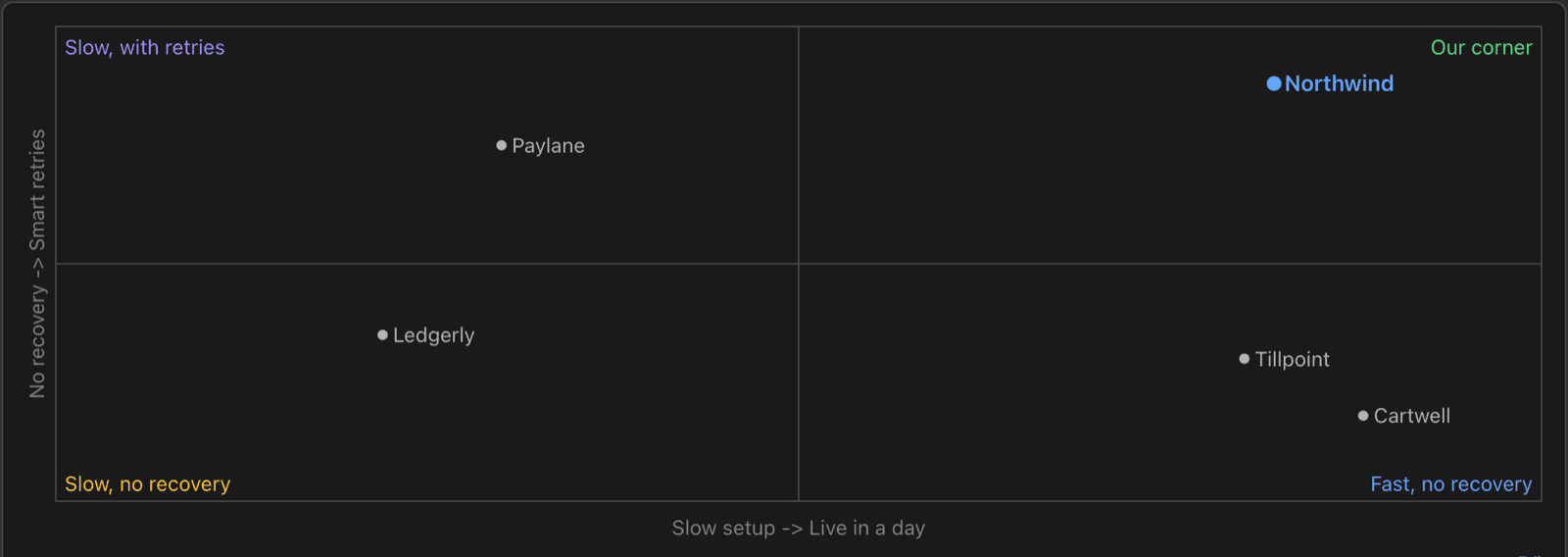
A 2x2 that places competitors by setup speed and payment recovery.
A placed view can switch between table, board, list, timeline, and 2x2 layouts, with its own field order, grouping, sorts, filters, and axes. Timelines use the start and end date fields you choose. The settings are stored in the view's link, so the same view looks the same for everyone. Click Open full view to open it on its type page without changing the page it is placed in.
Named views on a type page
A type page can keep several named view tabs, such as "By threat" or "This quarter." Add, rename, configure, or remove them, or save a full view you opened from a page under a new name.