Share Link to a File
Create an encrypted, expiring public link for a markdown or visual file in Nimbalyst so people outside your workspace can read it in a browser.
Share Link turns a file in your project into a web page anyone can read in a browser, without a Nimbalyst account. Use it to hand a plan, a mockup, or a diagram to someone outside your workspace with a single URL.
Sharing works for markdown files and for visual file types with a web viewer, including mindmaps, Excalidraw diagrams, data models, spreadsheets (CSV/TSV), mockups, calc documents, and slides.
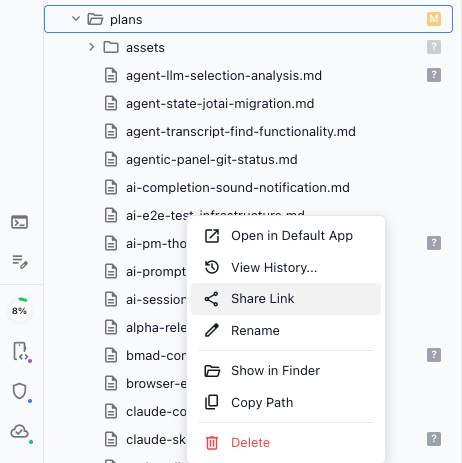
Creating a link
- Right-click the file in the file tree and select Share Link. (The same button also appears in the editor header for markdown files.)
- Sign in if prompted; sharing requires a Nimbalyst account.
- Choose how long the link should last: 1, 7, or 30 days. Your choice is remembered for next time.
- Click Share, then copy the link and paste it anywhere: Slack, email, X, a doc.
Security and safety
- Anyone with the link can view the file. Do not share files containing sensitive information.
- There is no password protection, but every link expires after the duration you chose.
- Shared content is stored encrypted on Cloudflare R2. It is end-to-end encrypted, and the decryption key travels only in the link itself, so Nimbalyst, Inc. cannot read the content.