Wiki in the Nimbalyst App
Use the Nimbalyst Wiki in the desktop app: Wiki mode, the Local and Team sections, visual editing of mockups, diagrams, 2x2s and typed tables, the /wiki skills, and agents that write the wiki as they work.
The Nimbalyst app is where the wiki is easiest to read, edit, and organize. It opens the same markdown files your coding agent writes, and adds visual editing, live views of your types, and agents that keep the wiki current next to your sessions, tasks, and code. The app is free; the Local section needs no account.
If you already started a wiki in Claude Code, Codex, or another agent, open the project in Nimbalyst and it is there, with nothing to import. See From Your Agent to the App to Your Team.
Open Wiki mode
Open the wiki from the Wiki icon in the left rail or press Cmd+D (Ctrl+D on Windows).
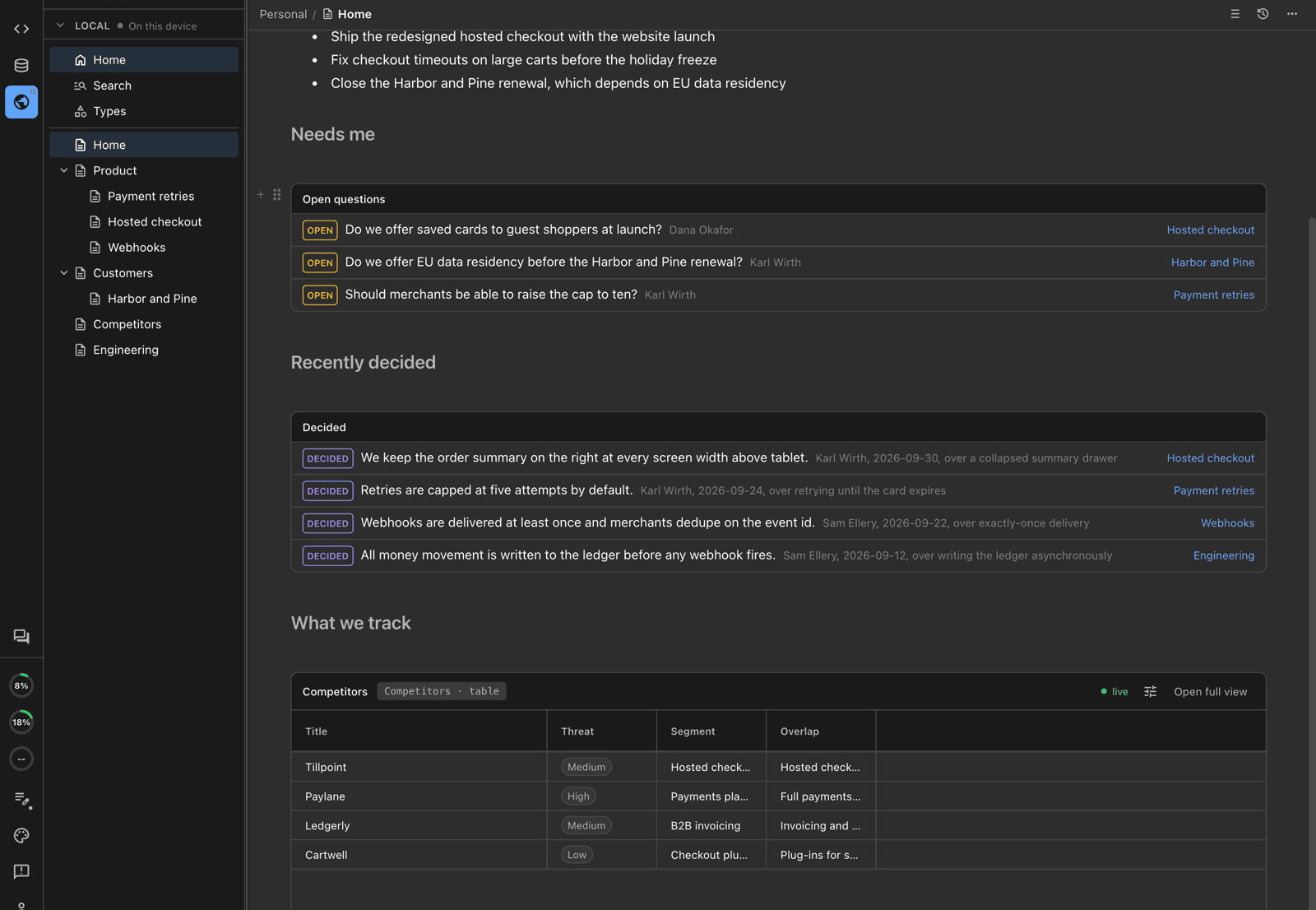
Wiki mode: the Local section's page tree on the left and Home in the center, with open questions, recent decisions, and a live table.
The sidebar has two sections:
| Section | Where the pages live | Needs |
|---|---|---|
| Local | Markdown files in your project, in nimbalyst-local/wiki by default. Readable and editable by you, any editor, git, and any agent. | Nothing. No account, works offline. |
| Team | The team project on Nimbalyst's sync service, edited live by everyone in the project. | Sign-in and a project shared with a Nimbalyst Teams organization. |
The Local section has Search and Types at the top, then your pages, then Trash at the bottom. Until a project is shared with a team, the sidebar reads "Sign in and share this project to see team pages" above the Local section.
The Local section is a folder of files
Every Local page is an ordinary markdown file, and a page's child pages live in a folder with the same name. Open the same wiki in Files mode and you see the files:
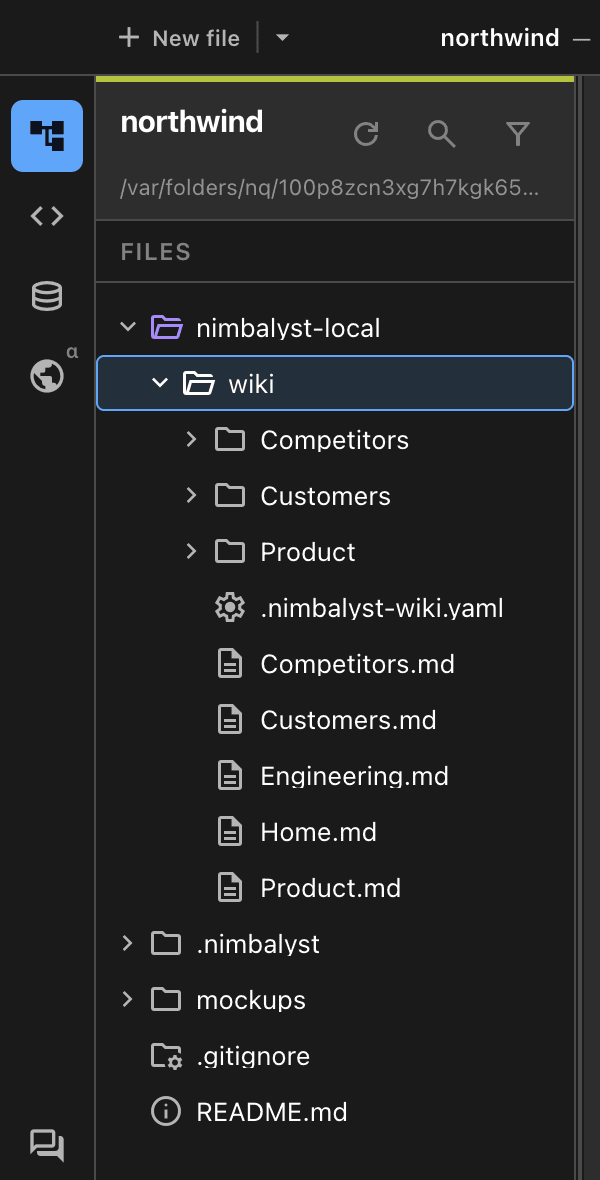
The same wiki in the Files tree: one markdown file per page, with child pages in a folder of the same name.
Because the wiki is files, Claude Code, Codex, and any other agent can read and edit it with or without Nimbalyst running, you can diff and commit it, and you can keep it private or check it in. See Local Wiki Files and Location.
What the app adds
- Visual pages. Pages hold mockups, Excalidraw drawings, Mermaid diagrams, and images, all editable in place, and interactive HTML pages whose links open other wiki pages. A page can also be a whole drawing, mind map, data model, mockup, canvas, or spreadsheet that opens in its own editor.
- Live views of your types. Place a table, board, list, timeline, or 2x2 of any type in a page from the slash menu. Editing a cell edits the item's page. See Decisions, Questions, Links, and Views.
- Marks you can click. Select a sentence and choose Mark decided or Mark open question from the toolbar.
- Page info. The info button in a page's header opens the Page info panel with the page's frontmatter properties and the sources it cites. A page whose status is not current shows it as a small tag at the top, and a typed page shows its type and fields as chips you can edit.
- Search and the Types map. One table of every page with its type, status, and summary, and a map of your types and how complete their fields are. See Pages, Types, and Fields.
- Rich blocks. Charts, callouts, columns, tabs, a table of contents, transclusions,
@mentions of people and dates, link previews, video players, code excerpts, and buttons that start an agent session or create a new item. Most can be resized from a corner grip. - Attachments. Drop or paste a file into a Local page to attach it. Images show inline, other files become links, and attachments stay with the page when it is renamed or moved.
- Bring in files. Copy to Wiki... on any file in the Files tree copies it into the wiki as a page. Add from Files... does the same from the Wiki's New menu.
Agents in Nimbalyst
Agent sessions in Nimbalyst have the wiki tools. With them an agent can:
- List the page tree and search page text.
- Read a page and edit it in small, exact changes.
- Create, rename, move, and reorder pages, typed pages, and types.
- Set a page's type and a plain page's status, owner, summary, and tags.
- Define types, fields, and relations, and create and update typed pages.
- Import a file from your project as a page.
- Read and reply to comments on team pages.
- Cite your prompts and answers from the session.
- Edit a drawing, mind map, data model, or other editor page with that editor's own tools, without opening it.
Each tool works on the Team or Local section. In the Local section the tools read and write the markdown files in your wiki folder, and an agent can also edit those files directly like any other file. An agent can read the pages of another project in the same team by naming it; its changes always stay in the current project.
Agent edits land directly
Agent edits apply right away, with no approval step. Two things keep you in control:
- A line in the transcript. Each page an agent edits shows an "Updated page" line you can click to open the page.
- History. Every agent edit to a Team page saves a version first, and Local pages have file history. Open the page's history to compare in red and green and restore any version. See Pages, Types, and Fields.
The writing guide tells agents to keep edits small, never delete or rewrite what a person wrote without asking, never invent a decision or a reason, and say which pages they changed.
The Wiki skills: /wiki:setup and /wiki:update
The built-in Wiki extension adds two commands. It is on by default; if you turned it off, turn it back on under Settings > Extensions > Installed.
| Command | What it does |
|---|---|
/wiki:setup | Builds the wiki: Home, starter pages, the "How we write this wiki" guide, and types and relations when you want them. See Set Up Your Wiki. |
/wiki:update | Writes pages the way your guide says: pages, typed pages, decided and open marks with the person's email, citations, sources, and named relations. Agents working on a wiki page are pointed to it. |
With the Wiki skills, an agent reads the guide and Home before writing, searches for an existing page before creating one, and puts each decision on the page it affects. Named relations are a Team wiki feature; in a Local wiki the agent writes a plain link.
Start a wiki in the app
Run /wiki:setup in any agent session. The agent asks what the wiki is for, then writes your Home page, a few starter pages, and a "How we write this wiki" guide. See Set Up Your Wiki.
Pages from the old Personal section
Pages you kept in the app's Personal section before version 0.80.6 still show in the Local section. Right-click the Local heading and choose Export N database pages to files to copy them into the wiki folder. See Local Wiki Files and Location.